
- SIGNA MR355 / SIGNA MR360
- Service Manual
- 5856356-3EN Revision 5.0
- Basic Service Documentation. Copyright General Electric Company.
- 00000018WIA309ABF20GYZ
- id_131074021.2
- Jul 5, 2019 11:49:10 PM
Right and Left Side Center Cover
Prerequisites
| Required persons | Preliminary requirements | Procedure | Finalization |
|---|---|---|---|
| 1 | Not Applicable | 15 minutes | Not Applicable |
| Item | Quantity | Effectivity | Part number | Manufacturer |
|---|---|---|---|---|
| Non ferrous Standard Tool | 1 | - | - | - |
| ||||

Removing the Left Side Center Cover
Procedure
- Remove the M6 x 16mm HSHC screw and M6 Nylon Flat Washer at
the bottom of the Left Side Center Cover.
Figure 1. Left Side Center Cover 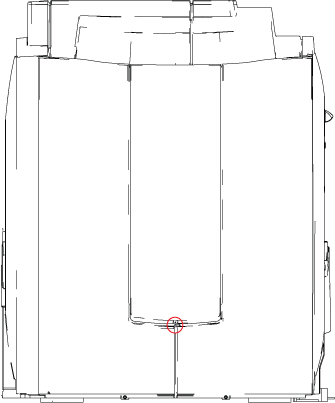
- Holding the cover on each side, lift cover up and off its two
support brackets.
Figure 2. Left Side Middle Cover Removal 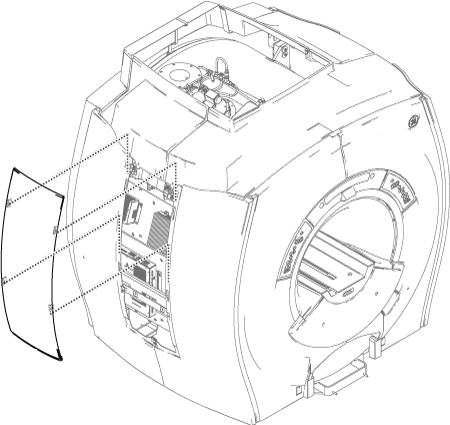
Removing the Right Side Center Cover
Procedure
- Label locations as needed and disconnect all cables except for
the top PG cable.Note:
The PG cable is fiber optic and should be handled with care.
Figure 3. 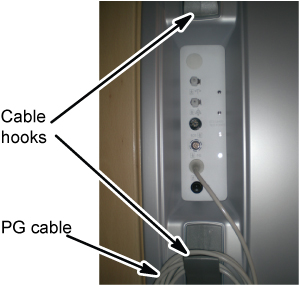
Finalization
No finalization steps.