
- SIGNA MR355 / SIGNA MR360
- Service Manual
- 5856356-3EN Revision 5.0
- Basic Service Documentation. Copyright General Electric Company.
- 00000018WIA305C1030GYZ
- id_131068171.3
- Jul 5, 2019 11:18:59 PM
Replacing Speaker
Prerequisites
| Required persons | Preliminary requirements | Procedure | Finalization |
|---|---|---|---|
| 1 | - | - | - |
About this task
Procedure for replacing the speaker located in the rear end bell.
Speaker Removal
Procedure
- Remove three (3) screws holding the speaker in place. See Figure 1.
Figure 1. SPEAKER ASSEMBLY 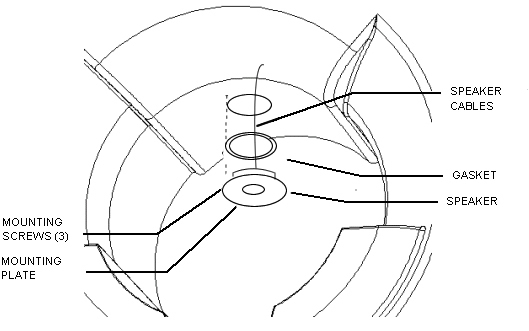
- Lift speaker off of mounting plate.
Figure 2. SPEAKER ASSEMBLY DETAIL 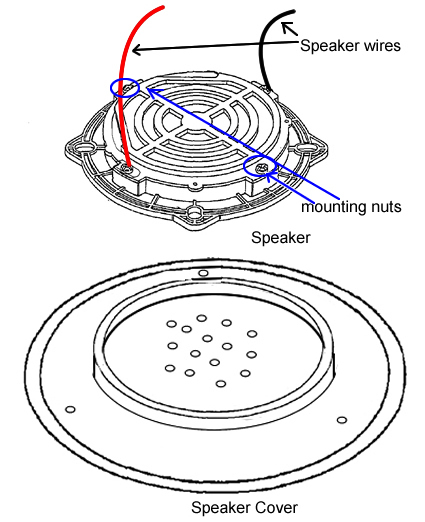
Speaker Installation
Procedure
- Secure new speaker to the mounting plate with two (2) nuts.
- Plug in the speaker wires.
- Secure the speaker assembly to the rear end bell using three (3) screws removed earlier.
- Remove tag-out tag from circuit breaker. Refer to Lockout / Tagout for System Cabinet PDU Main Breaker.
Finalization
Procedure
- Check the intercom function. Basically, intercom adjustment of GOC Audio Box is not required. If necessary, perform Intercom Adjustment For Simple OC Audio Board as troubleshooting.
- Perform Signal to Noise - Head Scan..