
- SIGNA MR355 / SIGNA MR360
- Service Manual
- 5856356-3EN Revision 5.0
- Basic Service Documentation. Copyright General Electric Company.
- 00000018WIA30BF1030GYZ
- id_131058191.1
- Jul 6, 2019 12:03:29 AM
SRI (Scan Room Interface) Replacement (Mobile Site)
Prerequisites
| Required persons | Preliminary requirements | Procedure | Finalization |
|---|---|---|---|
| 1 | Not Applicable | 30 minutes | Not Applicable |
| Condition | Reference | Effectivity |
|---|---|---|
|
System Power must be turned OFF. Refer to System Cabinet PDU Main Breaker LOTO Procedure. | - | - |
About this task
The SRI Assembly is located on the wall.
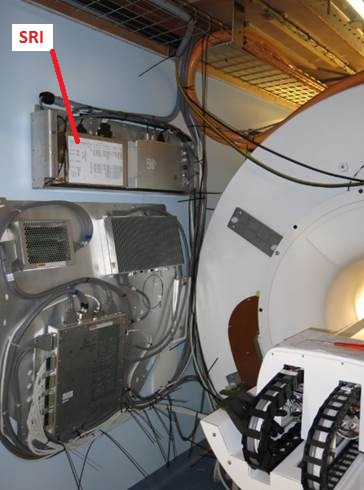
Removal of SRI (Mobile Site)
Procedure
- Remove front bracket with 2 screws.
Figure 2. Remove the bracket 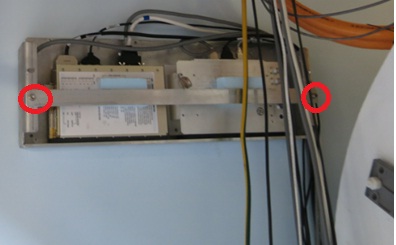
- Pull out to loosen from PAC/SRI tray.
Figure 3. Pull out to loosen from PAC/SRI tray 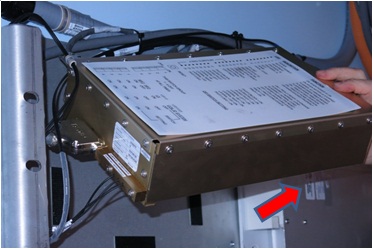
- Disconnect the all cables attached to the SRI.
Figure 4. Disconnect Cable 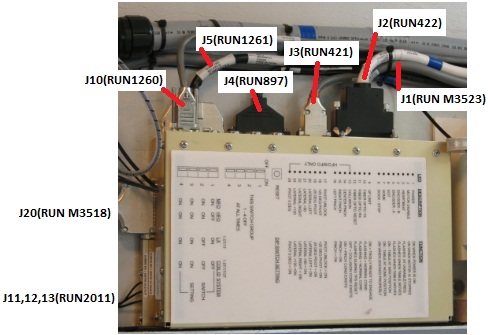
Install new SRI (Mobile Site)
Procedure
- Place new SRI on tray.
- Connect the all cables.
- Fix the cables with tie-wraps.
- Fasten it with belt.
Finalization
Procedure
- Perform SRI functional Check.
- Perform each test and verify that the each function works ok.
Figure 5. SRI Functional Check 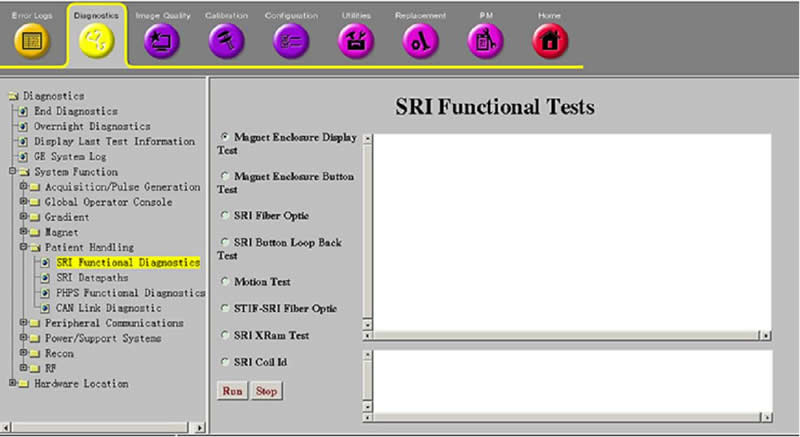
- Perform each test and verify that the each function works ok.
- Perform Signal to Noise - Head Scan.