
- SIGNA MR355 / SIGNA MR360
- Service Manual
- 5856356-3EN Revision 5.0
- Basic Service Documentation. Copyright General Electric Company.
- 00000018WIA30D91030GYZ
- id_131063731.1
- Jul 6, 2019 12:17:31 AM
Replacement of PAC
Prerequisites
| Required persons | Preliminary requirements | Procedure | Finalization |
|---|---|---|---|
| 1 | Not Applicable | 30 minutes | Not Applicable |
| ||||
| Condition | Reference | Effectivity |
|---|---|---|
|
System Power must be turned OFF. Refer to Lockout / Tagout for System Cabinet PDU Main Breaker. | - | - |
About this task
The PAC is located under the right side of the magnet enclosure.
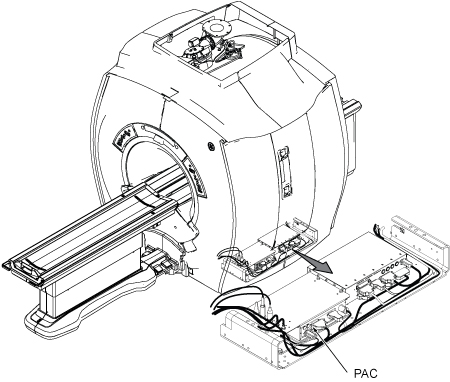
Removal of PAC (for System Initial as SIGNA Creator / SIGNA Explorer)
Procedure
- Remove bottom bar from Magnet right side.
Figure 2. Removing bottom bar 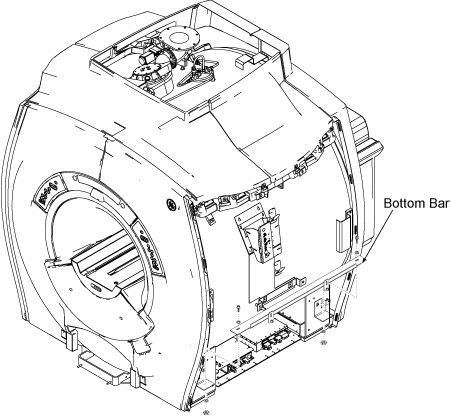
- Remove Four Bolts/Nuts/Washer that fixes the PAC/SRI Tray and
slide the PAC/SRI Tray out.
Figure 3. Slide PAC/SRI Tray 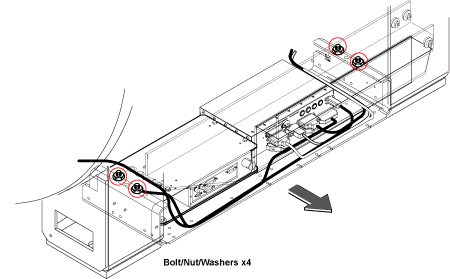
- Remove the PAC with bottom fixture.
Figure 4. PAC Removal 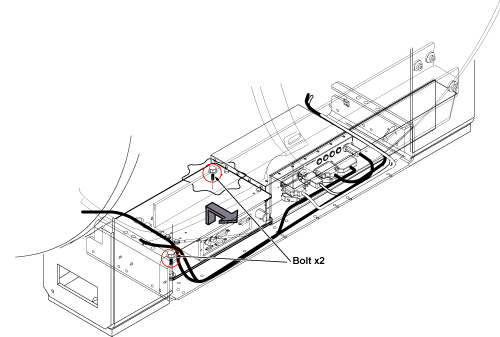
- Remove four screws and remove PAC Assy from Base Mount.
Figure 5. Remove PAC Assy from Base Mount. 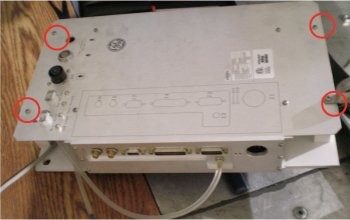
Removal of PAC (for Explorer Lift System)
Procedure
- Remove 4 screws securing right bottom bracket to magnet foot.
Figure 6. Screws Securing Right Bottom Bracket 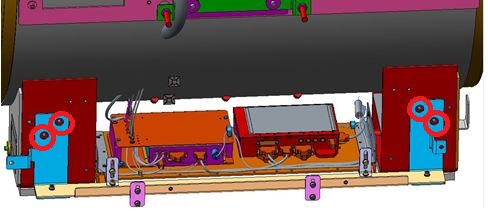
- Remove 2 screws securing PAC/SRI Tray to right bottom bracket.
Figure 7. Screws Securing PAC/SRI Tray 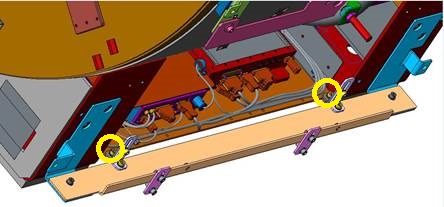
Installation of New PAC
Procedure
- Place new PAC on base mount and fix it with four screws.
- Place PAC on tray and tighten 2 screws.
- Connect the all cables.
- Restore PAC/SRI Tray.
- Fix the cables with tie-wraps.
- Restore bottom bar.
- Restore side covers.
- Remove tag-out tag from circuit breaker.
- Restore power.
Finalization
Procedure
- Perform PAC Manual Test.
- Perform Signal to Noise - Head Scan.