
- SIGNA MR355 / SIGNA MR360
- Service Manual
- 5856356-3EN Revision 5.0
- Basic Service Documentation. Copyright General Electric Company.
- 00000018WIA3063D630GYZ
- id_20117613.27
- Jun 29, 2021 12:57:52 PM
Planned Maintenance (PM) Schedule Overview
Planned Maintenance (PM) tasks are developed from design requirement and operations/use assumptions to provide for the minimum required maintenance that maintains specified equipment design performance, high image quality, and safety. GE Healthcare (GEHC) advanced service methods are developed to maximize efficiency and use system access time as productively as possible, as described in the lifecycle maintenance statement.
- The Warranty IB PM Schedule Concept: The Warranty PM Service requirement is different from the lifecycle Out of Warranty (IBOW) PM Service requirement due to manufacturing tests/checks, and installation PM checks, done during the install process, and the newness of the equipment and parts during the first 12 months after install.
- The Remote (Digital) PM Schedule Option: The use of remote, digital performance monitoring in place of on-site performance monitoring in PM tasks and schedules. If the performance tasks are observed digitally, and passed remotely with an approved digital method, then the on-site performance checks are not required for those tasks. Refer to the Digital Remote Check Procedure in Appendix A
- Equipment Operation Check (EOC): EOCs are not PMs, but rather operational checks required by both customer operators and engineers to ensure safety or equipment performance. EOCs are typically Customer Operator procedures or finalization procedures that an engineer completes if they are present on-site and have performed maintenance. In the case of MR and these products, the Magnet Rundown Unit (MRU) check that is required approximately weekly when the customer or the engineer enters the magnet room will no longer be a PM, but will become an EOC.
PM overview
GE Healthcare lifecycle maintenance
GE Healthcare equipment is designed and manufactured to be of the highest quality. Likewise, the maintenance requirements in the Customer Operations Manual/User Guides and the Customer Service Manuals are designed to help maintain safe, high quality performance of your equipment for its expected life.
Maintenance and repair work shall be carried out by qualified personnel, trained in maintenance and repair of this medical device in accordance with the manufacturer’s standards within the manufacturing enterprise. Customers should contact their local GE Healthcare Service Sales if they desire to have GE Healthcare complete the PMs with the Advanced (Proprietary) Service Methods and OEM trained service team.
In addition, GEHC systems have required customer, equipment operational checks that the customer should do on a periodic basis to ensure correct system operation or image quality before scanning. The details can be found in the Customer Operator Manuals.
PM scope
The PM tasks, schedules, methods, and procedures apply to the following products and the associated system options (defined in the PM schedules):
- SIGNA MR355 / SIGNA MR360
PM methodology
Schedules
There are two distinct PM schedules, (A) Warranty IB PM and (B) IB Out of Warranty (IBOW) PM, that are used to ensure the specified system performance for the customer, while ensuring optimization of system access time for maintenance.
(A) Warranty IB PM
Warranty PM tasks are defined by considering that the equipment is new, clean and calibrated during manufacture and at installation. That ensures specified engineering operational performance beyond the first 12 months of service following install. The investment in installation checks, the newness of the equipment, and the other contractual service covered by the 12-month warranty period following install allows for PM efficiencies and more up-time for the customer during the warranty period.
The primary (minimum) technical recommended PM schedules and tasks during the warranty period require approximately 7 hours of applied maintenance time per year, divided into two warranty PM schedules. A summary of the PM tasks and schedule times including warranty PM core system, GE option systems, and tasks authorized as remote/digital option are given in the listed warranty schedules.
- Schedule 1 Warranty Planned Maintenance
(done 2th-3th month from the system install date)
- Warranty PM tasks and schedule designed for on-site only.
- On-site GE system option warranty PM (W1) task time: 60 minutes
- On-site core warranty PM (W1) task time: 240 minutes (4 hours)
- Schedule 2 Warranty Planned Maintenance
(done 8th -9th month from the system install date)
- Warranty PM tasks and schedule designed for on-site only.
- On-site core warranty PM (W2) task time: 287 minutes (4 hours and 47 minutes)
The recommended warranty PM schedules are applicable only for the MR products that are in scope. Any other upgraded systems would adapt the IBOW PM (post-warranty) schedules given below for use in the warranty period.
It is possible that local regulation, or a unique customer requirement (commercial concession), may dictate additional PMs beyond the technical minimum PM schedules, W1 and W2, during the 12-month warranty period after install. There are two recommended options for that case:
- The region or country could complete the IBOW PM schedules (A, B, C, D) per the description in (B) IBOW PM (Post-Warranty) below, for those customers, understanding that the modality only re-reimburses service for the technically required minimum PM plan. This option could include using the remote option IBOW PM schedules B and D in addition to warranty PM W1 and W2, to fill the customer requirement remotely if the pre-conditions of the remote options in (B) IBOW PM (Post-Warranty) are met.
- The region or country may define a region generic (commercial) PM, for use above and beyond the minimum technical warranty PM (W1 and W2) proprietary warranty service minimum requirement. The generic (commercial) PM, assumed to be a short, simplified visit, must be defined in MyWorkshop (MWS) and approved by region QA, and available as a product/region-specific Digital Service Form (DSF) in the Service Information Management System (SIMS). Use of the generic PM assumes that the region will complete the warranty PM schedules W1 and W2 in the 12 months after install.
(B) IBOW PM (Post-Warranty)
The recommended IBOW PM tasks require approximately 14 hours of on-site applied maintenance time per year divided into four schedules. The time and the four schedules reflect the requirements for the core MR system without GE system options. GE System and Remote Option notes are listed below with each schedule. These PM Service Requests (SRs) will be dispatched from the Region Service Customer Relation Managers (CRM) as they are currently. The difference for the remote option is how you complete the PM schedule for those PM SRs. A summary of the PM tasks and schedule times including IBOW PM core system, GE option systems, and EOC is given below.
- Schedule A Planned Maintenance (IBOW)
- PM tasks and schedule designed for on-site only.
- 1.5T on-site GE system option applied time: Up to 490 minutes (8 hours and 10 minutes) added to core time
- 1.5T on-site core system applied time: 395 minutes (6 hours and 35 minutes)
- Schedule B Planned Maintenance (IBOW)
- PM tasks and schedule designed for remote option OR on-site.
- Remote option core system applied time using FX application: 20 minutes
- On-site core system applied time: 20 minutes
- 1.5T on-site GE system option applied time: Up to 80 minutes (1 hours 20 minutes) added to core on-site time
- Schedule C Planned Maintenance (IBOW)
- On-site PM tasks and schedule designed for on-site only.
- 1.5T on-site GE system option applied time: Up to 444 minutes (7 hours and 24 minutes) added to core time
- 1.5T on-site core system applied time: 384 minutes (6 hours and 24 minutes)
- Schedule D Planned Maintenance (IBOW)
- PM tasks and schedule designed for remote option OR on-site.
- Remote option core system applied time using FX application: 20 minutes
- On-site core system applied time: 20 minutes
- 1.5T on-site GE system option applied time: Up to 80 minutes (1 hours 20 minutes) added to core on-site time
Two of the four IBOW PM schedules (schedules A and C), as well as the two warranty PM schedules (schedules W1 and W2) have on-site efficiencies that can be gained with the on-site Field Engineer (FE) completing the PM tasks in parallel. The parallel tasks save time; those time savings (not included above) gained from completing tasks in parallel.
The IBOW PM schedule B and D can be done remotely provided the following conditions are met:
- The MR system is connected to the GE back-office (system connectivity) and sending the system data to the Service Data Lake.
- The region service CRM has the capability to record completion of the Service Document/Manual defined EOC(s) in the SR debrief for corrective repair and field modification install (FMI) type SRs.
- The region service team, either the call center, remote engineer, or FE/representative, must have access to On-Watch/Rules Studio (OW/RS) Remote Digital PM outcomes. Those PM tasks that are approved as a Remote Digital method, as well as the OW/RS details, are listed in Appendix A. At present, the access to those Remote Digital PM outcomes can come through two paths: primary is the FX Application/Tool that is integrated as the user interface with the region CRM, and secondary (back-up) is the MR System ID Health Viewer within the Spotfire IB Health Dashboard. Remote digital PM outcomes will also be in the Field Force Automation (FFA) Application.
- The MR system being serviced does NOT have a GE Table System Option that requires on-site procedure only; examples are the MR 1.5T Sentinelle Vanguard breast MRI table and GE OR compatible table. These must be serviced on-site four times per year.
IF ANY OF THE ABOVE CONDITIONS CANNOT BE MET, THEN THE REGION AND THE FE MUST COMPLETE ALL PM SR SCHEDULES ON-SITE.
The FE, call center, or remote engineer can check the status of IBOW schedule B and IBOW schedule D PM task performance at any time using the FX Application tool to help in understanding the status of the equipment when talking to the customer. However, when completing a dispatched PM SR for those B/D schedules, and any one of the remote/digital PM tasks does NOT pass, then the FE must go to the site and complete the on-site PM service method/procedure prior to closing the SR.
For IBOW schedules B and D with the remote PM task option, if all the remote/digital PM tasks pass, then the FE records those tasks as PASS in the DSF ePM checksheet, just as they would for an on-site task. No special comment is needed since those tasks are authorized by engineering to be completed with the remote/digital method.
- Operation of oxygen monitor
The recommended PM items on each list can be completed on any time schedule to best accommodate a customer’s individual requirements. Customers wanting the least number of interruptions of their scanning schedule may want GE to do all checks during a single extended site visit, four times per year. Other customers, desiring shorter and more frequent site visits by their FEs, may find it advantageous to have a portion of the checks accomplished at each visit. All the checks on each checklist should be completed within the prescribed timeframe to ensure optimal system performance and reliability.
Lastly, as a complete example of the recommended scheduling methodology, the figure below shows the recommended GEHC PM schedules and the transition from the 12-month warranty PM period to the IBOW (contract) PMs in the post-warranty period.
GEHC PM schedules

(C) EOC
The MRU quarterly LED check is defined as the EOC for all our MR products. This will be completed by our customers, since all of our MR products require the customer to complete this on a weekly basis. FEs are also required to complete that MRU EOC check as part of all on-site PM visits (both for Warranty and Post Warranty PM) and capture that in the DSF ePM checklist referenced below. Also, as part of any corrective repair, the on-site FE must complete that MRU EOC when entering the magnet room and record the EOC on the Corrective Repair or FMI SR debrief for those region CRMs with that capability.
Field or remote engineer (or representative) workflow
The Digital Remote PM Option for schedule B and D can be executed by a region call center, a remote engineer, or a FE/representative – anyone that has access to and can process/debrief:
- The PM SR generated by the CRM scheduler or dispatch system
- The remote digital rule outcomes for the MR system ID being serviced
- The current DSF ePM available in SIMS
- Current connectivity information to confirm the system is connected
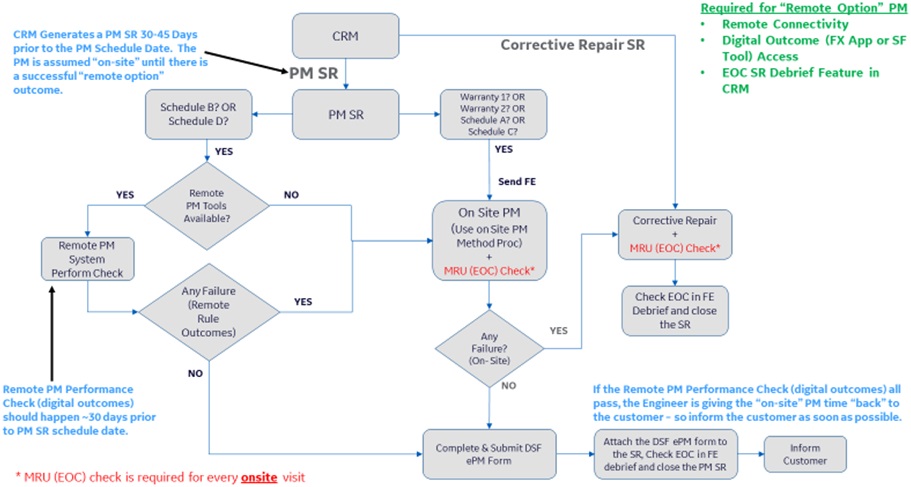
There is no special requirement for the CRM to generate a special or remote PM SR type. The service request is the same PM SR type that has been generated in the past. In this case, now two PMs/First Year Service (Warranty), and four PMs/Year (IBOW or Contract).
The workflow is the following steps:
- The CRM generates the PM SR dispatch to the assigned engineer (or call center).
- If the PM SR is for Schedule W1, W2, or Schedule A, and C, then the FE must be sent to the site to complete the SR per the checklist and service manual.
- If the PM SR is schedule B or D, then the service person can attempt the remote method in steps 4 through 7.
- For the PM SR system ID, check the PM remote digital outcomes using the FX Application, or as secondary, the MR Spotfire IB Health Dashboard. This can be checked in advance of the actual visit date so that the customer can be notified early of system availability should all the PMs pass.
- If all the remote digital outcomes are green (pass), and all the SW verification data is present, then complete the ePM per the detailed procedure in Appendix A, and save the DSF ePM Checksheet to the repository.
- Attach the DSF ePM Checksheet to the PM SR, and close the SR.
- Call the customer and inform them the PM is complete – advise outcome – make sure MR is working from customer perspective – and email them the DSF ePM if they desire.
- If any of the Schedule B or D PM SR system ID remote digital outcomes are red or do not pass, then the FE will need to go to the site and complete the PM SR using the on-site methods in the manual. Schedule B and D are shorter, so coordinate with customer best time to minimize down time of machine.
- If a site visit is required for Schedule B or D, consider any GE system option PM task that could be completed during those PM SRs to shorten the other on-site visits (A and C).
PM workflow diagram
Online libraries and DSF ePM checklists
Distribution
After service documents, such as operator manuals, service manuals, technical bulletins (service notes), and DSFs (regulatory forms), are approved and released by GEHC Modality/Design Engineering, they are distributed through the approved GEHC online distribution systems. The present GEHC distribution system of record is SIMS. GEHC, and GEHC approved partners, can get access to service documents by logging into (SSO enabled) SIMS. The legacy distribution system was the Content Document Library (CDL), and has been retired.
DSF ePM checklist/checksheet
After completing PM tasks, complete, save, and submit the DSF ePM checklist to the service repository (or new enterprise repository) and attach the DSF ePM to the PM SR debrief.
Operational notes and assumptions
It is assumed in warranty that the equipment is new, clean, and calibrated at installation, which ensures specified operation well beyond its first year in service. MR systems are to be stored and/or operated in the conditions and environment specified by product Pre-Installation Manual, the Service Operator Manual, and the Safety Manual procedures.
It is assumed the MR systems covered by the Warranty PM differentiation methodology are newly manufactured, or factory re-manufactured GoldSeal systems ONLY. Silver-preferred systems are not covered by the new-system Warranty PM plan. Those systems would use the standard IBOW (contract) PM plan during any silver-preferred warranty period.
The region CRMs fundamentally operate like each other in scheduling Warranty PMs SRs. The region is responsible for updating their CRM systems with the warranty PM schedules for the MR systems in-scope. Regional teams can complete the schedules B and D only if the above-mentioned conditions are met in that region/country for systems under GEHC contract.
Commercial considerations
- The MR system/equipment installed base at the site should be 100% connected to the GEHC back office during the warranty period, and that should be in the Equipment Sale Warranty Terms & Conditions (T&C). The same is true for IBOW service contracts.
- The percent of time the equipment is connected to the GEHC back office should be at least 95% of the time. Connected time should also be in the T&Cs for both GEHC equipment sale warranties, and service contracts.
- The customer is expected to complete the necessary operations (function) checks required per the operator manual to ensure safe operation and good image quality.
- The difference between warranty PM periodicity and IBOW contract PM periodicity is tied to the operational assumptions above, and the Lifecycle Maintenance Statement. In short, the system equipment is new, had a complete set of all PMs at install, is remotely monitored with proprietary back-office in warranty, and is monitored closely at other service calls that may be requested by the customer. Therefore, less PM service calls during warranty.
- The goal of the warranty PM differentiation is to return two days and over 10 hours of system availability (scan time) back to the customer. GEHC is watching the system performance through the back office, so performance monitoring is increased for a GEHC MR system.
- As with warranty PMs, certain regions, countries, or customers may have regulation or local commercial requirement to complete more than the minimum contract IBOW PM plan of four PMs/year. In those cases, the remote PM schedules B and D may be repeated more often, or the region could use a defined generic PM (to check on-off function, and connectivity for example) if that is approved in MWS by region QA, is titled in SIMS for that express use only, and is built in the Global DSF ePM Checksheet format.
- As during warranty, the customer is expected to complete the necessary operations (function) checks required per the operator manual to ensure safe operation and good image quality.
- For GEHC proprietary service, there are four IBOW contract PMs required as a minimum per year. Two of those four, schedule B and D, have a remote performance check option. Those can be done remotely under specific conditions, or on-site by qualified GEHC service personnel.
- As with warranty PMs, certain regions, countries, or customers may have regulation or local commercial requirement to complete more than the minimum Contract IBOW PM plan of four PMs/year. In those cases, the Remote PM schedules B and D may be repeated more often, or the region could use a defined generic PM (to check on-off function, and connectivity for example) if that is approved in MWS by region QA, is titled in SIMS for that express use only, and is built in the Global DSF ePM Checksheet format.
- The customer will still see the four PMs per year scheduled (assuming the contract is for the standard technical minimum, and not a greater number for commercial purpose) that are scheduled by the CRM/APM. But two of those (B and D) have the remote option – for the customer, that means there will still be a closed SR, and they can be provided (or retrieve from the Repository) the completed DSF PM Checksheet.
- The two remote option PM schedules B and D are much shorter in time. If the FE must complete those on site – the customer should not be required to give up the equipment for a full day as in the past. Again – great system availability for the customer.
- If the remote option PM schedules B and D pass the performance checks remotely, the FE or the remote team/call center will notify the customer in advance so that the system can be available to the customer and be used in the customer work plan on the dates of those PMs.
Appendix A: Digital remote check procedure using rules studio/on-watch rules and FX user interface application
Remote/digital method PM checks: Option Schedule B and D
The MR PM checks (tasks) in Table 1 below are authorized to be conducted with a digital On-Watch/Rules Studio (OW/RS) analytic method outcome.
| On-site PM tasks | Purpose | Remote digital PM rule |
|---|---|---|
| Software Revision Check for Safety | Image Quality | SW_Revision_Check_Rule_PM {GetVer SW Tool Application} |
Currently there are two user experience/application methods for observation of digital remote outcomes that enable the PM tasks/checks in Table 1 to be completed by remote method. Those are:
-
FX User Application
Is the user interface for Seibel America’s (SAM), Seibel International, and Service Max CRMs. The FX Digital Application/Tool is accessed through the CHROME or EXPLORER browser with an SSO login. It can be used by any FE or remote team to support region workflows. The link to the FX Application (Production) is: http://gehcfxp.com.
-
IB Health Dashboard
Is a stand-alone Spotfire visualization tool that is best accessed through the CHROME browser with SSO Login. The IB Health Dashboard has a MR Modality section with a System ID Health Viewer. The MR System ID Health Viewer has a software section containing the data for the Software Revision Check for Safety PM check, as well as a PM Check section containing outcomes of the Remote OW/RS PM checks. The link to the IB Health Dashboard is: http://sc.ge.com/*MR PM.
Note: Spotfire OneIDM AccessFirst-time users must place a request for Spotfire access through oneidm.ge.com.
- Log into https://oneidm.ge.com.
- Type Spotfire in the request access box.
- Select Spotfire-HC - Healthcare and click Request Access.
The Access Request Detail screen appears.
- Select Production as the environment.
- Select Global Magnet Monitor Reporting as the application group.
- Select Consumer as the role for web player access.
- Click Add to Request.
- Add the Reason for Request. For example, Access needed as a new user.
- Click Submit.
Once approved by your manager and content owner, you will receive a notification email and will be able to access the PM page.
| Remote digital PM rule name | System log, error log, or data source | On-watch rule ID (or link to rule) |
|---|---|---|
| SW_Revision_Check_Rule_PM | MWS DOC1667089 |
It should be noted that eventually, the remote digital PM rule outcomes will also be available in the Field Force Automation (FFA) Application for the call/customer service centers, and the remote engineering teams who use FFA.
Remote digital PM check method procedure detail
- Procedure using the FX user application
Both the FX (CRM) User Interface Application, and the MR Spotfire PM Healthpage, can be accessed from Mobile devices or a Laptop computer. The easiest access method is to have the MyAppsPlus loaded on the device/computer: http:// sc.ge.com/*myappsplusdownload The second access method is to request access to the applications through the IDM.
Step One (1). Open FX and go to the “Activities Info Section” in FX.
◼ Open the FX Application; https://fx.cloud.gehealthcare.com/FX/ (in CHROME)
◼ Search and/or select the SystemID for the PM SR; Select “Lookups” on the left side of page, then “Sys, SR, Activity”. Enter the System ID and select “View Details”.
◼ Scroll down to “Equip Service History”, and under the “View SR Types”, then select “PM.” Pick the latest PM scheduled at top of list, and open with the “>” arrow.
◼ Scroll down to “Activities” section and click the Customer site/name listed. In that customer system info section, open the “Activities Info Section”.
◼ The “System Metrics” containing the Digital Remote PM Outcomes are in that “Activities Info Section” of FX.
Step Two (2). PM Software Revision Check for Safety. If this required PM Task indicates “PASS” in FX, then use that to complete the DSF ePM Checklist as shown Figure A. 1.
◼ If the Software Revision Check for Safety in the MR Digital PM Application does NOT PASS, the Digital/Remote method failure may be due to several reasons:
o Connectivity or dataflow problem. Action: Contact Region Connectivity Leader or Remote Engineer; assess dataflow to the DataLake. Try again.
o The correct Software OP program or Service Pack is not loaded.
◼ If the Software Revision Check for Safety cannot PASS with the Remote Method, then the engineer/representative will need to go to the site during the scheduled PM SR and reload the Software Op Program, and any Service Packs required for safety per the Service Manual, and the latest version of the MR Engineering SW Matrix DOC1667089.
Figure A. 1
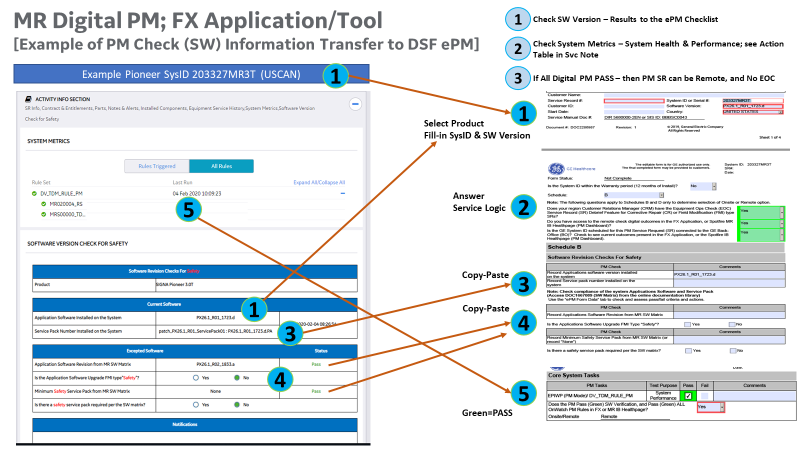
Step Three (3).
Review Spotfire PM Healthpage” Task. The review of MR PX/VX Platform “System Health Status & Information” portion of the Spotfire PM Healthpage is a recommended, not required, task. The task is “No Fail” in the Checksheet. This task will be more completely defined in the MR Spotfire PM He althpage section that follows, since “System Health” is not currently displayed in FX. “SystemHealth" in the Spotfire PM Healthpage is defined as:
1. Status of IB In Spec (IBIS) Performance Check, and the Magnet IB In Spec (MIBIS) Performance Check. Th ese checks are not yet displayed in FX, so in order to see them, the engineer/representative must open the MR Spotfire PM Healthpage.
2. Because the “Review Spotfire PM Healthpage” task is a "No Fail" review, if MR Spotfire Healthpage IBIS/MIBIS System Health is not reviewed (or data is incomplete/not available), then leave Pass/Fail blank in ePM Checksheet, and enter "NA" in the commen ts. If the review is complete see the next p aragraph for instruction.
- Procedure Using the MR Spotfire PM Healthpage
The MR Spotfire PM Healthpage for the PX/VX Platform products has three sections; (1) PM Software Revision Check for Safety, (2) On-Watch Rule Performance Check, and (3) System Health Status & Information (IBIS/MIBIS Performance Check) described in Figure A.2 below.
Figure A.2
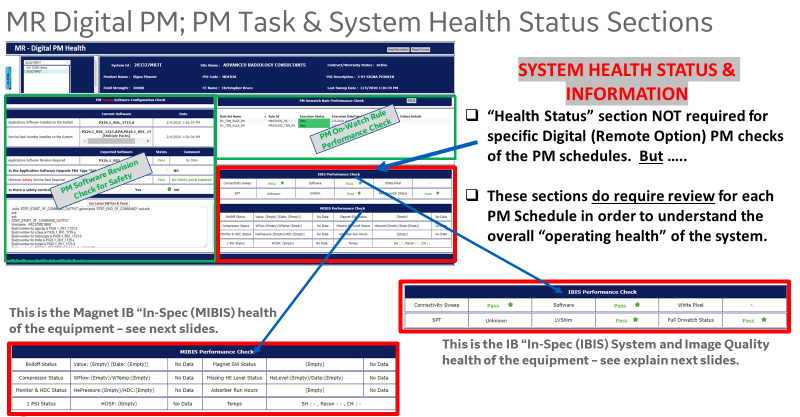
Step One (1). Open the MR Spotfire PM Healthpage.
◼ Open the Spotfire PM Healthpage Application; http://sc.ge.com/*MR PM (CHROME).
◼ Search, then select, the System ID for the PM SR in the upper-left corner. Select Product Name and type in System ID into the DSF ePM (Figure A.3, Item #1).
Figure A.3
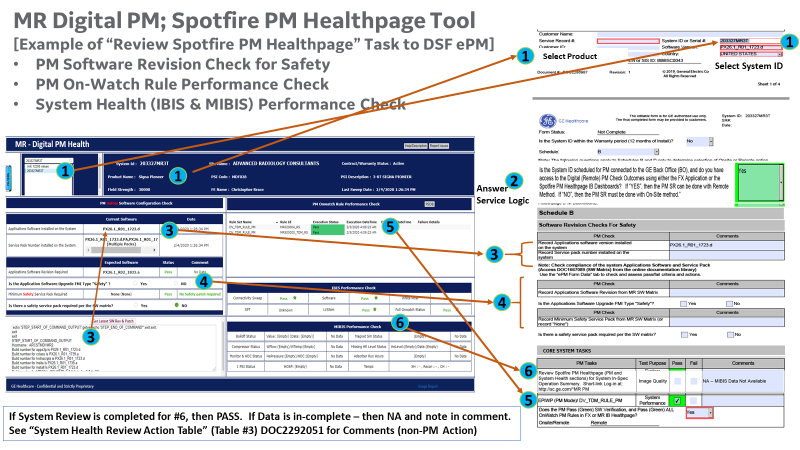
GE Proprietary and Confidential Information Page 37 of 39 MR DRF Template Any copy made from the electronic version shall be considered an uncontrolled copy. Before using this document, please check MyWorkshop for the latest revision.
Step One (2). Answer the Service logic Questions in the DSF ePM as shown in Figure A.3 above.
◼ For Schedule A (On-site), if the system has a SYSTEM OPTION TASK (GE provided Options Only) for the “Operation of Oxygen Monitor” task (“YES”), then that PM Check will be displayed for Schedule A (On-Site).
◼ For Schedule B & D, if the system is connected to the BO, and the engineer has access to the FX or MR Spotfire PM Healthpage (YES), then the Remote Method is possible.
Step Three (3) & Four (4). Conduct the “PM Software Revision Check for Safety” task as shown Figure A. 3, Item 3 a nd 4 above.
◼ Record the “Current Software” from the PM Healthpage into the “Installed Software” and “Installed Service Patch” section of the DSF
◼ Record the “Expected Software” from the PM Healthpage into the “Record Software/Service Patch” section of t he DSF ePM.
◼ If the “Expected Software” shows “Fail” Status for “Old Data”, then the “Current Software” Date is older than seven days. If “current” matches “expected then attempt to confirm near real time using the “ Get Latest SW Rev & Patch ” button al low up to a minute of processing to fetch that data. If the SW Rev and Patch information in that window match what is expected, then the PM Software Revision Check for Safety check can PASS even though it shows “Old Data” in the “Expected” window. If no data can be obtained, or the SW Rev does not match, then the PM method must be On Site.
Step Five (5). Conduct the “PM On Watch Rule Performance Check” as shown with Figure A. 3, Item
◼ T here are two OWRS rules that make up “DV_TDM_Rule_PM” that are applicable to the PX/VX Platform. Both rules must be visible in the MR Spotfire PM Healthpage, and PASS (Green) to complete the PM with the Remote
◼ If the Remote Method does NOT pass, then the White Pixel PM Check must be done with the On Site Method. If the data check rule (MRS00000_TDM_RS) is failing due to data age or incomplete data then contact a Remote Support Engineer to check connectivity, or force a data sweep. Retry Remote Method in 72 96 Hours.
Step Six (6).Conduct the recommended “Review Spotfire PM task as shown Figure A. 3,Item 5 and 6 above, and Table A. 3 (Non PM Recommended Actions), below.
◼ Review Spotfire PM Healthpage. If the engineer/representative does not have the MR Spotfire Healthpage available, or visible, or for some reason there is incomplete or missing IBIS or MIBIS data – then leave the outcome (Pass/Fail) blank and put “NA” in the comments.
◼ If the engineer/representative can access the Healthpage, and the IBIS/MIBIS data is available, then review Items 6 of the System Health, and mark “PASS”.
◼ The intent of the PM Health Status & Information section is to provide a basis for discussion of the system status with the customer, and to better understand any customer observations during that discussion.
◼ Table A.3 below provides recommendation that are considered “Beyond” the PM; that is. Non-PM actions that could be possible, like Corrective Repair (CR), or should be investigated on-site at the next service call (could be the Remote Option PM of Schedule B/D, since that time is already scheduled with the customer). There are four situations from the “Review Spotfire PM Healthpage” task that could require urgent On-site action, and comment in the “Comments” block of the ePM checklist, are:
o IB In Spec (IBIS) Performance Check System Performance Test (SPT). If the PM Healthpage indicates Severe” = one of more urgent fails = Create a CR SR: Run SPT On Site at next scheduled Service Call.
o IB In Spec (IBIS) Performance Check LVShim. If the PM Healthpage indicates “ = The system requires Shim. Create a CR SR: Run LVShim On Site at n ext scheduled Service Call.
o IB In Spec (IBIS) Performance Check Full On Watch Status. If the PM Healthpage indicates “P1” = Failing at least one P1 rule. P1 alerts are for things that should be addressed in the same day. Contact Remote Support Enginee r/Team open CR SR as required. If indicates “P2” = All P1s Pass; but failing at least one P2 rule. P2 alerts are for things that should be addressed within the same week. Contact Remote Support Engineer/Team open CR SR as required.
o Magnet IB In Spec (MIBIS) Performance Check Absorber Run Status. If the PM Healthpage indicates “Fail” = over 30K Hours. Verify Absorber Hours at next scheduled Service Call, and if over 20K Hours (PM Spec), then replace.
Table 3. PX MR Digital PM -- Spotfire PM Healthpage; System Health Review Action Table Tool/Application Source Analytics/Data Source Outcomes Action/PM Checklist Comments FX System Metrics (Activity Info Section) PM On-Watch Rule Performance Check 1. DV_TDM_RULE_PM MR020004_RS MRS00000_TDM_RS
2. Other OW PM Rules are not supported
Pass (Green) HighLight
Fail (Red) Highlight
Action: 1. Record "Pass" for the EPIWP (PM Mode)/DV_ TDM_RULE_PM Check for Schedule B and D Remote.
2. If "Fail", and the "Fail" is for the data currency rule (MRS00000_TDM_RS) only, then enter a report of "Dataflow Issue" at the "Report Issue" Button in the top, right-hand corner of the PM Healthpage. Wait 72-96 Hours and attempt the Digital Remote method again. If "Fail" persists, the PM must be completed with the On-Site method.
3. If "Fail" is for the TDM rule (MR020004_RS), then the PM must be completed with the On-Site method.
FX System Metrics (Activity Info Section) PM System Health IB In-Spec (IBIS) Performance CheckMagnet IB In-Spec (MIBIS) Performance Check
1. Not yet displayed in FX
Not Applicable 1. Not yet displayed in FX
No Action. Not Applicable (NA) for FX Application.
Go to MR Spotfire PM Healthpage
MR Spotfire PM Healthpage (PM On-Watch Rule Section) PM On-Watch Rule Performance Check 1. DV_TDM_RULE_PM MR020004_RS MRS00000_TDM_RS
2. Other OW PM Rules not supported
Pass (Green) HighLight Fail (Red) Highlight
Action: 1. Record "Pass" for the EPIWP (PM Mode)/DV_ TDM_RULE_PM Check for Schedule B and D Remote.
2. If "Fail", and the "Fail" is for the data complete/age rule (MRS00000_TDM_RS) only, then enter a report of "Dataflow Issue" at the "Report Issue" Button in the top, right-hand corner of the PM Healthpage. Wait 72-96 Hours and attempt the Digital Remote method again. If "Fail" persists, the PM must be completed with the On-Site method.
3. If "Fail" is for the TDM rule (MR020004_RS), then the PM must be completed with the On-Site method.
MR Spotfire PM Healthpage (System Health Status & Info Section) PM System Health IB In-Spec (IBIS) Performance Check
System Performance Test (SPT)
1. Assesses overall system healthMR System ID IBIS Sweep data file (DataLake)
Pass (Green) Highlight Severe (Red) Highlight
Marginal (Red) Highlight
Age File = (Black) No Highlight
Pass = No Action. evere = one of more urgent fails = Create a CR SR: Run SPT On-Site at next scheduled Service Call.
Marginal = no severe fails, but there are one or more errors. Run SPT at next scheduled on-site Svc Call to resolve errors
Age File = last recorded test over six months old. Run the SPT using on-site procedure at next schedule Svc Call.
MR Spotfire PM Healthpage (System Health Status & Info Section) PM System Health IB In-Spec (IBIS) Performance Check
LVShim
1. LVShim correctness critical to spec operation and Image Quality (IQ)MR System ID IBIS Sweep data file (DataLake)
Pass (Green) Highlight Fail (Red) Highlight
Age File (Black) No Highlight
Pass = No action. Fail = The system requires shim. Create a CR SR: Run LVShim On-Site at next scheduled Service Call.
Age File = last recorded test over six months old. Run the SPT using on-site procedure at next scheduled Svc Call.
MR Spotfire PM Healthpage (System Health Status & Info Section) PM System Health IB In-Spec (IBIS) Performance Check
Full On-Watch Status
1. Status of ALL On-Watch Rules available, not just PM Rules; Includes all Triggers/AlertsIB Health Fleet View Summary of OW/RS Rules
Pass (Green) Highlight P1 (Red) Highlight
P2 (Red) Highlight
P3 (Red) Highlight
Monitor (Red) Highlight
No Data (Black) No Highlight
Pass = No action (all enabled OW rules pass). P1 = Failing at least one P1 rule. P1 alerts are for things that should be addressed in the same day. Contact Remote Support Engineer/Team -- open CR SR as required.
P2 = All P1s Pass; failing at least one P2 rule. P2 alerts are for things that should be addressed within the same week. Contact Remote Support Engineer/Team -- open CR SR as required.
P3 = All P1 and P2s pass; failing at least one P3 rule. P3 alerts are for things that do not directly impact the customer, but should be addressed on the next on-site call or service site visit.
Monitor = All P1s, P2s, and P3s pass; failing at least one Monitor rule, which indicates an underlying issue, but is not yet actionable.
MR Spotfire PM Healthpage (System Health Status & Info Section) PM System Health Magnet IB In-Spec (MIBIS) Performace Check
Absorber Run Status
1. Run Hours on current AbsorberMR System ID IBIS Sweep data file (DataLake)
Pass (Green) Highlight Fail (Red) Highlight
Empty or No Data (Black) No Highlight
Action tied to "Inspect Cryocooler Systems PM Task" Pass = has less than 30K Hrs. Replace during On-Site PM SR/Service Call if Absorber over 20K Hrs (or per PM Svc Manual).
Fail = over 30K Hours. Change at next scheduled Service Call.
“Empty” and/or “No Data” = Indicated that there is incomplete, or no data, in the DataLake for Rule processing.