• SIGNA MR355 / SIGNA MR360
  • Service Manual
  • 5856356-3EN Revision 5.0
  • Basic Service Documentation. Copyright General Electric Company.
  • Object ID: 00000018WIA3091FF20GYZ
  • Topic ID: id_13106475 Version: 1.2
  • Date: Jul 5, 2019 11:49:11 PM

16CH RRx Replacement (Mobile Site)

Prerequisites

Table 1. Personnel requirements
Required personsPreliminary requirementsProcedureFinalization
1Not Applicable30 minutesNot Applicable
Table 2. Tools and test equipment
ItemQuantityEffectivityPart numberManufacturer
Non Magnetic Tool Set1---
Table 3. Replacement parts
ItemQuantityEffectivityPart numberManufacturer
RRX (Refer to Illustrated Parts)1---
Table 4. Safety
Table 5. Required conditions
ConditionReferenceEffectivity

System Power must be turned OFF. Refer to System Cabinet PDU Main Breaker LOTO Procedure.

--

Procedure

  1. Remove covers.
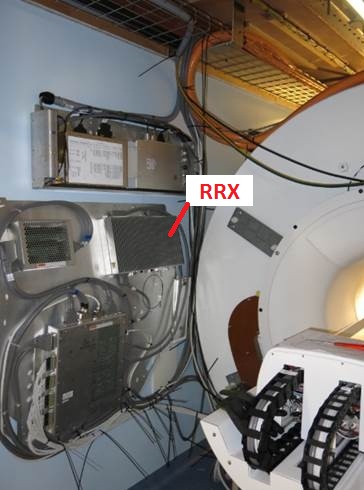
  2. RRX is located on the wall.
    Figure 1. RRX Location
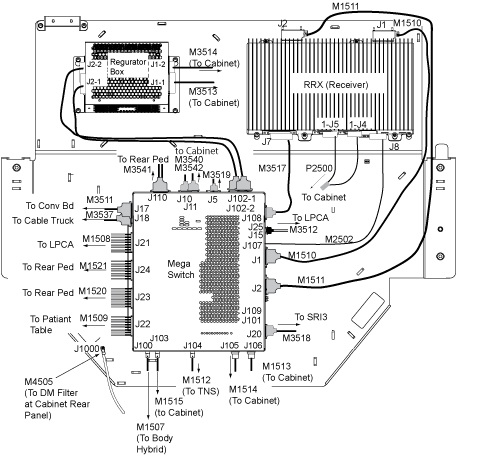
  3. Disconnect the bottom cables from J7, J5, J4, J8.
    Note: Handle the Fibre Optic cables with care, they are very fragile.
    Figure 2. RRX Cable Removal
  4. Loosen 4 screws.
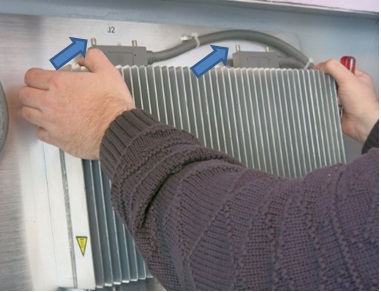
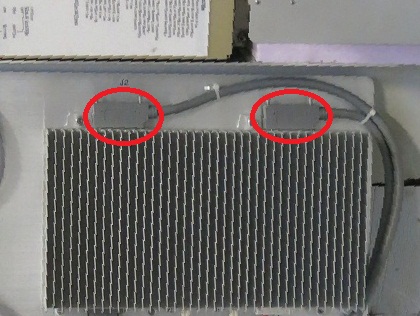
  5. Pull out a little and disconnect the top 2 cables from J1, J2.
    Figure 3. Pull out a little and disconnect J1, J2
  6. Restore it by the reverse order of the removal.

Finalization

  1. Restore the Power. Refer to System Cabinet PDU Main Breaker LOTO Procedure.
  2. Perform the following Diags and confirm that all of the tests are passed.
  3. Perform System Gain Calibration.
  4. Perform one Body or Head Scan.
  5. Perform SPT Coherent Noise Test .
    Note: Perform SPT Coherent Noise Test Only by selecting 'No' for 'Select All Tests?' and 'ON' for 'Coherent Noise'. No need to perform SPT Full test.