
- SIGNA MR355 / SIGNA MR360
- Service Manual
- 5856356-3EN Revision 5.0
- Basic Service Documentation. Copyright General Electric Company.
- 00000018WIA30622030GYZ
- id_131073881.2
- Jul 5, 2019 11:18:59 PM
Temperature Sensor Replacement
Prerequisites
| Required persons | Preliminary requirements | Procedure | Finalization |
|---|---|---|---|
| 2 | Not Applicable | 60 minutes | Not Applicable |
| Item | Quantity | Effectivity | Part number | Manufacturer |
|---|---|---|---|---|
| Digital Volt Meter (DVM) | 1 | - | - | - |
| Standard Screwdriver | 1 | - | - | - |
| Philips Screwdriver | 1 | - | - | - |
| Adjustable Hex Wrench or Socket Set | 1 | - | - | - |
| Allen Wrench Set | 1 | - | - | - |
| 2" x 4" piece of wood (approximately 18 - 20 inches long) | 1 | - | - | - |
| Two people required for removing the end bells. | 2 | - | - | - |
| Temperature Sensor Cable Kit | 1 | - |
46-328326G1 | - |
| Condition | Reference | Effectivity |
|---|---|---|
|
System Power must be turned OFF. Refer to Lockout / Tagout for System Cabinet PDU Main Breaker. | - | - |
|
Be sure that your Temperature Sensor Cable Kit has all the required contents, which are listed in Temperature Sensor Cable Kit. | - | - |
About this task
The temperature sensor is located on front end bell.
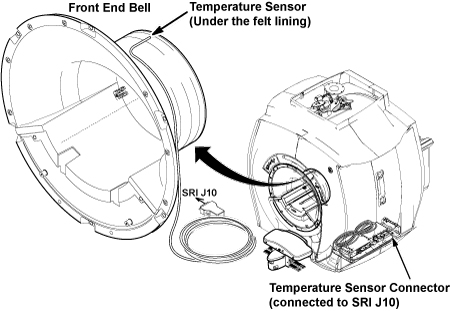
Procedure
- Remove the sensor from front end bell by breaking the epoxy.
Figure 2. Bore Temperature Sensor Location 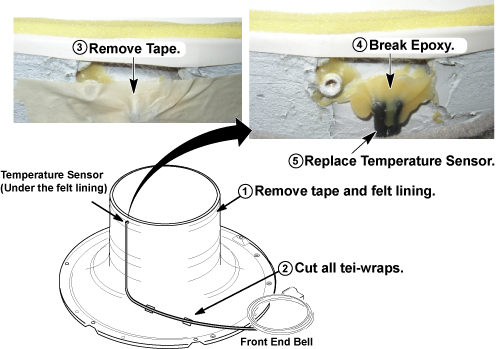
Finalization
- Perform Signal to Noise - Head Scan.