
- SIGNA MR355 / SIGNA MR360
- Service Manual
- 5856356-3EN Revision 5.0
- Basic Service Documentation. Copyright General Electric Company.
- 00000018WIA304AEF20GYZ
- id_131061041.4
- Apr 21, 2020 3:30:42 AM
16CH RRx
Prerequisites
| Required persons | Preliminary requirements | Procedure | Finalization |
|---|---|---|---|
| 1 | Not Applicable | 30 minutes | Not Applicable |
| Item | Quantity | Effectivity | Part number | Manufacturer |
|---|---|---|---|---|
| Non Magnetic Tool Set | 1 | - | - | - |
| Item | Quantity | Effectivity | Part number | Manufacturer |
|---|---|---|---|---|
| RRX (Refer to Illustrated Parts) | 1 | - | - | - |
| ||||||||
| Condition | Reference | Effectivity |
|---|---|---|
|
System Power must be turned OFF. Refer to System Cabinet PDU Main Breaker LOTO Procedure. | - | - |
Procedure
- Remove right middle side cover and right side covers.
-
Side Middle Cover (Left side Only)
-
Side Covers (Left Front side Only)
Figure 1. RRX Location 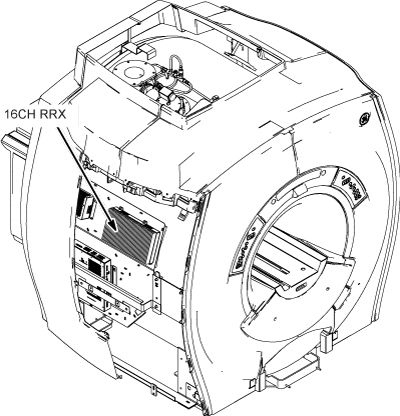
-
- Disconnect all connectors from RRX. Note:
Handle the Fibre Optic cables with care, they are very fragile.
Figure 2. RRX Cable Removal 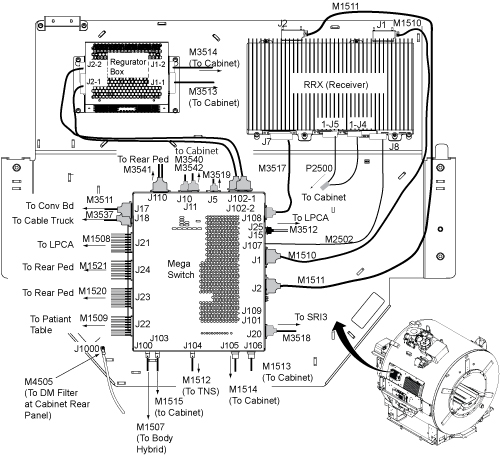
Loosen 4 screws and remove RRX.CAUTION 
Figure 3. RRX Removal 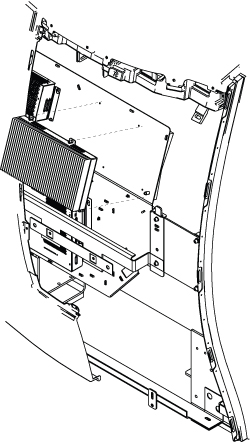
Finalization
- Perform the following Diags and confirm that all of the tests are passed.
- Perform System Gain Calibration.
- Perform one Body or Head Scan.
- Perform SPT Coherent Noise Test .
Note:
Perform SPT Coherent Noise Test Only by selecting 'No' for 'Select All Tests?' and 'ON' for 'Coherent Noise'. No need to perform SPT Full test.