- id_2001469
- Version: 9.2
- Date: Jan 28, 2020 11:08:19 AM
Shutting down the host computer
Shutting down the host computer shuts down the system safely and turns off the power to the host computer.
Procedure
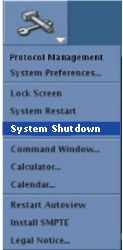
- To shut down the system, click the arrow on the Tools High Level Access tab.
- Click System Shutdown.
Figure 1. System power off
- Click Yes to confirm the system power off.