- id_12374026
- Version: 1.16
- Date: Jan 8, 2020 1:17:06 PM
KASC Boards Replacement
Prerequisites
| Required persons | Preliminary requirements | Procedure | Finalization |
|---|---|---|---|
| 1 | Not Applicable | 30 minutes | 30 minutes |
| Item | Quantity | Effectivity | Part number | Manufacturer |
|---|---|---|---|---|
| Standard Tool | 1 | - | - | - |
| Item | Quantity | Effectivity | Part number | Manufacturer |
|---|---|---|---|---|
| KASC Boards | 1 | - |
Refer to FRU Manual |
- |
|


Procedure
- notice
- From the Common Service Desktop, turn off the ICN(s) (see ICN On/Off Procedure).
- Perform LOTO on the reconstruction equipment. See the MR Service Safety Manual, PN 5452735.
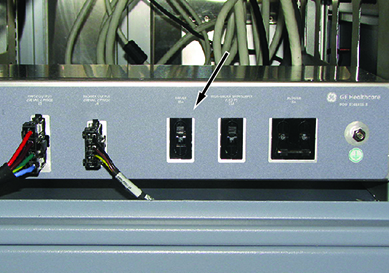
- In the PEN cabinet, turn off the circuit breaker to the driver module.
Figure 1. Driver Module Circuit Breaker (in PEN Cabinet)
- Open the PGR/ISC covers.
- Disconnect connectors from the front panel of the defective board.
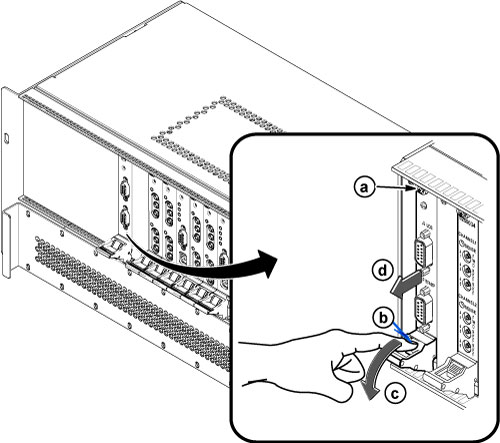
- Perform the following steps.
- Loosen 2 screws.
- Push the release tab.
- Open the extractor tab.
- Remove the board.
note:The circuit board should be handled using only the faceplate, ejectors, and the edges of the board.
Figure 2. Board Removal
- Place the card in an appropriate shipping package, or discard, if applicable.
- Remove the terminators (if any) from the defective board and install them to the same connectors on the replacement board.note:
New boards do not come with terminators, so you must reuse them from the old board.
- Install the new board by reverse order of removal, and restore the PGR/ISC covers.
 |
Finalization
- In the PEN cabinet, turn on the circuit breaker to the driver module.
- Remove LOTO from the reconstruction equipment. See the MR Service Safety Manual, PN 5452735.
- Turn the ICNs on per the ICN On/Off Procedure. note:
For the first 3 or 4 minutes, LEDs come on only at the rear of the ICN, next to the power cables. After 3 to 4 minutes, you will hear the ICN fans come on and then the LED at the front of the ICN starts to flash.
- Perform a TPS Reset, and then do a check scan to make sure the system operates correctly.