- id_2012034
- Version: 3.0
- Date: Dec 18, 2019 2:57:08 AM
Removing the Integrated Control Engine (ICE) fan assembly
Removing the Integrated Control Engine (ICE) fan assembly from the System Cabinet.
Prerequisites
| Personnel requirements | |||
|---|---|---|---|
| Required persons | Preliminary requirements | Procedure | Finalization |
| 1 | - | 5 to 10 minutes | - |
| Tools and test equipment | |||
|---|---|---|---|
| Item | Quantity | Part number | Manufacturer |
| Nonmagnetic Titanium Service Tool Kit, Small Set | 1 Kit | 5113258 | - |
| Nonmagnetic Titanium Service Tool Kit, Large Set | 5112581 | - | |
Procedure
- Remove the ICE as follows:note: Do not remove the slide rails from the ICE chassis.
- Press the release tabs in on each side and pull the ICE forward.note: Hold the ICE carefully when you remove it so that it does not fall.
- Do the following steps to remove a fan from the back of the ICE.
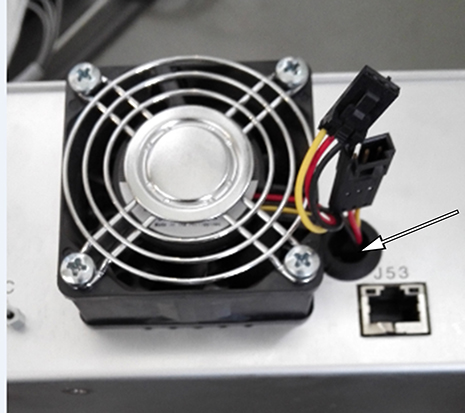
- Pull the fan power cable from the hole beside the fan, and disconnect the cable.note: Be careful when you remove the power cable. It can fall into the hole shown below.
Figure 1. Hole for power cable
- Remove four screws, and remove the fan.
Figure 2. Removing the fan
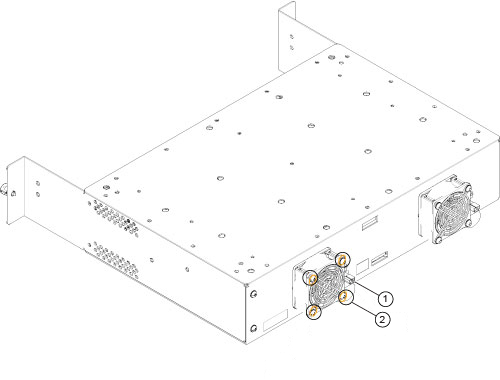
1 Connect the fan cable to the power cable 2 Tighten four screws - Pull the fan power cable from the hole beside the fan, and disconnect the cable.