• SIGNA™ Hero 3.0T Service Methods
  • 5852800-8EN Revision 1.0
  • Object ID: 00000018WIA30706350GYZ
  • Topic ID: id_2020517 Version: 1.13
  • Date: Jul 7, 2021 3:51:56 PM

Installing the Digitized Per Pin (DPP) dock cables

Installs the Digitized Per Pin (DPP) dock cables.

Procedure

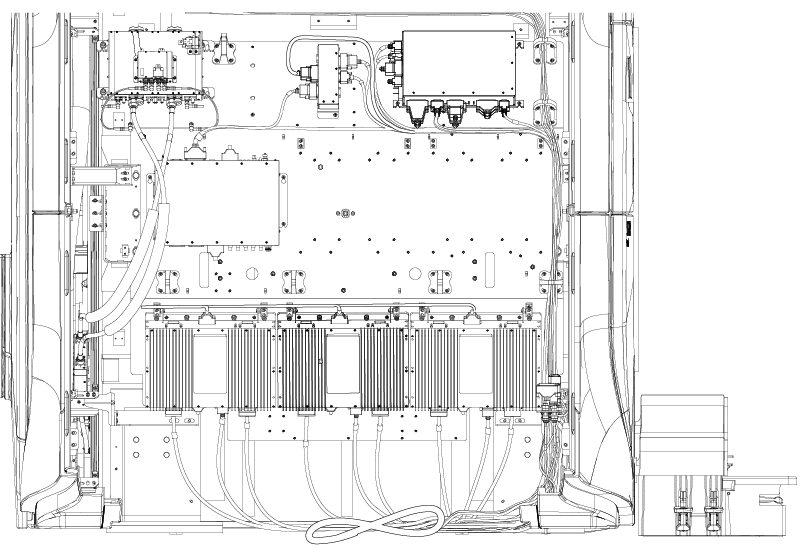
  1. Coil any excess dock cable in a figure-eight underneath the magnet.
    Figure 1. Side electronics plate cable routing
  2. Connect the coil cables to the DPP receivers.
    1. Loosen the captive fasteners securing the DPP receivers to the magnet.
    2. Rotate the DPP receivers to access the bottom.
    3. Connect the cables.
    4. After all cables are connected, restore the DPP receivers to their positions.
    5. Tighten the captive fasteners securing the DPP receivers to the magnet.
    Figure 2. DPP receiver connection
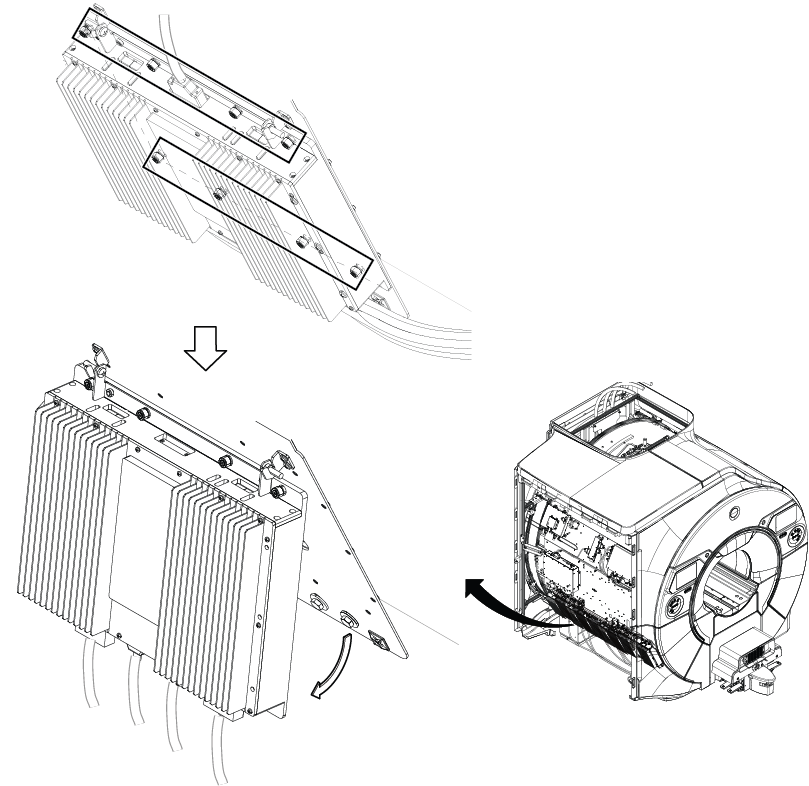
    Figure 3. DPP receiver numbers
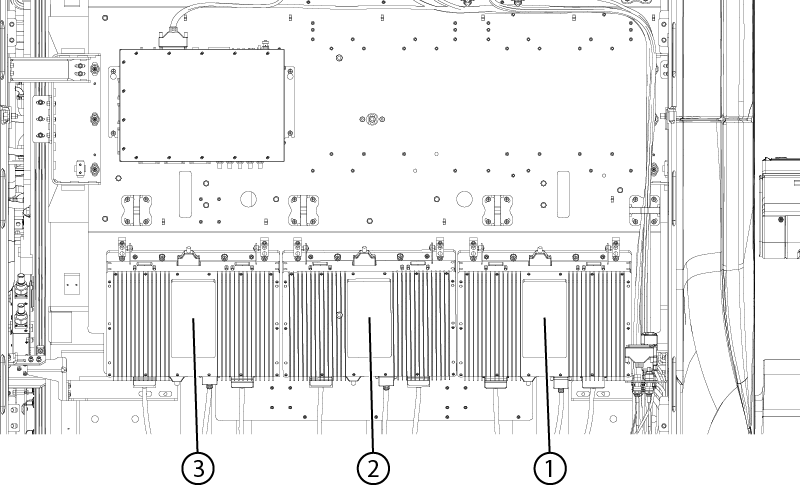
    Table 1. DPP connections
    Dock cableDPP connection
    5946431DPP 1
    5946432DPP 2
    5946430DPP 3
  3. Route and connect the following cables:
    Table 2. Dock cable connections
    Dock cableMagnet cableLocation
    EOT SwitchM3507End of travel switch
    LONG DRV MTR PWRM3311Table Input/Output (IO) bracket
    M3313M3313
    LONG DRIVE MOTOR HALL COMMM3315Table IO bracket
    PAC PWRM3360Table IO bracket
    M3379M3379Table IO bracket
    MNS TX P1 P-PortTABLE-IO-J1Table IO bracket connector (bottom side)
    NB TX P2 P-PortTABLE-IO-J2Table IO bracket connector (bottom side)
    FILTER TO PAC P2125TABLE-IO-J7/J8Table IO bracket connector (bottom side)
    PATIENT ALERT SQUEEZE BULBTABLE-IO-J9Table IO bracket connector (bottom side)
    MEMS PWR P1M3392MEMS BNC power cable
    MEMS POWER P2M3392MEMS BNC power cable
    MEMS POWER P4M3392MEMS BNC power cable
    MEMS POWER PEM3392MEMS BNC power cable
    1-WIREMAG-RX DIST-J57Magnet side electronics plate
    M3370MAG-SRI-J3Magnet side electronics plate
    FRONT MICMAG-SRI-J32Magnet side electronics plate
    REAR MICMAG-SRI-J31Magnet side electronics plate
    M3341MAG-SRI-J20Magnet side electronics plate
    5798533MAG-TIF-J1Magnet side electronics plate
    CRADLE POS ENCMAG-TIF-J2Magnet side electronics plate
    LONG DRIVE MOTOR ENCMAG-TIF-J3Magnet side electronics plate
    5V-DIGITALMAG-TIF-J6Magnet side electronics plate

Finalization

To make sure the dock cover is not obstructing the table down link, do the following:
  1. Dock the patient table.
  2. Move the patient table into the bore and return it to the home position.
  3. Use the Down pedal on the dock to lower the table.

    If the table moves down too slowly, adjust the cradle home table down interlock (see Adjusting the cradle home table down interlock).