The dock is heavy, weighing more than 50 pounds, and it contains ferrous material, making it strongly attracted to the magnet.
Two people are necessary to move the dock out of the magnet room to perform maintenance. From this point in the procedure, downward pressure must be continuously applied to the dock to prevent it from being pulled into the magnet bore.
Warning
Possible personal injury
To oppose any pull from the magnet, field engineers must apply continuous downward pressure to the top of the dock, even when lifting the dock in this step.
Do not place any part of the human body in the path between the dock and the magnet.
Warning
Possible personal injury
The dock contains highly ferrous material.
Never lift the front of the dock (the portion of the dock farthest from the magnet) more than 3 inches (7.6 cm) from the floor. The rear of the dock (the portion of the dock closest to the magnet) should always remain in contact with the floor. Never lift the rear of the dock off the floor in the magnet room.
Procedure
Undock the table and remove it from the scan room.
Remove the nut, washers, and clamp bracket from the anchor stud.
If the site has followed the Pre-Installation Manual and the anchor is a two-part assembly, remove the anchor stud (bolt) from the female sleeve anchor, using hand-force to turn the stud. This allows the dock to remain flush with the floor during removal. This is the preferred method.
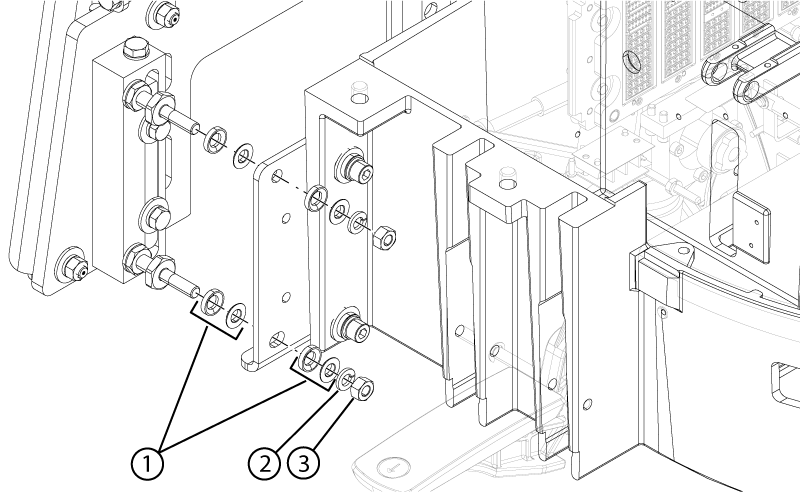
Remove four M10 Stainless Steel Hex Nuts (3000-M10C-33), four M10 Bronze Lock Washers (7700820-210), and four spherical washer sets securing the dock to the dock mounting bracket.
Remove the dock from the dock mounting bracket.
Remove four sets of spherical washers, one set from each of the mounting studs.
Figure 1. Dock mounting hardware
1
Spherical washer sets
2
Lock washer
3
Nut
Note: Remove only the nuts from the rear of the dock that connect it to the dock brackets. Do NOT remove the dock brackets from the magnet.
Use two people to pull the dock away from the magnet and hold down the dock assembly. Move the dock until the stud in the front is hitting the inner frame.
Use two people to lift the front of the dock JUST ENOUGH to clear the top of the stud in the floor. Avoid scraping the dock assembly or the base of the magnet.
Use two people to move the dock to the left, just beyond the anchor stud.
Use two people to lower the dock back on the floor immediately to the side of the anchor stud.
With two people, one holding each side of the dock, slowly and deliberately slide the dock away from the magnet, keeping downward pressure on the top of the dock assembly. Use care as the loose cables will be trailing behind the dock. Move the dock to a distance equivalent to where the foot of the patient table would normally be located.
When the dock has been moved beyond the normal location of the patient table foot, one person can apply constant downward pressure to hold the dock in place while the other person carefully removes the cables from the front of the magnet and places them near the room exit.
Use two people to lift the dock and move it out of the scan room.