Replacing the Gen2 gradient filter for remote siting configuration
Instructions to remove the Gen2 gradient filter and replace it with a Gen2 gradient filter.
Prerequisites
Personnel requirements - Replacing 5808046-2 with 5808046-2
Required persons
Preliminary requirements
Procedure
Finalization
2
-
1-2 hours
15 minutes
Tools and test equipment
Instance
Item
Quantity
Part number
Manufacturer
All
Torque Wrench, 8-50 N m Adjustable, non-magnetic
1
5534134 or 5534134-2
-
All
Nonmagnetic Titanium Service Tool Kit, Large Set
1 Kit
5112581
-
Replacement parts
Instance
Item
Quantity
Part number
Manufacturer
All
Gen2 Gradient Filter Assembly
1
5808046-2
-
Safety
Before working in any GE Healthcare MR suite or performing any GE Healthcare service procedure, you must:
Have read and understood all hazard conditions and safety requirements in the latest revision of the GE Healthcare MR Service Safety Manual (5452735).
Have successfully completed all relevant GE Healthcare Environmental Health and Safety (EHS) courses (or for non-GE employees, equivalent workplace training courses).
Comply with all site-specific training and workplace safety requirements.
If you have any safety concerns at any time, do not begin work or immediately stop work and move to a safe location. Immediately contact your supervisor or site safety officer for instructions on how to proceed.
DANGER
Fatal electric shock hazard
The gradient amplifiers act as constant load sources and will send maximum current to any load, including any human who gets across the outputs.
To prevent fatal electric shock, follow LOTO steps to disable and make sure of safe voltage levels.
CAUTION
THE WEIGHT OF THE GRADIENT FILTER IS 55 lbs (25 kg).
2 persons are required for replacing the gradient filter, and safety shoes should be worn.
About this task
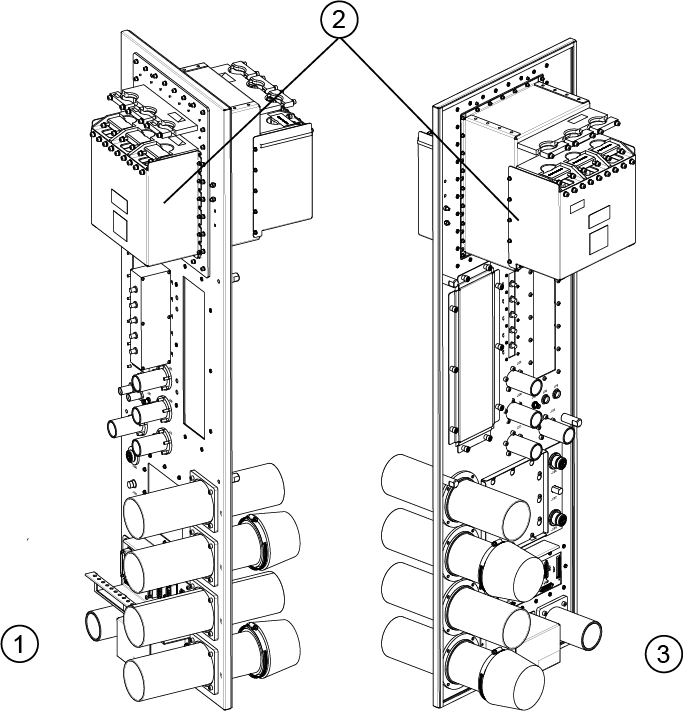
Figure 1. Gradient filter location
1
Scan room side
2
Gradient filter
3
Equipment room side
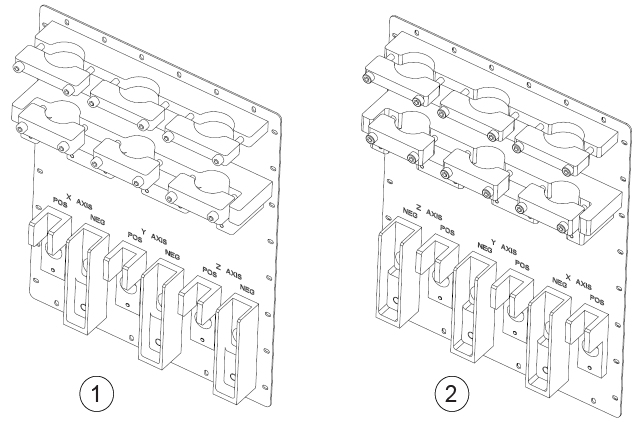
The cables are in X, Y, Z order from left to right on the equipment room side, and Z, Y, X order from left to right on the scan room side.Figure 2. Gradient filter cable order