
- SIGNA MR355 / SIGNA MR360
- Service Manual
- 5856356-3EN Revision 5.0
- Basic Service Documentation. Copyright General Electric Company.
- 00000018WIA30A80030GYZ
- id_131058071.3
- Jul 5, 2019 11:49:11 PM
Gradient Filter
Prerequisites
| Required persons | Preliminary requirements | Procedure | Finalization |
|---|---|---|---|
| 1 | Not Applicable | 30 minutes | 15 minutes |
| Item | Quantity | Effectivity | Part number | Manufacturer |
|---|---|---|---|---|
| Non Magnetic Tool Set | 1 | - | - | - |
| Digital volt meter (DVM) with alligator clip leads | 1 | - | - | - |
| Item | Quantity | Effectivity | Part number | Manufacturer |
|---|---|---|---|---|
| Gradient Filter (Refer to Illustrated Parts) | 1 | - | - | - |
| ||||||||

| Condition | Reference | Effectivity |
|---|---|---|
|
PDU must be turned OFF. Refer to Lockout / Tagout for PDU in System Cabinet. | - | - |
Procedure
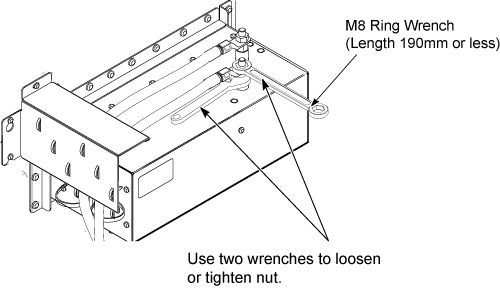
Remove the cable from defective gradient filter while keeping the spacer on cable intact.Notice Note:Use two wrenches as illustration to tighten the nut. Need to tighten with enough torque to avoid spike noise. But, do not over tighten not to break stud.
- Cut tie-wraps at defective Gradient Filter.
Figure 1. Remove the all cables 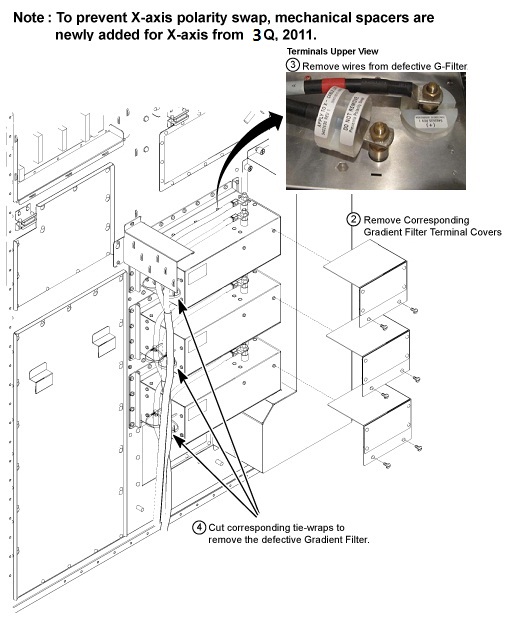
- Remove gradient filter from Penetration Panel.
Figure 2. Remove Gradient Filter 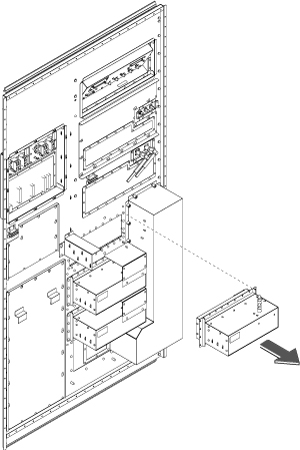
- Connect Gradient Cables. Make sure screw is fixed, nut is tight,
and cable is not detached from terminal.Note:
Use two wrenches to tighten the nut.
Finalization
Procedure
- Restore the Power. Refer to Lockout / Tagout for PDU in System Cabinet.
- Perform Geometry Verification.
- Perform Signal to Noise - Head Scan.