• SIGNA MR355 / SIGNA MR360
  • Service Manual
  • 5856356-3EN Revision 5.0
  • Basic Service Documentation. Copyright General Electric Company.
  • Object ID: 00000018WIA30096240GYZ
  • Topic ID: id_2013113 Version: 1.11
  • Date: Apr 23, 2020 7:54:59 PM

ICN Replacement

Prerequisites

Personnel requirements
Required personsPreliminary requirementsProcedureFinalization
110 mins40 mins8 mins
Replacement parts
ItemQuantityPart numberManufacturer
ICN1Refer to FRU Manual-
Safety

Before working in any GE Healthcare MR suite or performing any GE Healthcare service procedure, you must:

  • Have read and understood all hazard conditions and safety requirements in the latest revision of the GE Healthcare MR Service Safety Manual (5452735).
  • Have successfully completed all relevant GE Healthcare Environmental Health and Safety (EHS) courses (or for non-GE employees, equivalent workplace training courses).
  • Comply with all site-specific training and workplace safety requirements.

If you have any safety concerns at any time, do not begin work or immediately stop work and move to a safe location. Immediately contact your supervisor or site safety officer for instructions on how to proceed.

About this task

Procedure

  1. From the Common Service Desktop, turn off the ICN(s) (see ICN On/Off Procedure).
  2. Turn off the System power. Refer to System Cabinet PDU Main Breaker LOTO Procedure.
  3. Turn on the front and back cover
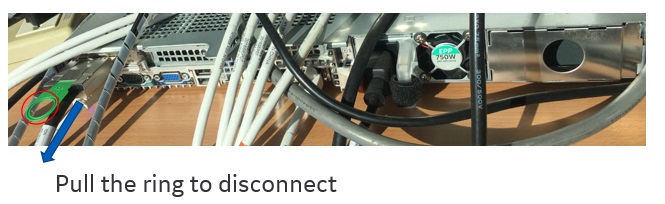
  4. Disconnect all of the cables from ICN.
    Figure 1.
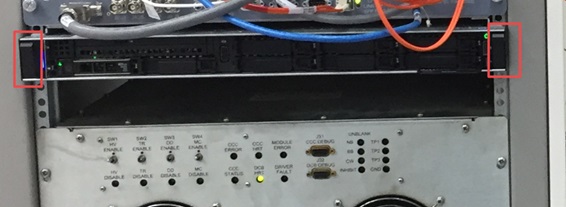
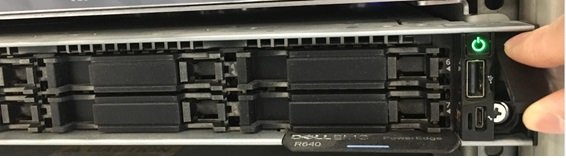
  5. Loosen 2 captive screws under the screw cover and slide out the ICN.
    Figure 2.
    Figure 3.
  6. Install the new ICN follow reverse sequence.
  7. Connect all the cables.

Finalization

  1. Restore the Power. Refer to Cabinet Power-Up Procedure .
  2. Perform ICN On/Off procedure for Dell R640 (Gen 7).
  3. Configure the new ICN (see VRE Reconfiguration).
  4. Perform a test scan to ensure the system is working properly.