- id_2019542
- Version: 2.0
- Date: Oct 10, 2019 2:37:09 PM
Installing the dockable table Physiological Acquisition Controller (PAC)
Installs the Physiological Acquisition Controller (PAC) into the dockable table.
Prerequisites
| Personnel requirements | |||
|---|---|---|---|
| Required persons | Preliminary requirements | Procedure | Finalization |
| 1 | - | 15 minutes | - |
| Tools and test equipment | |||
|---|---|---|---|
| Item | Quantity | Part number | Manufacturer |
| Nonmagnetic Titanium Service Tool Kit, Small Set | 1 | 5113258 | - |
| Consumables | |||
|---|---|---|---|
| Item | Quantity | Part number | Manufacturer |
| Cable Tie, Self-Locking | As needed | 5343293 | - |
Procedure
- Install the PAC into the table.
- Loosely install the four screws securing the PAC to the table.
Figure 1. PAC hardware
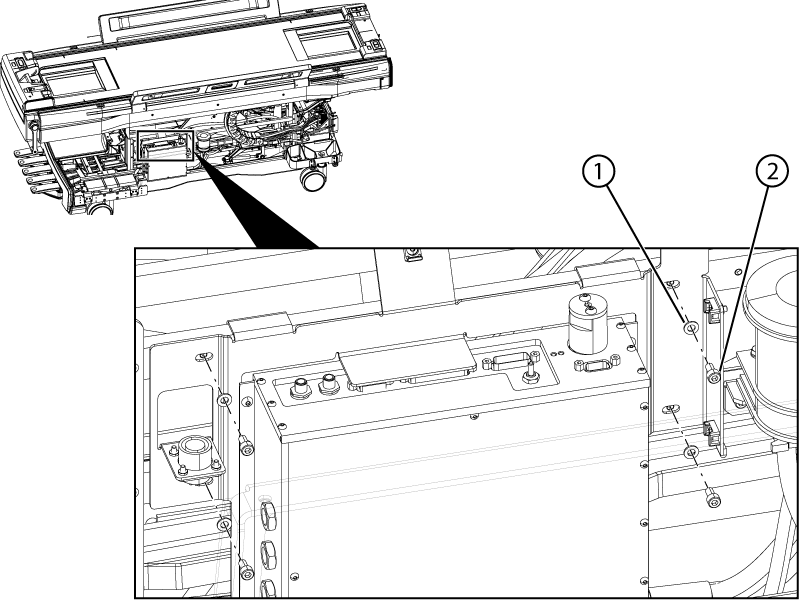
1 Washer 2 Screw - Connect the following cables and pneumatic tube to the PAC:
Figure 2. PAC connections
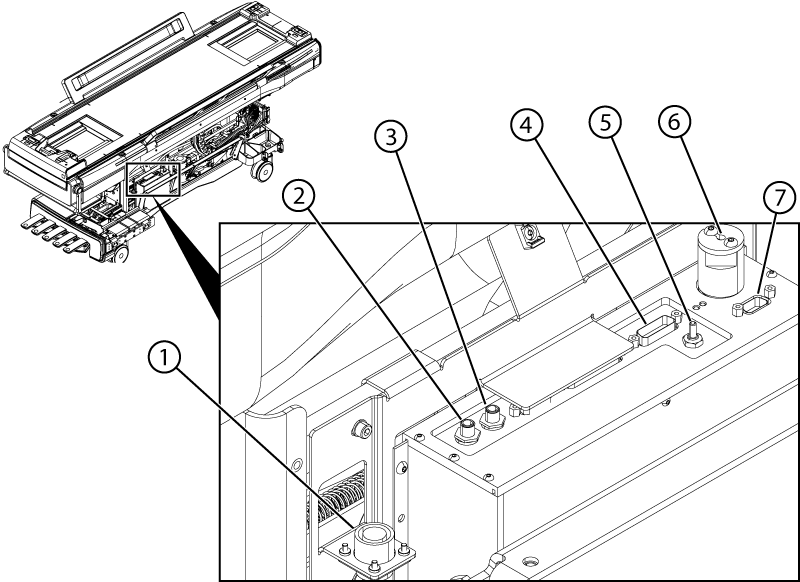
1 ECG extension cable PAC ECG connector 2 M3386 J6 3 M3386 J5 4 5946424 J2 5 Resp tube J3 6 5946423 J1 7 5946424 J9 - Tighten the four screws securing the PAC to the table.
- Install cable ties securing the cables and pneumatic tube to the PAC bracket and table cable track as required.note: Do not overtighten the cable ties.
- Lower the table to the down position to make sure there is no interference with the cable routing.
- Re-route any cables that are touching table structure.