Basic Service Documentation. Copyright General Electric Company.
Object ID: 00000018WHA3041A4GYZ
Topic ID: id_2001773 Version: 1.47
Date: Jun 2, 2020 12:08:45 PM
Removing the host computer
Remove the host computer from the GOC when upgrading the system.
Prerequisites
Personnel requirements
Required persons
Preliminary requirements
Procedure
Finalization
1
-
30 minutes
-
Tools and test equipment
Item
Quantity
Part number
Manufacturer
Screwdriver
1
-
-
Disk Management Tool
1
-
-
ESD Strap
1
-
-
Procedure
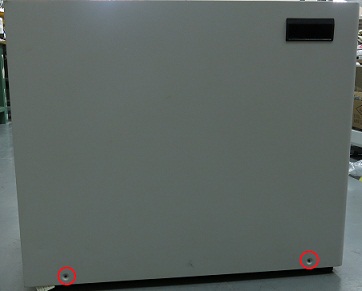
Remove the two screws that secure the left side panel of the GOC.
Figure 1. GOC left side panel
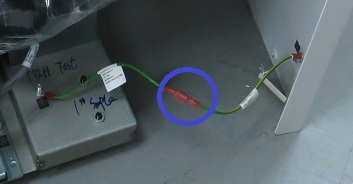
Note: The side panel has a short ground lead connecting it to the main chassis. When removing the side panel, do not strain this ground lead.
Disconnect the short ground lead that connects the side panel to the GOC main chassis at the center of the lead.
Figure 2. Left side panel ground lead
Remove the left side panel and put it in a safe place.
Make sure all the cables are properly labeled. If not, note their locations for reattachment.
Remove all the cables connected to the computer.
Remove the strap(s) from the computer.
Remove the host computer from the GOC.
Loosen or remove the brackets if necessary.
Perform a disk wipe on all applicable hard drives. For more information, refer to the latest revision of the Disk Management Tool Service Manual (PN 5500610-1EN) available from the online documentation library.

 Note: The side panel has a short ground lead connecting it to the main chassis. When removing the side panel, do not strain this ground lead.