
- SIGNA MR355 / SIGNA MR360
- Service Manual
- 5856356-3EN Revision 5.0
- Basic Service Documentation. Copyright General Electric Company.
- 00000018WIA30ECDF20GYZ
- id_131061393.0
- Feb 22, 2021 9:54:54 PM
PCI AA Replacement
Prerequisites
| Required persons | Preliminary requirements | Procedure | Finalization |
|---|---|---|---|
| 1 | Not Applicable | 30 minutes | 30 minutes |
| Item | Quantity | Effectivity | Part number | Manufacturer |
|---|---|---|---|---|
| Standard Tool | 1 | - | - | - |
| Item | Quantity | Effectivity | Part number | Manufacturer |
|---|---|---|---|---|
| PCIAA collector (Refer to Illustrated part manual) | 1 | - |
5729035 | - |
| ||||

Procedure
- Remove the GOC cover by unscrewing the two screws and disconnect
the ground cable.
Figure 1. Removing the PC cover 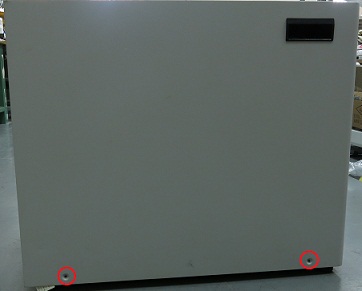
Figure 2. disconnect the ground cable 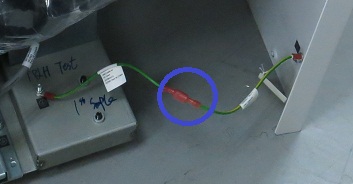
- Remove the two screws securing the back side bracket and remove
the bracket.
Figure 3. Loosen four screws 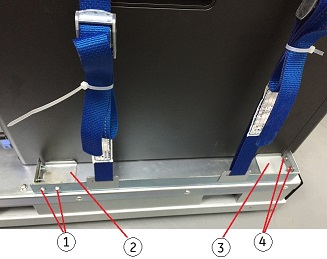
(1) Screws securing back side bracket (2) Back side bracket (3) Front side bracket (4) Screws securing front side bracket - Loosen the two straps and remove the hook.
Figure 4. Removing Strap 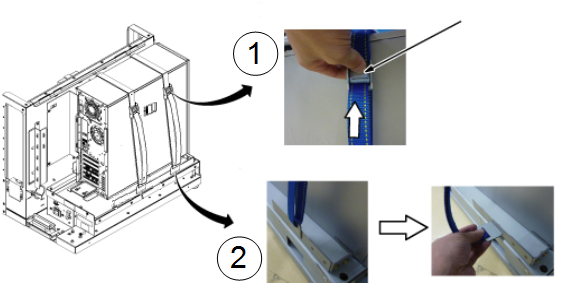
Item Description 1 Press release lever of buckle and loosen strap. 2 Remove the hook. - Lift up the cover-release latch and Lift the cover upward to
a 45–degree angle, and remove it from the host PC.
Figure 5. Remove cover from PC 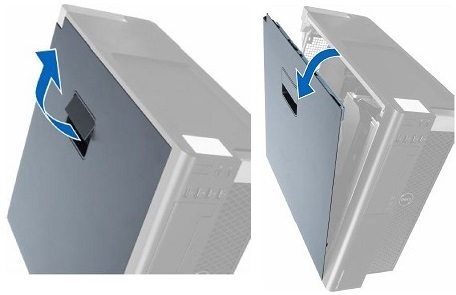
- Remove the PCI AA Board and PCI AA Extended Board, and take
them away.
Figure 6. Remove the PCI AA 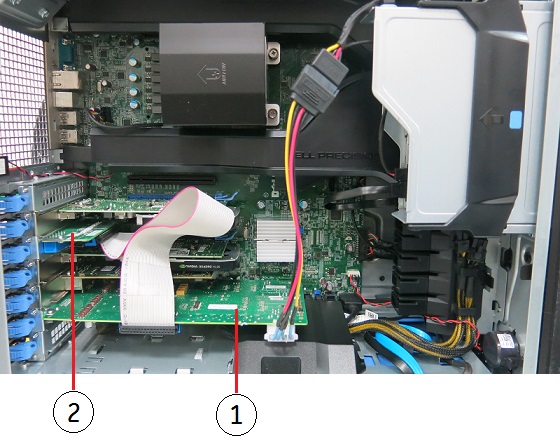
(1) PCI AA Board (2) PCI AA Extended Board
Finalization
- Turn the system power on. Verify system boot up without any problem.
- Perform Emergency Stop and Off Check
- Perform .Note:
GOC PCI AA is pre-adjusted at vendor. So, basically, intercom adjustment of GOC PCI AA is not required. If necessary, perform Intercom Adjustment as troubleshooting