
- SIGNA MR355 / SIGNA MR360
- Service Manual
- 5856356-3EN Revision 5.0
- Basic Service Documentation. Copyright General Electric Company.
- 00000018WIA30EB1030GYZ
- id_131058061.3
- Jul 6, 2019 12:17:31 AM
Replacing/Installing the SCIM, Keyboard and Mouse
Prerequisites
| Required persons | Preliminary requirements | Procedure | Finalization |
|---|---|---|---|
| 1 | - | 30 minutes | - |
| Item | Quantity | Effectivity | Part number | Manufacturer |
|---|---|---|---|---|
| SCIM with English Template installed | 1 | - |
2289697-2 | - |
| Data Cable | 1 | - |
5308574 | - |
| Standard USB US English Keyboard | 1 | - |
2275756 | - |
| International Languages Overlay package | 1 | - |
5148389-9 | - |
| Condition | Reference | Effectivity |
|---|---|---|
|
Powered Off the whole system | - | - |
About this task
In this section you will replace the old keyboard or install the new keyboard.
System Power must be turned off
About this task
Refer to 1.5T System Cabinet PDU Main Breaker LOTO Procedure.
Keyboard Replacement
Procedure
- Place new Velcro strips on the top of the strips attached to
the SCIM as shown in Figure 1.
Figure 1. Placing Velcro Strips 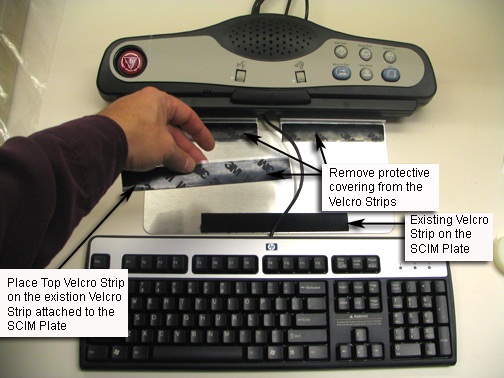
Mouse Replacement
Procedure
- Unplug the defective Mouse from the host computer USB connector.
- Install the new mouse by plugging it directly into the host computer USB connection.
- This completes the Mouse Replacement.
SCIM Replacement
Procedure
- Turn the SCIM over to expose the cable connections. See Figure 2.
Figure 2. Data Cable Connection 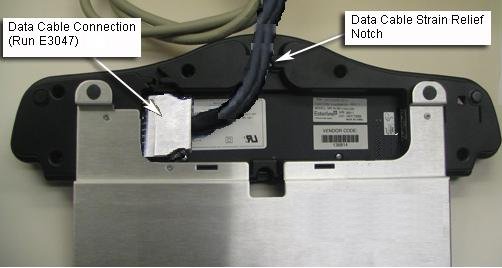
SCIM,Keyboard and Mouse Install
Procedure
- Remove the SCIM, Data Cable, Keyboard and SCIM language overlay
from the box.
Figure 3. SCIM Kit Contents 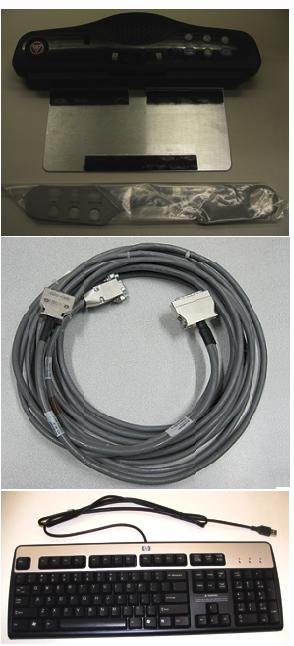 Note:
Note:SCIM's come with one overlay for the selected language.
Note:For the availability of other languages check the Sales Catalog.
Figure 4. Language Overlay 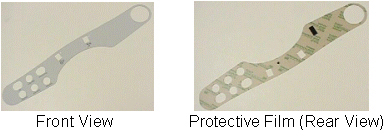
- Remove the plastic strips from the Velcro, exposing the adhesive
surface. See Figure 5.
Figure 5. SCIM Velcro Strips 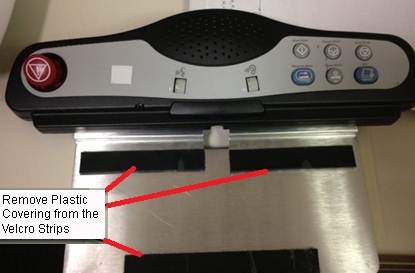
- Place the keyboard tight against the SCIM, Center it as best
as possible, and drop into place. The Velcro pads will now be sticking
to the bottom of the keyboard.Note:
The adhesive on the Velcro takes 24 hours to completely adhere to the bottom of the keyboard. Allow the adhesive to dry completely before removing keyboard from SCIM base.
Figure 6. SCIM And Keyboard Assembled 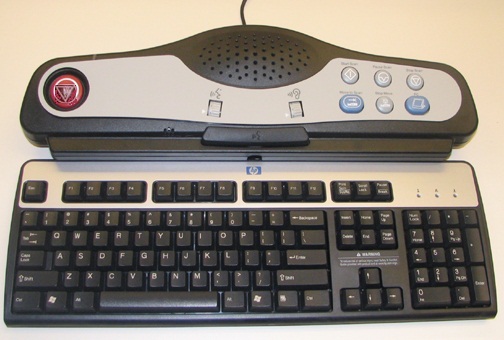
Finalization
Procedure
- Restore Power by referring to Lockout / Tagout for SV 1.5T System Cabinet PDU Main Breaker
- Perform Keyboard Function Check
- Perform Signal to Noise - Head Scan.