
- SIGNA MR355 / SIGNA MR360
- Service Manual
- 5856356-3EN Revision 5.0
- Basic Service Documentation. Copyright General Electric Company.
- 00000018WIA30B2B230GYZ
- id_156673211.11
- Apr 23, 2020 6:48:29 PM
Clean Dust Filter / Dust Filter Replacement
Prerequisites
| Required persons | Preliminary requirements | Procedure | Finalization |
|---|---|---|---|
| 1 | Not Applicable | 15 minutes | 15 minutes |
| Item | Quantity | Effectivity | Part number | Manufacturer |
|---|---|---|---|---|
| Standard Tool | 1 | - | - | - |
| Item | Quantity | Effectivity | Part number | Manufacturer |
|---|---|---|---|---|
| Clean Dust Filter / Dust Filter | 1 | - |
Refer to FRU Manual | - |
| ||||

Procedure
- Remove the service cover by unscrewing the two screws and disconnect the ground cable.Note: The side panel has a short ground lead connecting it to the main chassis. When removing the side panel, do not strain this ground lead.
Figure 1. Removing the service cover 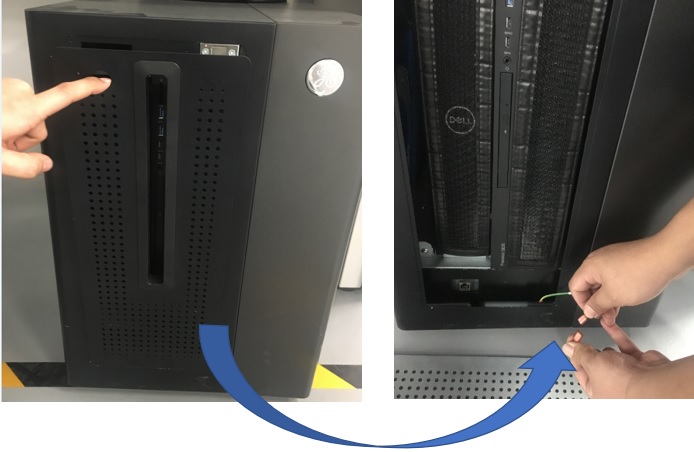
- Remove dust filter.
Figure 2. Remove dust filter . 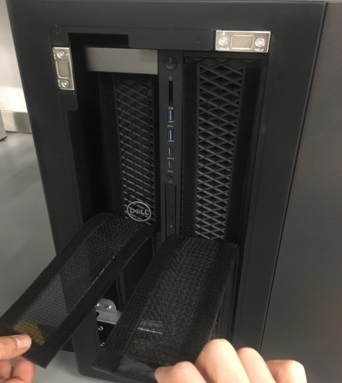
Finalization
- Restore the system. Refer to LOTO for GOC.
- Turn the system power on. Verify system boot up without any problem.
- Perform check scan.