
- SIGNA MR355 / SIGNA MR360
- Service Manual
- 5856356-3EN Revision 5.0
- Basic Service Documentation. Copyright General Electric Company.
- 00000018WIA30170030GYZ
- id_131061411.2
- Jul 5, 2019 10:25:10 PM
GOC PDU Replacement
Prerequisites
| Required persons | Preliminary requirements | Procedure | Finalization |
|---|---|---|---|
| 1 | Not Applicable | 45 minutes | 10 minutes |
| ||||

Procedure
- Shut off the CB1 of Power Distribution Supply at the back of
GOC.
Figure 1. Shut off CB1 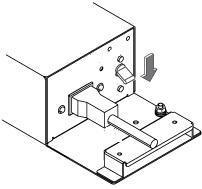
- Disconnect GOC power cable according to following step.
- Remove plug cover by loosening two screws.
- Disconnect GOC power cable.
Figure 2. Disconnect GOC power cable 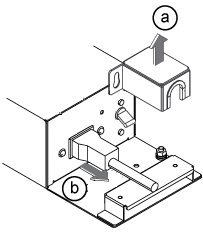
- At the right side of GOC, disconnect the power cable from J3,
J4, J10.
Figure 3. GOC right side view 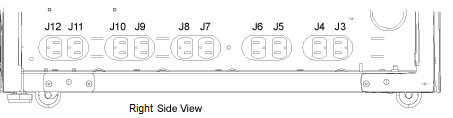
- Remove two screws and remove GOC CHASSIS FACING PLATE.
Figure 4. GOC CHASSIS FACING PLATE 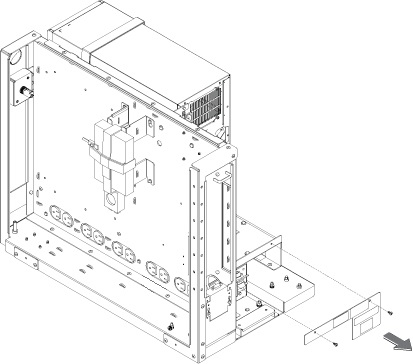
- Remove GOC PDU per following steps.
- Remove three screws.
- Withdraw GOC PDU.
Figure 5. GOC PDU Removal 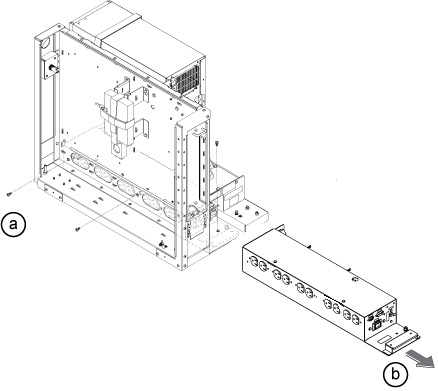
Finalization
- Restore power to the GOC. Perform Lockout/Tagout of GOC.
- Verify that the system boot up.
- Log in.
User name: sdc
Password: adw2.0
- Verify that the system is fully booted.