
- SIGNA MR355 / SIGNA MR360
- Service Manual
- 5856356-3EN Revision 5.0
- Basic Service Documentation. Copyright General Electric Company.
- 00000018WIA30B3BF20GYZ
- id_131061371.3
- Jul 6, 2019 12:03:29 AM
GOC Dust Filter Clean/Replacement Procedure
Prerequisites
| Required persons | Preliminary requirements | Procedure | Finalization |
|---|---|---|---|
| 1 | Not Applicable | 30 minutes | 30 minutes |
| Item | Quantity | Effectivity | Part number | Manufacturer |
|---|---|---|---|---|
| Standard Tool | 1 | - | - | - |
| Item | Quantity | Effectivity | Part number | Manufacturer |
|---|---|---|---|---|
| Host PC front panel dust filter (Refer to Illustrated part manual) | 1 | - | - | - |
| ||||

Procedure
- Remove the Side cover by unscrewing the two screws and disconnect
the ground cable.
Figure 1. Removing the side cover 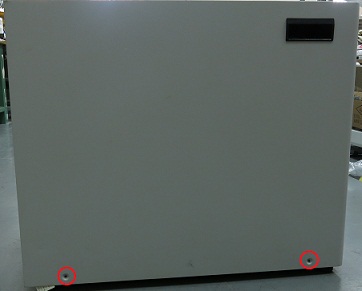
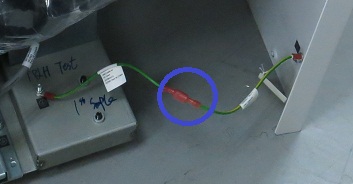
- Remove dust filter.
Figure 2. Remove dust filter. 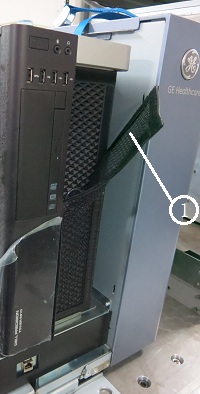
(1) Dust Filter
Finalization
- Restore the system.
- Turn the system power on. Verify system boot up without any problem.
- Perform one body or head scan.