
- SIGNA MR355 / SIGNA MR360
- Service Manual
- 5856356-3EN Revision 5.0
- Basic Service Documentation. Copyright General Electric Company.
- 00000018WIA30D61030GYZ
- id_131070701.2
- Jul 6, 2019 12:17:31 AM
PDU EMI Filter
Prerequisites
| Required persons | Preliminary requirements | Procedure | Finalization |
|---|---|---|---|
| 1 | Not Applicable | 60 minutes | Not Applicable |
| Item | Quantity | Effectivity | Part number | Manufacturer |
|---|---|---|---|---|
| Non Magnetic Tool Set | 1 | - | - | - |
| Item | Quantity | Effectivity | Part number | Manufacturer |
|---|---|---|---|---|
| PDU EMI Filter (Refer to Illustrated Parts) | 1 | - | - | - |
| ||||||||||||


| Condition | Reference | Effectivity |
|---|---|---|
|
PDU and Service Disconnect Panel (or Main Disconnect Panel) must be turned OFF. Refer to Lockout / Tagout for MDP(Main Disconnect Panel) or Facility PDU . | - | - |
Procedure
- Remove Main Breaker Panel from front side.
Figure 1. Remove Main Breaker Panel 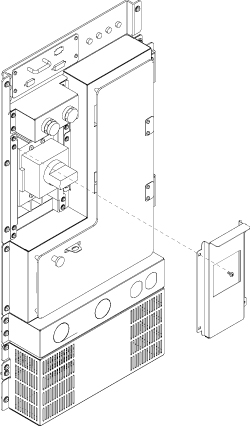
- Open Breaker panel by removing four screws.
Figure 2. Open Breaker Panel 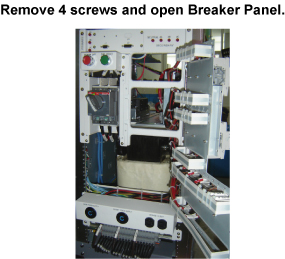
- Disconnect 3 cables from under side of Main Breaker. Use 5mm
hex wrench to loosen screws
Figure 3. Remove 3 Cables of Main Breaker 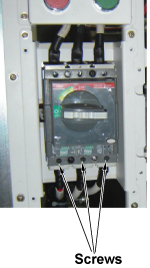
- Remove PDU access cover by loosening 20 screws.
Figure 4. Remove PDU Access cover 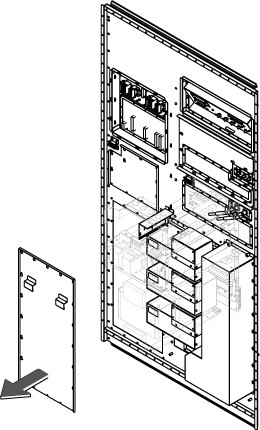
- Remove Ground Cable.
Figure 5. Terminals and Screws 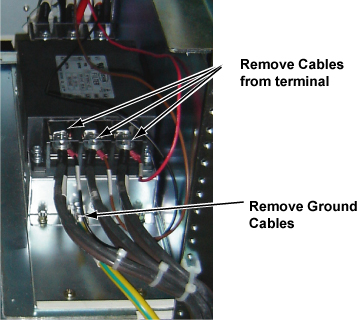
- Remove two screws at the EMI filter panel and slide toward the
rear side to disconnect the plate.
Figure 6. Remove Filter from SC front side 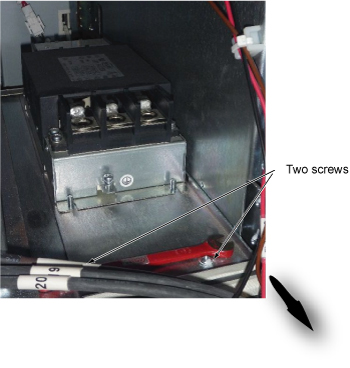
- Remove the EMI Filter with plate from the front opening as Figure 7.
Figure 7. EMI Filter Removal 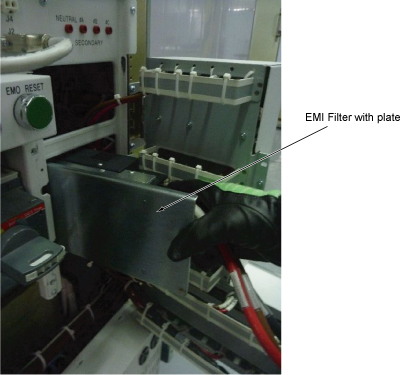
Finalization
Procedure
- Restore Power for main input circuit breaker.
- Restore the Power. Refer to Lockout / Tagout for MDP(Main Disconnect Panel) or Facility PDU .
- Run one head or body scan.