
- SIGNA MR355 / SIGNA MR360
- Service Manual
- 5856356-3EN Revision 5.0
- Basic Service Documentation. Copyright General Electric Company.
- 00000018WIA3076FF20GYZ
- id_131069971.4
- Jul 5, 2019 11:18:59 PM
Contactor for Night Mode
Prerequisites
| Required persons | Preliminary requirements | Procedure | Finalization |
|---|---|---|---|
| 1 | Not Applicable | 60 minutes | Not Applicable |
| Item | Quantity | Effectivity | Part number | Manufacturer |
|---|---|---|---|---|
| Standard Tool | 1 | - | - | - |
| Item | Quantity | Effectivity | Part number | Manufacturer |
|---|---|---|---|---|
| Contactor for night mode (Refer to Illustrated Parts) | 1 | - | - | - |
| ||||||||

| Condition | Reference | Effectivity |
|---|---|---|
|
PDU and Service Disconnect Panel (or Main Disconnect Panel) must be turned OFF. Refer to Lockout / Tagout for MDP(Main Disconnect Panel) or Facility PDU . | - | - |
Procedure
- Remove PDU access cover by loosening 20 screws.
Figure 1. Remove PDU Access cover 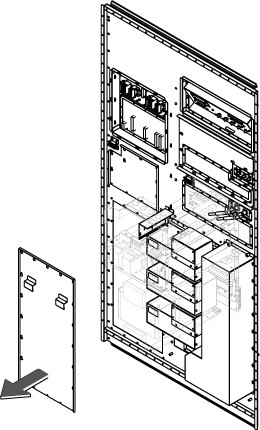 Note:
Note:Contactor might be located behind the rear panel and it's difficult to remove the cables. In this case, remove the contactor first referring to Step 6. Then, remove cables.
- Remove 2 stops. And then push Emergency off Contactor and Night
mode contactor from left side to right side.
Figure 2. Remove 2 stops and Push Contactors 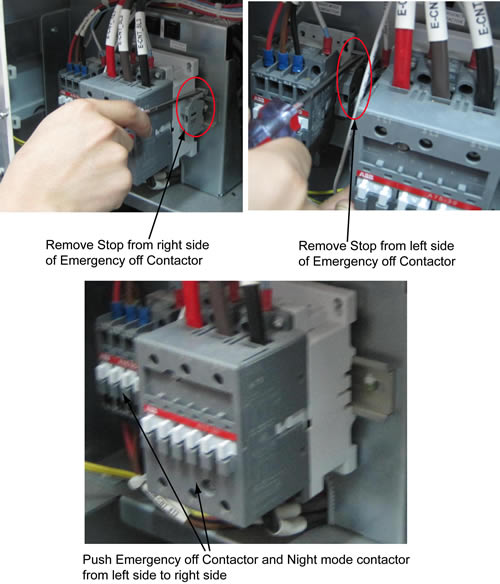
- Loosen 3 screws and disconnect 3 cables from the upper contactor
terminal.
Figure 3. Remove cables 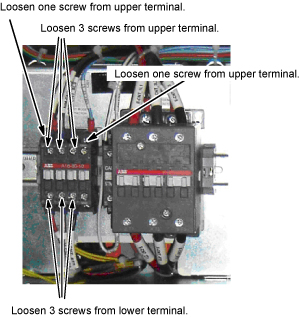
- Remove the contoctor by pulling the lever to lower direction
with flat screwdriver.
Figure 4. Contoctor Removal 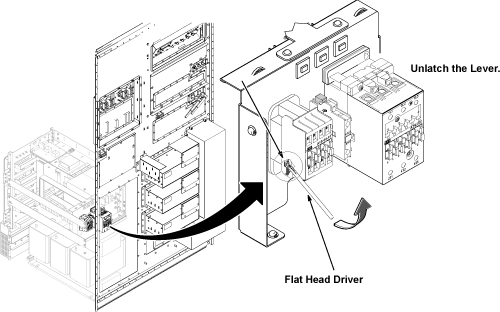
Finalization
Procedure
- Restore Power for main input circuit breaker.
- Restore the Power. Refer to Lockout / Tagout for MDP(Main Disconnect Panel) or Facility PDU .
- Run one head or body scan.