
- SIGNA MR355 / SIGNA MR360
- Service Manual
- 5856356-3EN Revision 5.0
- Basic Service Documentation. Copyright General Electric Company.
- 00000018WIA30681E20GYZ
- id_131061606.0
- Apr 26, 2020 10:23:49 PM
ICN On/Off procedure for Dell R640 (Gen 7)
Prerequisites
| Required persons | Preliminary requirements | Procedure | Finalization |
|---|---|---|---|
| 1 | 0 minutes | 30 minutes | 0 minutes |
| ||||||||

About this task
This procedure documents the proper methods of shutdown for ICN Gen7 (Dell R640) . The ICNs are powered up when the host is started. There is no need to switch the ICNs on individually. If needed, you can switch on the ICNs from the VRE Power Control utility (Switch on ICNs from VRE power control).
The ICNs are powered down when the host software is shut down. To shut the ICNs down individually, use the VRE Power Control utility (Power down ICNs from VRE power control)
If the preferred shutdown method does not work, a last resort is to use the ICN power button (Power Off ICNs manually).
Switch on ICNs from VRE power control
Procedure
Power down ICNs from VRE power control
About this task
This is the preferred method for shutting down the ICNs.
Procedure
- At the host computer, on the Service Browser, select Utilities > Toolbox > VRE > Power Control.
Figure 1. Power control 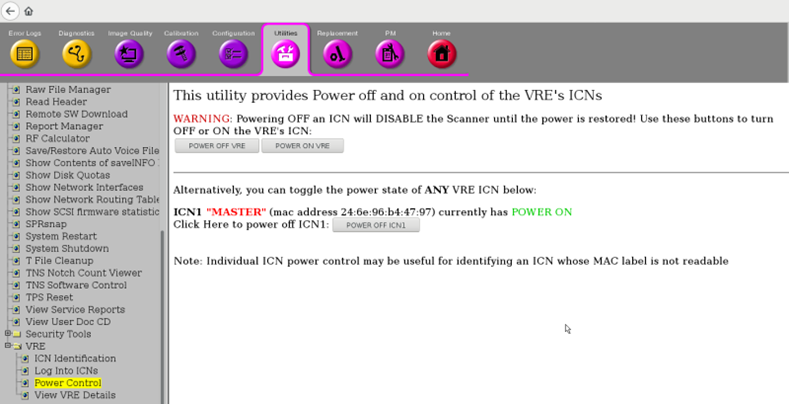
- Refresh the Power Control link to see the current state of the
ICN.
Figure 2. ICN 1 switched Off 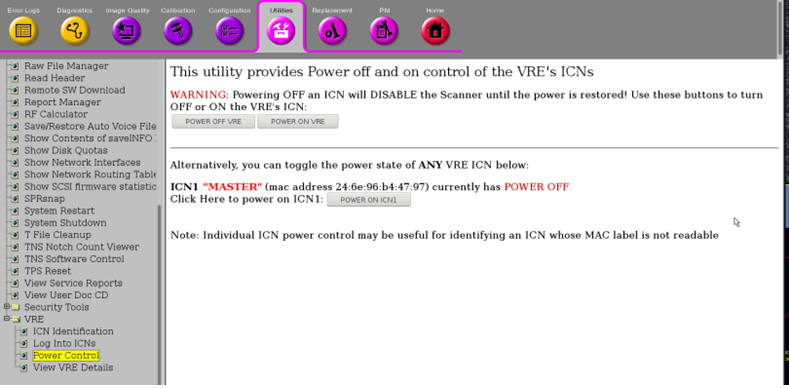
- The Dell Gen 7 ICN (part 5941100) is powered down when the green power LED located on the upper left side of the front of the ICN for Dell Gen 7 is not illuminated.
Figure 3. ICN Front Panel Gen 7 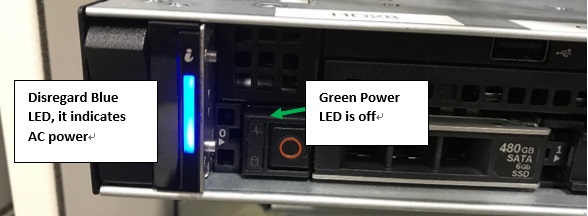
Power down from root level
About this task
If the application software is down, you can power down the ICNs using command line at the root level.
Procedure
- In the xterm window, type: /etc/init.d/poweron_vres
stop and press Enter.
Figure 4. VRE Stop command 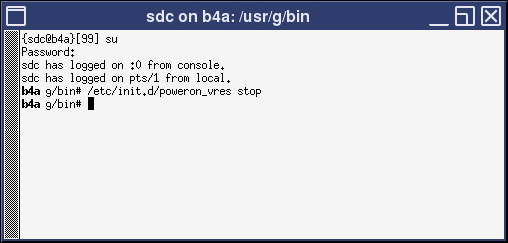
The ICN(s) should turn off after one minute.
The Dell ICN is powered down if the green power LED located on the upper left side of the front of the ICN is not illuminated.
Power Off ICNs manually
About this task
Procedure
Finalization
Finalization
No finalization steps.