Basic Service Documentation. Copyright General Electric Company.
Object ID: 00000018WHA3062A4GYZ
Topic ID: id_2001781 Version: 15.1
Date: Jan 18, 2021 10:51:59 PM
Applying LOTO - ISC
Apply LOTO to both the gradient and system PDU breakers on the MDP when servicing either of these items in the ISC. Applying LOTO ensures a safe environment when working on these parts.
Prerequisites
Personnel requirements
Required persons
Preliminary requirements
Procedure
Finalization
1
-
10 minutes
-
Procedure details
Name of equipment
Number of locks
Titles of employees authorized to perform LOTO
Titles of affected employees
How to notify
ISC
Electronics attached on magnet (except magnet)
Patient table
GOC
1 per GE field engineer (FE)
GE FEs
Hospital personnel
Verbally, posted signs
Tools and test equipment
Item
Quantity
Part number
Manufacturer
Digital Voltmeter (DVM)
1
46-194427P284
-
Red Warning LOTO Tag
2
46-194427P322
-
Multi-Locking Device (if multiple service personnel are involved)
1
46-194427P313
-
Red LOTO Personal Lock Wrap
2
2393068
-
Brass Master Padlock with Brass Shackle
2
46-194427P320
-
Note: The following table describes the type, location, and magnitude of energy when applying LOTO.
Energy source
Location of energy isolating means
Magnitude of energy
Electrical
MDP
380/400/415/480 VAC
Stored energy
Time discharge of internal capacitors
208 VAC, 420 VAC
Water under pressure
ICC
5.0 Bar (80 PSI)
Safety
Before working in any GE Healthcare MR suite or performing any GE Healthcare service procedure, you must:
Have read and understood all hazard conditions and safety requirements in the latest revision of the GE Healthcare MR Service Safety Manual (5452735).
Have successfully completed all relevant GE Healthcare Environmental Health and Safety (EHS) courses (or for non-GE employees, equivalent workplace training courses).
Comply with all site-specific training and workplace safety requirements.
If you have any safety concerns at any time, do not begin work or immediately stop work and move to a safe location. Immediately contact your supervisor or site safety officer for instructions on how to proceed.
Warning
Electrocution Hazard
Dangerous and/or fatal voltages are present in the energized cabinet.
Follow LOTO steps to disable and verify safe voltage levels.
Procedure
Make sure the host computer is shut down.
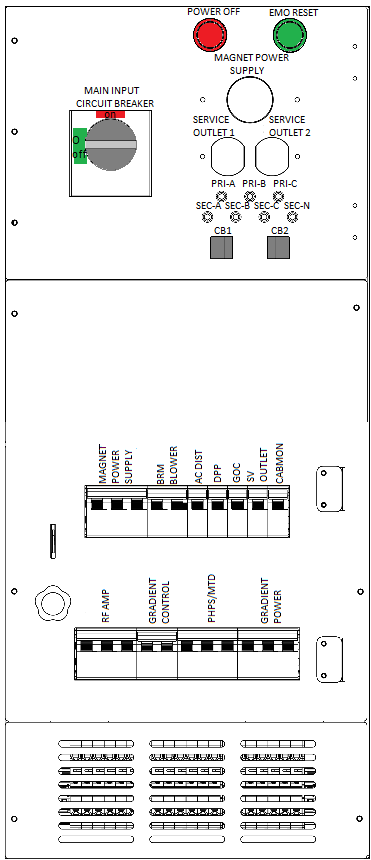
At the front panel of the PDU, press the Power Off button.
Figure 1. PDU front panel
Rotate the larger main breaker labeled MAIN INPUT counter-clockwise to the green, OFF (O) position.
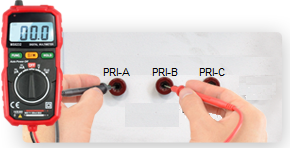
On the PDU front panel, check the voltage between PRI-A, PRI-B, PRI-C to make sure that the voltage is under 1VAC.
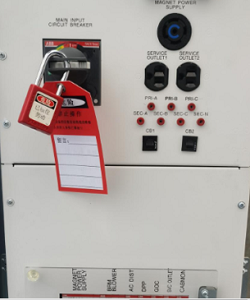
Lock and tag out the PDU "MAIN INPUT" circuit breaker.