
- SIGNA™ Hero 3.0T Service Methods
- 5852800-8EN Revision 1.0
- 00000018WIA30D35450GYZ
- id_20222771.6
- Oct 11, 2021 6:31:30 PM
Replacing the reversing link
Replaces the shaft linkage reversing link in a dockable patient table.
Procedure
- Remove the three shoulder screws. Shoulder screws are accessible from the bottom of the table.Note: There are plastic washers on both sides of the mounting holes. Take care to prevent damaging the washers during the replacement procedure. Also, both outer shoulder screws have brass washers installed.
Figure 1. Shaft linkage assembly 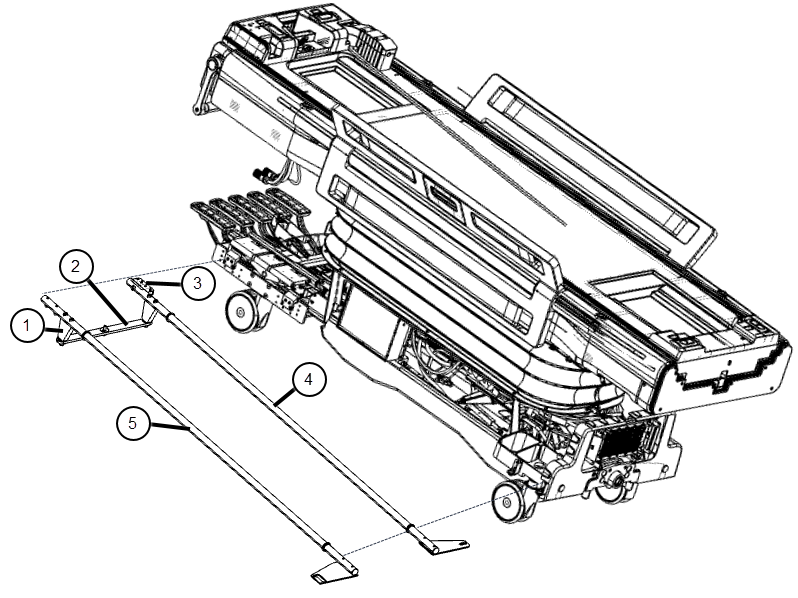
1 Shaft extension 2 Reversing link 3 Mounting block 4 Shaft linkage-left 5 Shaft linkage-right Figure 2. Shoulder screw hardware 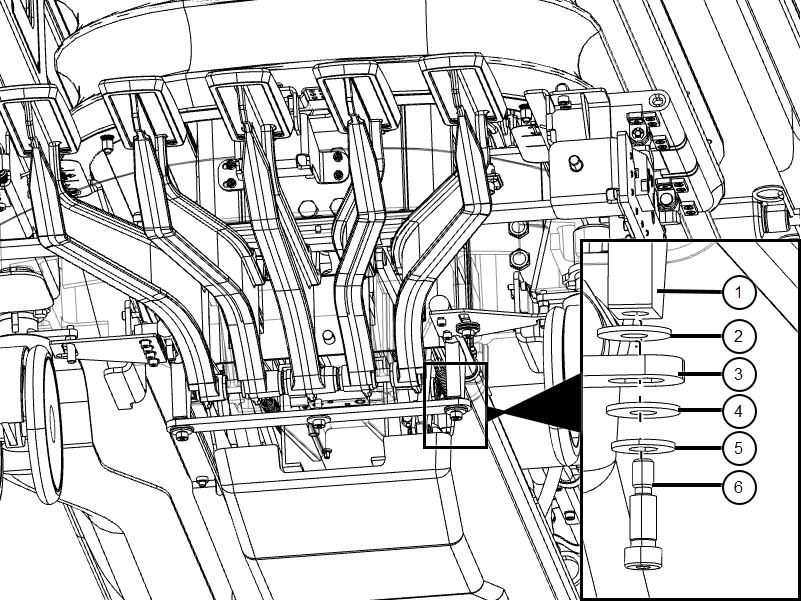
1 Shaft extension 2 Nylon washer 3 Reversing link 4 Nylon washer 5 Brass washer 6 Shoulder screw