Installs the rear cover onto the dockable table base.
Prerequisites
Personnel requirements
Required persons
Preliminary requirements
Procedure
Finalization
1
-
5 minutes
-
Tools and test equipment
Item
Quantity
Part number
Manufacturer
Nonmagnetic Titanium Service Tool Kit, Small Set
1
5113258
-
Procedure
Lower the table approximately 5 cm.
Step on the up and electrical dock pedals while simultaneously pressing the undock pedal fully. This will create enough space to install the cover.
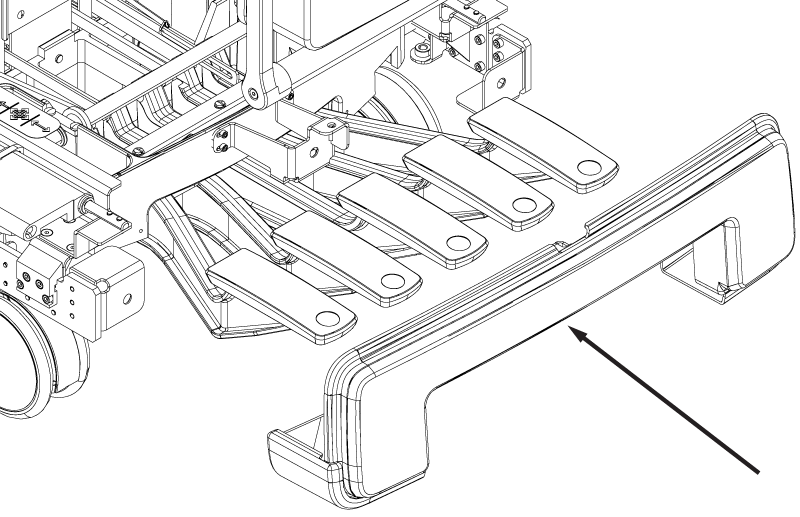
Install the rear base cover onto the table base.
Note: Do not engage the down table pedal while removing the cover.
Figure 1. Rear base cover
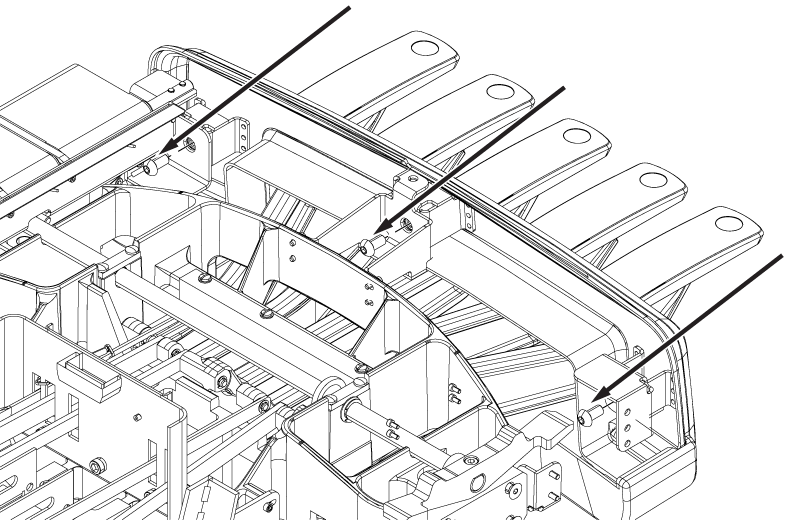
Install the three screws securing the rear base cover to the table base.
Figure 2. Rear base cover screws
Make sure the Dock, Undock, and Electrical Dock pedals function properly with no binding. Press each pedal gently to resolve any binding. If pressing the pedals does not resolve the binding, examine the linkages at the bore-end of the table to determine the source of the binding.