Installing the dockable table handle-end cradle cover
Installs the cover on the handle-end of the dockable table cradle.
Prerequisites
Personnel requirements
Required persons
Preliminary requirements
Procedure
Finalization
1
-
15 minutes
-
Tools and test equipment
Item
Quantity
Part number
Manufacturer
Nonmagnetic Titanium Service Tool Kit, Small Set
1
5113258
-
Required conditions
The cradle hardtop cover is installed.
Procedure
If removed, position the handle-end cradle cover at the handle end of the cradle.
Note: When lowering the cover, make sure there are no cables or air hoses pinched between the cover and the cradle.
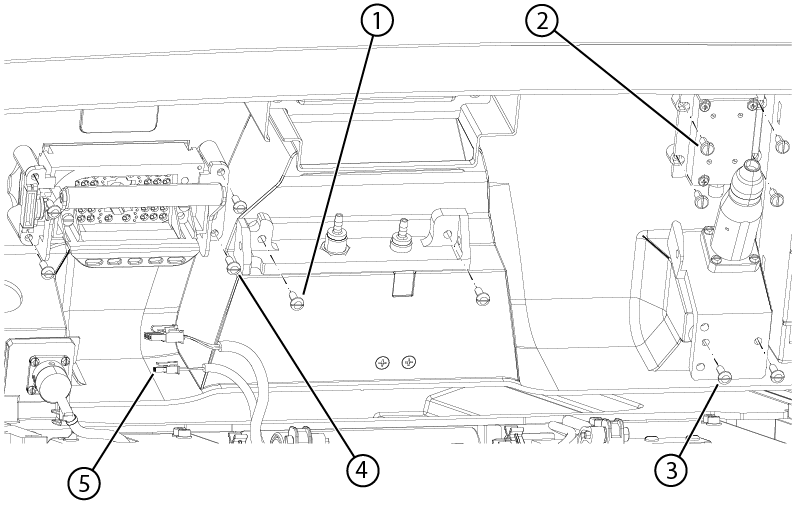
Connect any previously removed handle-end cradle cover components to the cover as follows:
Figure 1. Handle-end cradle cover components
1
Pneumatic connection bracket screw
2
Microphone screw
3
Peripheral Gating (PG) bracket screw
4
P-port screws
5
Emergency egress connector
Install the two screws securing the pneumatic connection bracket to the cover.
Install the four screws securing the microphone to the cover.
Install the two screws securing the PG bracket to the cover.
Connect the egress switch connector.
Install the four screws securing the P-port to the cover.
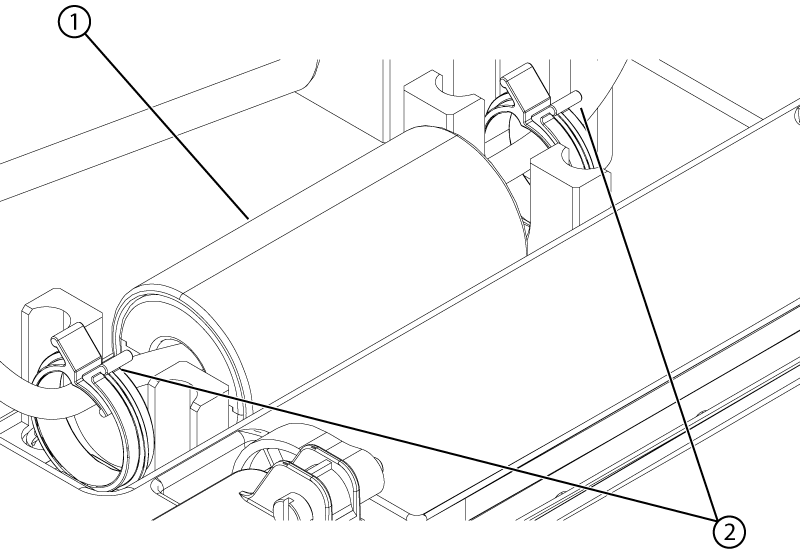
Lower the handle-end cover towards the cradle until any baluns that are out of their holders can be reinstalled.
Figure 2. Handle-end cover balun
1
Balun
2
Balun holders
Install any baluns into their holders by opening the holder with one hand while placing the balun into the holder with the other hand.
Install the handle-end cover onto the handle-end cover brackets.
Make sure the ECG connector is aligned with the ECG opening on the handle-end cradle cover. If it is not aligned, adjust the ECG connector bracket to roughly center the connector with the cover opening.
Make sure the turn-up coil port cover opens easily and close automatically.
Note: If the cover does not open easily or close automatically, lift the cover, move any cables that may interfere with the counterbalance, lower the cover, and retest the cover.
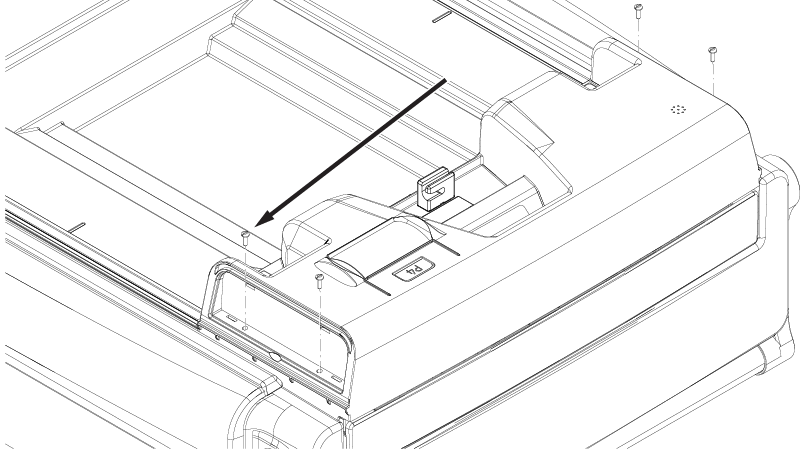
Install the four screws securing the cover to the cradle.
Figure 3. Handle-end cradle cover screws
Install the side covers onto the handle-end cradle cover.