- id_13106160
- Version: 3.4
- Date: Jan 17, 2020 11:16:55 AM
ICN On/Off procedure for Sun 4100, 4170, and Dell R620
Prerequisites
| Required persons | Preliminary requirements | Procedure | Finalization |
|---|---|---|---|
| 1 | 0 minutes | 30 minutes | 0 minutes |
|



This procedure documents the proper methods of shutdown for the Dell R620, Sun 4100, 4170, and 4170M2 ICNs. The ICNs are powered up when the host is started. There is no need to switch the ICNs on individually. If needed, you can switch on the ICNs from the VRE Power Control utility (Switch on ICNs from VRE power control).
The ICNs are powered down when the host software is shut down. To shut the ICNs down individually, use the VRE Power Control utility (Power down ICNs from VRE power control)
If the preferred shutdown method does not work, a last resort is to use the ICN power button (Power Off ICNs manually).
Switch on ICNs from VRE power control
Procedure
- On the Common Service Desktop, go to Utilities > Toolbox > VRE > Power Control.
- Click POWER ON ICN for the selected ICN. The ICN is automatically powered on.
The Sun 4170 and 4170M2 take 2 to 3 minutes before the lights on the front of the ICN return to a normal (non-blinking) state. Wait for all hard drive LEDs to turn on, and for all lights to stop blinking.
The Dell ICN displays the boot status on the LED readout, located on the front panel of the ICN.
- If the application software is down, you can power on the ICNs from the xterm command line. Type: /etc/init.d/poweron_vres start and press Enter.
Power down ICNs from VRE power control
This is the preferred method for shutting down the ICNs.
Procedure
- At the host computer, on the Service Browser, select Utilities > Toolbox > VRE > Power Control.
Figure 1. Power control
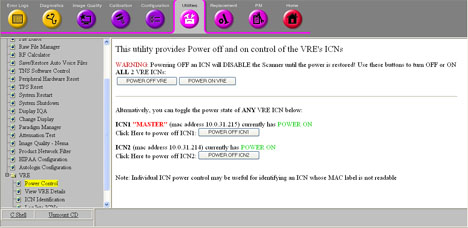 note: The number configuration should match the number of VREs. The illustration above shows images from a system with a Sun 4100 ICN. Systems with a Sun 4170, 4170M2, or R620 ICN have only one ICN selection.
 - Confirm the ICN numbers and their MAC addresses. The MAC addresses are printed on a sticker on the front of the ICNs.
- Click POWER OFF ICN(x). Wait for the ICN to power off.
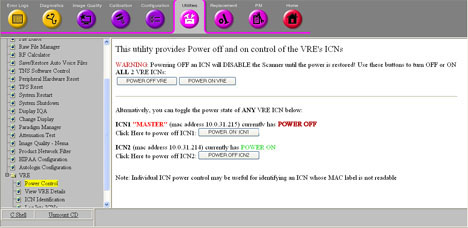
The screen displays the power status of the ICN as it is switching off.
- Refresh the Power Control link to see the current state of the
ICN.
Figure 2. ICN 1 switched Off
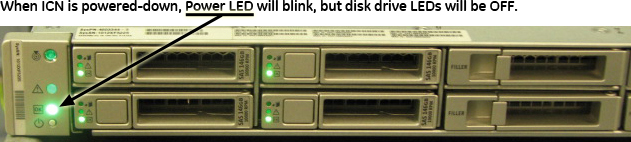
- The Sun ICN(s) are powered down if the green disk drive LEDs on the front of the ICN(s) are no longer illuminated. The power LEDs continue to blink even after the ICN is powered down.
Figure 3. ICN front panel (Sun 4100)
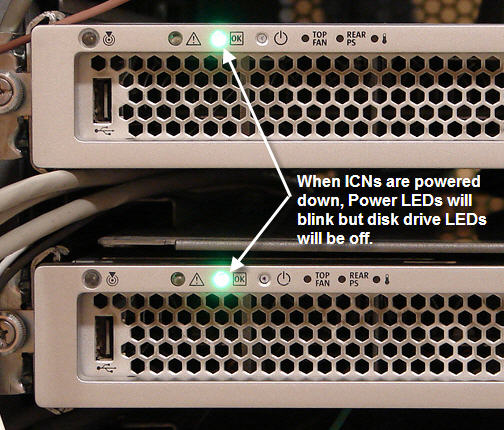
Figure 4. ICN front panel (Sun 4170 and 4170M2)
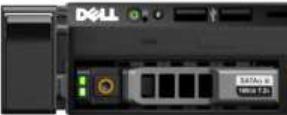
- The Dell ICN is powered down when the green power LED located on the upper left side of the front of the ICN for Dell R620 is not illuminated.
Figure 5. ICN front panel (Dell R620)
Power down from root level (Dell, Sun 4100, 4170, and 4170M2)
If the application software is down, you can power down the ICNs using command line at the root level.
Procedure
- Log into the application using the root login.note: It is possible that the customer changed the default password. If you cannot log in, contact the customer for the correct password.
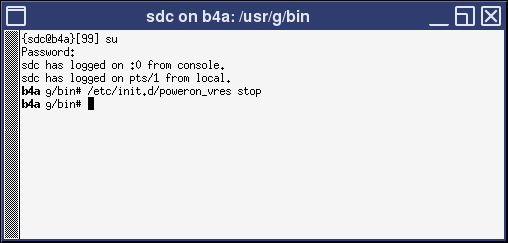
- In the xterm window, type: /etc/init.d/poweron_vres
stop and press Enter.
Figure 6. VRE Stop command
The ICN(s) should turn off after one minute.
The Sun ICN(s) are powered down if the green disk drive LEDs on the front of the ICN(s) are no longer illuminated. The power LEDs continue to blink even after power down.
The Dell ICN is powered down if the green power LED located on the upper left side of the front of the ICN is not illuminated.
Power Off ICNs manually
Procedure
- For Sun ICNs, momentarily press the power button. (For Dell ICN, the green LED is also the power button.) This brings down the ICN in a soft method. It takes a minute or two for the operating system to boot down.
The Sun ICN(s) are powered down if the green disk drive LEDs on the front of the ICN(s) are no longer illuminated. The power LEDs continue to blink even after power down.
The Dell ICN is powered down if the green power LED located on the upper left side of the front of the ICN is not illuminated.
- If the OS freezes or is not responding, then the soft method did not work properly. In this case, hold the power button down for six seconds to force the power off.
Finalization
Finalization
No finalization steps.