- id_2022062
- Version: 1.2
- Date: Feb 6, 2020 1:23:27 PM
Installing table undock mechanism components
Installs the undock link and lever to the table base.
Prerequisites
| Personnel requirements | |||
|---|---|---|---|
| Required persons | Preliminary requirements | Procedure | Finalization |
| 1 | - | 10 minutes | - |
| Tools and test equipment | |||
|---|---|---|---|
| Item | Quantity | Part number | Manufacturer |
| Nonmagnetic Titanium Service Tool Kit, Small Set | 1 | 5113258 | - |
| Consumables | |||
|---|---|---|---|
| Item | Quantity | Part number | Manufacturer |
| 3.6 inch Cable Tie | 1 | 46-208758P1 | - |
Procedure
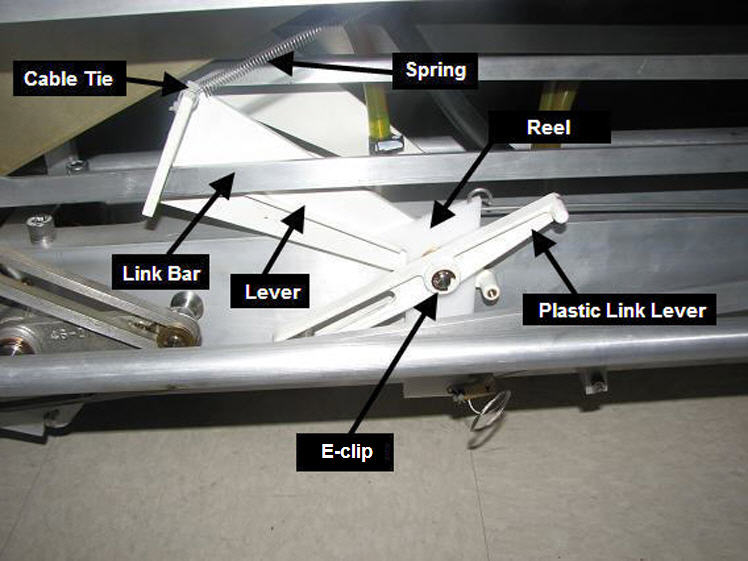
- Slide the link bar through the slot in the lever.
Figure 1. Lever Assembly
- Install the undock hook block onto the link bar.
Figure 2. Undock hook block screws
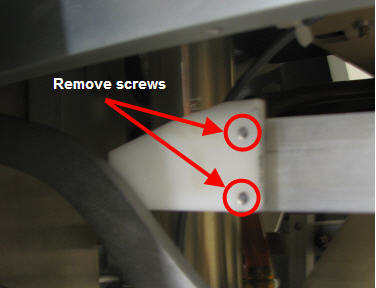
- Install the two screws securing the block to the link bar.
- Slide the link bar and lever onto the pin.
- Install the spring to the lever using a cable tie through the slot in the lever.
- Install the handle end of the link bar onto the pin of the undock pedal.
Figure 3. Location of E-clip and Link Bar
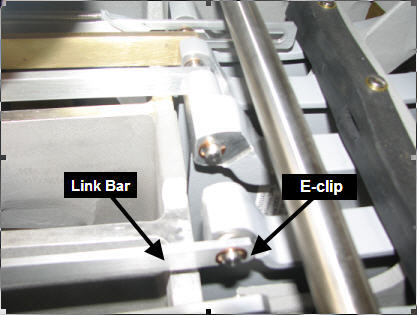
- Install the e-clip securing the link bar to the pedal pin.
- Install the bushing onto the pin.
- Install the reel with spring attached onto the pin.
- Install the plastic link lever onto the pin and the guide.
- Install the e-clip securing the lever to the pin.
- Raise the table slightly to take the weight off of the table lock safety bar and raise the safety bar.
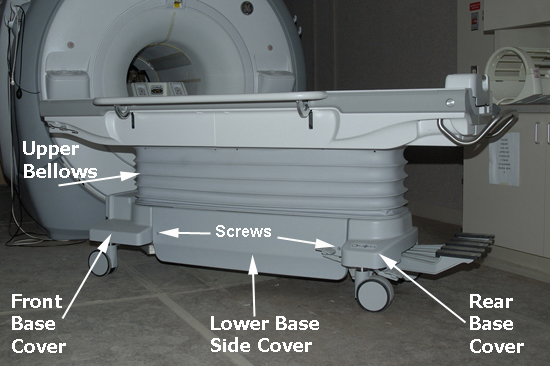
- Install both the left and right lower base side covers by installing the two screws holding each to the table assembly. Attach the Velcro® securing them to the Bellows.
Figure 4. Table covers
Finalization
- Do Cradle Home Table Down Interlock Adjustment.
- Dock the table to the scanner, and verify proper operation of the undock pedal.
- Dock the table and verify proper operation from the operator console.