Removes the top cover from the table dock.
Prerequisites
| Personnel requirements |
|---|
| Required persons | Preliminary requirements | Procedure | Finalization |
|---|
| 1 | - | 5 minutes | - |
| Tools and test equipment |
|---|
| Item | Quantity | Part number | Manufacturer |
|---|
| Nonmagnetic Titanium Service Tool Kit, Small Set | 1 | 5113258 | - |
| Required conditions |
|---|
| The table dock is removed. |
| Warning |
|---|
 | Ferrous material hazard The table dock components are ferrous and can become dangerous projectiles within the magnetic field. The dock must be removed from the magnet room prior to removing any parts from the dock. |
Procedure
- Remove the four screws securing the dock top to the dock base.
Figure 1. Dock top and base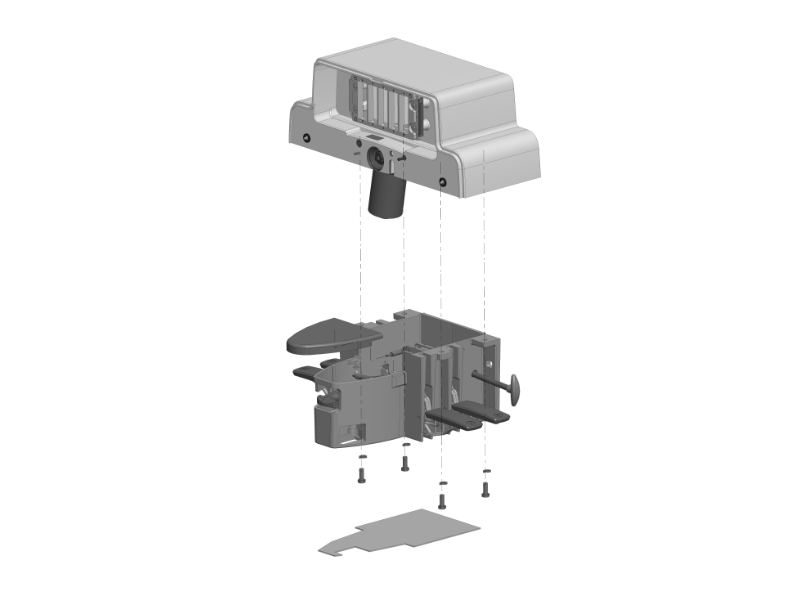
- Pull the dock emergency release handle.
Note: The emergency release handle links inside of the dock will interfere with the motor if the handle is not pulled prior to lifting the dock cover.
- Disconnect the UP pedal switch connector by lifting and holding the dock top while disconnecting the switch connector.
Figure 2. Up pedal switch connector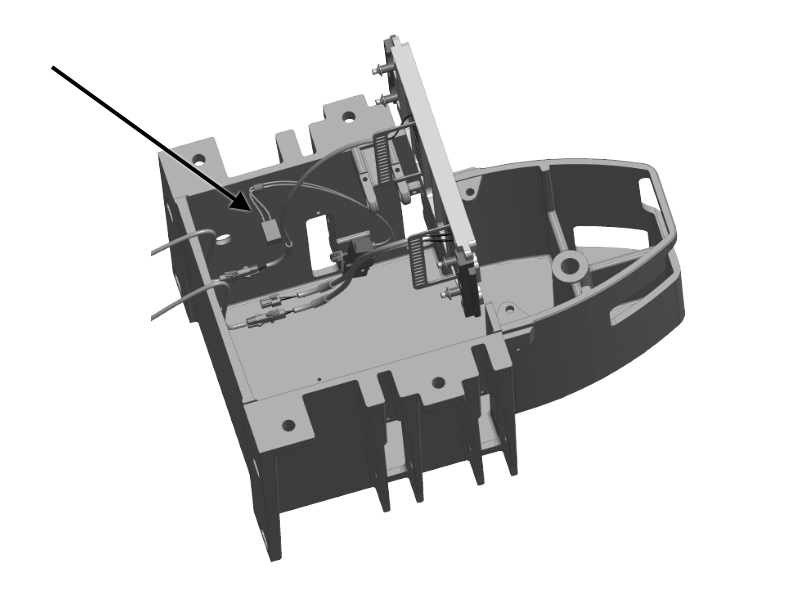
- Taking care not to stress the remaining cables, lift the top and place it upside down next to the base.
Note: Disconnect any cable that may be stretched.
