Installing the magnet left- and right-hand lower access panels
Installs the left- or right-hand lower access panel onto the magnet front cover.
Prerequisites
Personnel requirements
Required persons
Preliminary requirements
Procedure
Finalization
1
-
5 minutes
-
Required conditions
Table interface cover is installed.
About this task
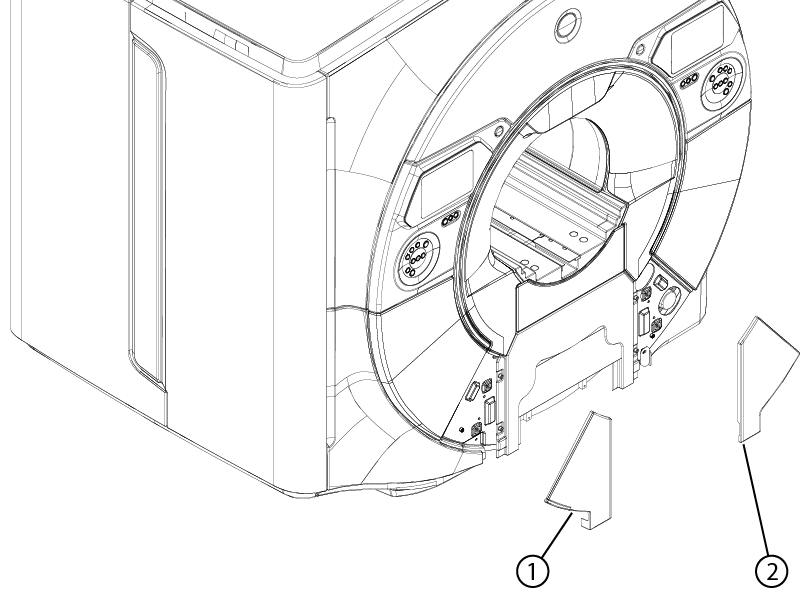
The procedure for installing the left-hand and right-hand lower access panels is identical. Follow the procedure below to install either or both access panel(s) as required.Figure 1. Lower access panel locations
1
Left-hand lower access panel
2
Right-hand lower access panel
Procedure
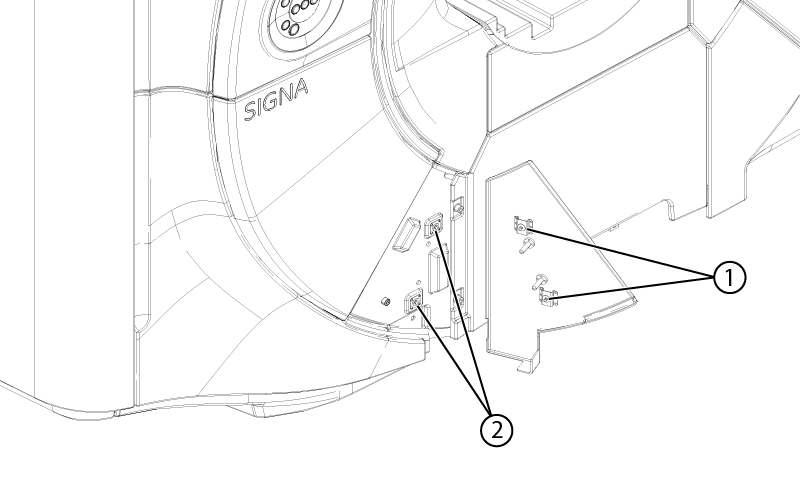
Align the two ball and catch strikers on the back of the access panel with the ball and catch latches on the magnet front cover.
Figure 2. Lower access panel alignment
1
Ball and catch latches
2
Ball and catch strikers
Install the lower access panel onto the magnet front cover. Make sure the ball and catch latches retain the panel.