Removes the cradle flipper assembly cable from the dockable patient table.
Prerequisites
| Personnel requirements |
|---|
| Required persons | Preliminary requirements | Procedure | Finalization |
|---|
| 1 | - | 10 minutes | - |
| Tools and test equipment |
|---|
| Item | Quantity | Part number | Manufacturer |
|---|
| Nonmagnetic Titanium Service Tool Kit, Large Set | 1 | 5112581 | - |
Procedure
- Pull the end of the cable that attaches to the flipper assembly through the routing openings on the underside of the table.
Figure 1. Flipper assembly (bottom view)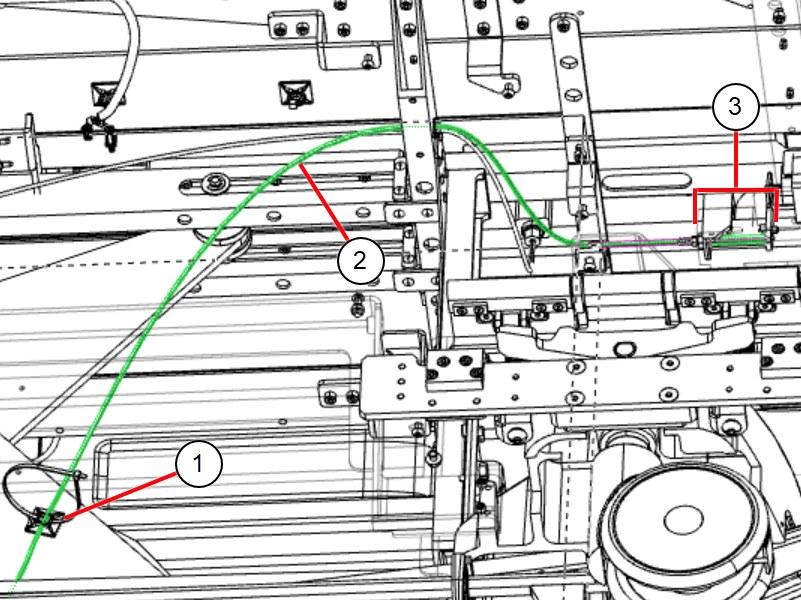
| 1 | Cable management |
| 2 | Flipper cable |
| 3 | Flipper assembly |
- Unfasten the cable tie that secures the cable to the outer scissor plate.
- With an Allen wrench, loosen the screws that secure the flipper cable to the brass pivot block and adjustment block.
Figure 2. Flipper cable routing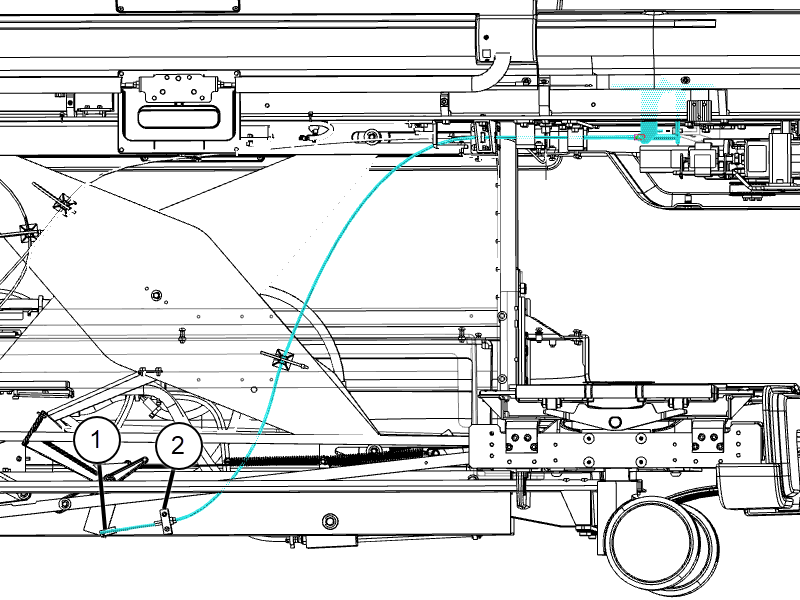
| 1 | Pivot block |
| 2 | Adjustment block |
- Unfasten the cable from the blocks and pull it from the table.
