Removes the cradle flipper assembly from the dockable patient table.
Prerequisites
Personnel requirements
Required persons
Preliminary requirements
Procedure
Finalization
1
-
10 minutes
-
Tools and test equipment
Item
Quantity
Part number
Manufacturer
Nonmagnetic Titanium Service Tool Kit, Large Set
1
5112581
-
Procedure
Note: Pressing the actuating button engages the secondary cradle latch cable and causes the pin stop to move down flush with the table top surface, allowing the cradle to slide forward.
Manually move the cradle forward to expose the flipper switch.
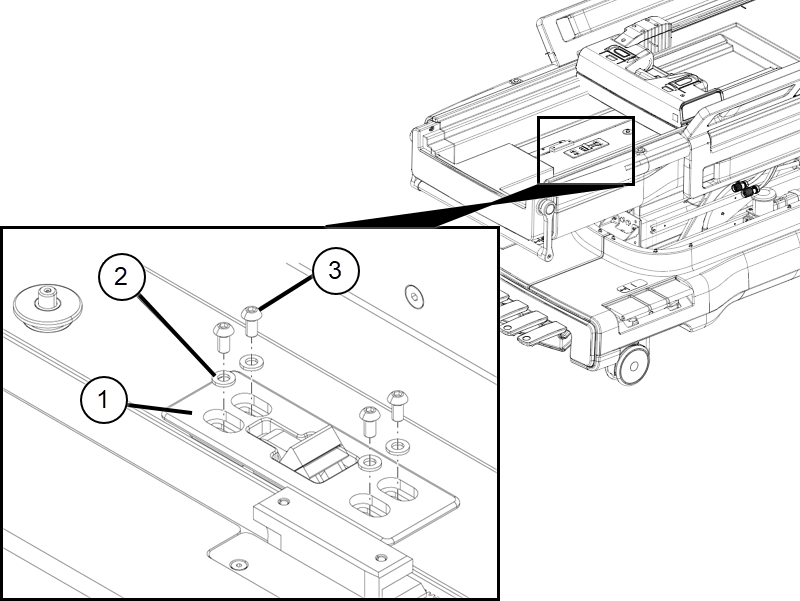
Remove the four screws with washers securing the flipper assembly.
Figure 1. Flipper tabletop hardware
1
Flipper assembly
2
Washer
3
Screw
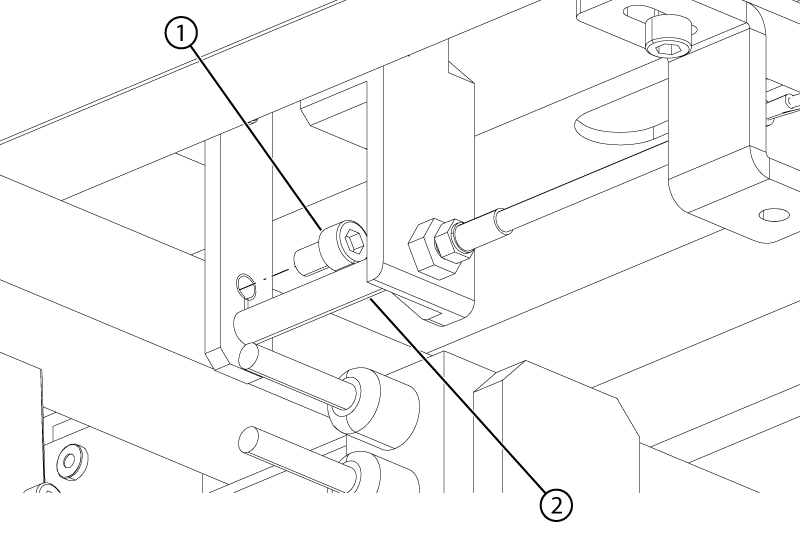
On the underside of the table, remove the screw holding the cable to the flipper assembly.
Figure 2. Flipper housing cable
1
Flipper cable screw
2
Flipper cable spacer
Slide the ball end of the cable up to the screw hole, and pull the end of the cable out of the flipper assembly. Retain the cable spacer.
Remove the flipper assembly from the top of the table.