Installs the replacement cradle flipper assembly cable on the dockable patient table.
Prerequisites
Personnel requirements
Required persons
Preliminary requirements
Procedure
Finalization
1
-
10 minutes
-
Tools and test equipment
Item
Quantity
Part number
Manufacturer
Nonmagnetic Titanium Service Tool Kit, Large Set
1
5112581
-
Procedure
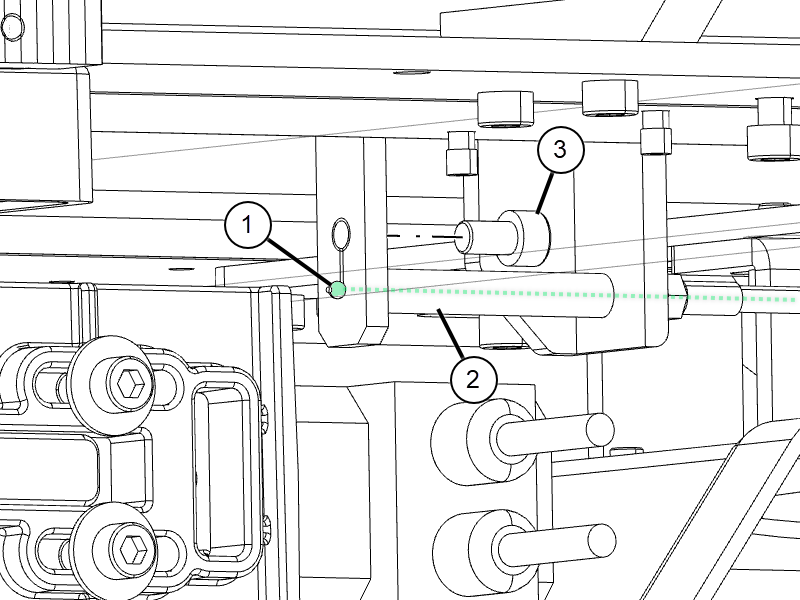
Insert the ball end of the flipper cable through the plastic spacer into the new flipper assembly, and secure the flipper cable with the previously removed screw.
Figure 1. Flipper cable
1
Flipper cable ball end
2
Cable spacer
3
Screw
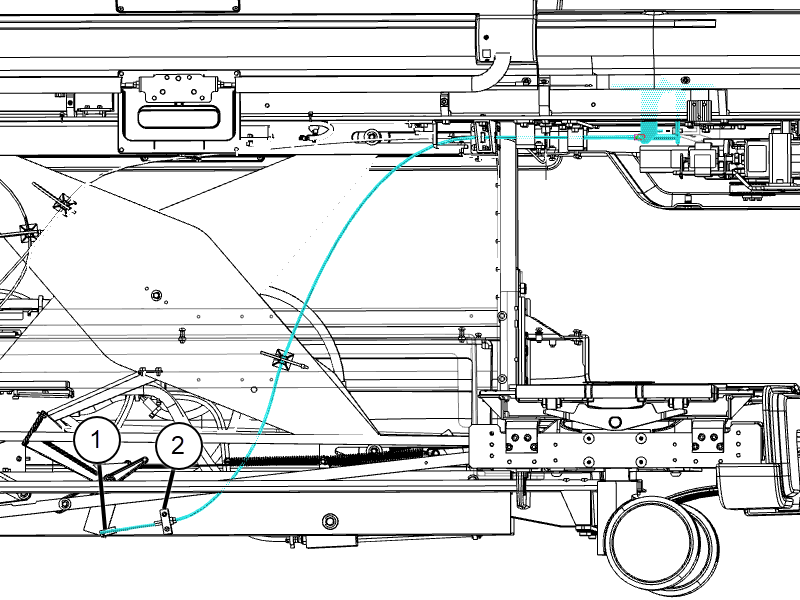
Slide the remainder of the cable through the routing holes on the underside of the table.
Attach the cable to the outer scissor plate cable management bracket with a cable tie.
Thread the cable through the adjustment block and fasten the cable into the brass pivot block.
Figure 2. Flipper cable routing
1
Pivot block
2
Adjustment block
Pull excess slack from the cable and tighten the screws on the pivot block and adjustment block.