Prepares a new dockable table motor for installation by moving the pulley and mounting plate from the removed motor to the new motor.
Prerequisites
| Personnel requirements |
|---|
| Required persons | Preliminary requirements | Procedure | Finalization |
|---|
| 1 | - | 10 minutes | - |
| Tools and test equipment |
|---|
| Item | Quantity | Part number | Manufacturer |
|---|
| Nonmagnetic Titanium Service Tool Kit, Small Set | 1 | 5113258 | - |
| Consumables |
|---|
| Item | Quantity | Part number | Manufacturer |
|---|
| Loctite #243 | As needed | 5415261-3 | - |
Procedure
- Remove the screw securing the pulley to the removed motor drive shaft.
Important: The pulley screw is fragile. Use caution when removing the screw.
Figure 1. Motor pulley and bracket hardware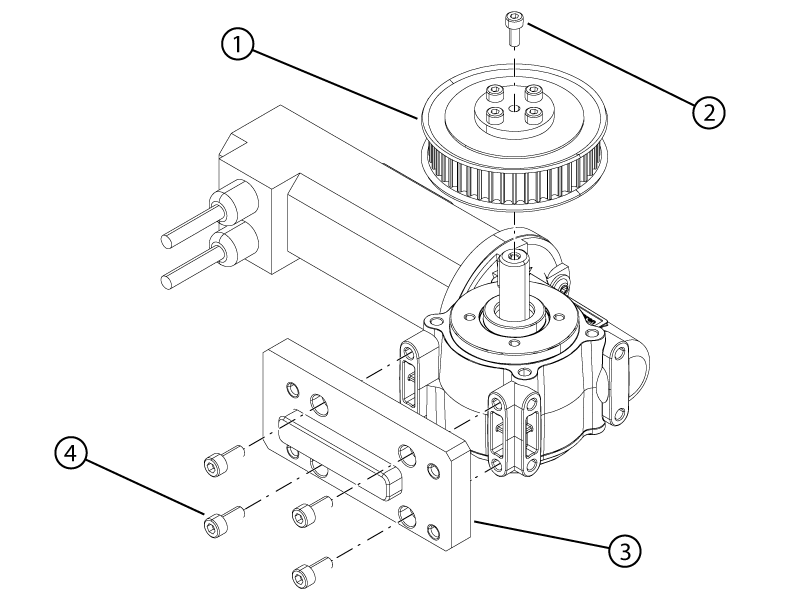
| 1 | Pulley |
| 2 | Pulley screw |
| 3 | Bracket |
| 4 | Bracket screw |
- Remove the pulley from the removed motor.
- Remove the four screws securing the motor bracket to the removed motor.
- Remove the motor bracket from the removed motor.
- Install the motor bracket onto the new motor.
- Apply Loctite #243 to the four motor bracket screws.
- Install the four screws securing the motor bracket to the motor.
- Install the pulley onto the new motor drive shaft.
- Apply Loctite #243 to the pulley screw.
- Install the screw securing the pulley to the motor drive shaft.
