- SIGNA™ Hero 3.0T Service Methods
- 5852800-8EN Revision 1.0
- 00000018WHA304A72GYZ
- id_200166611.2
- Aug 20, 2021 6:09:58 PM
Doing the cradle motion test
Makes sure the motion of the patient cradle into and out of the magnet bore is operating correctly.
Prerequisites
| Personnel requirements | |||
|---|---|---|---|
| Required persons | Preliminary requirements | Procedure | Finalization |
| 1 | - | 10 minutes | - |
| Safety |
|---|
|
Before working in any GE Healthcare MR suite or performing any GE Healthcare service procedure, you must:
If you have any safety concerns at any time, do not begin work or immediately stop work and move to a safe location. Immediately contact your supervisor or site safety officer for instructions on how to proceed. |
About this task
The SRI Motion Test moves the cradle to home and through the end of travel switch location using different speeds and accelerations to ensure operation of the cradle.
The cradle does the following series of moves:
- The cradle moves to home (if home is not known, it sets the home position by moving to home).
- The cradle moves past the configured end of travel location. This verifies the configuration for scan range is set to the same value as the position where the physical end of travel switch block is installed.
- The cradle moves out of the bore to 1m (from the home switch location) using a faster speed (300 mm/s), and faster acceleration and deceleration (300 mm/s/s).
- The cradle moves 0.5 meters farther into the bore using the faster speed and acceleration.
Procedure
- Select or and then click Run.
Figure 1. Cradle motion test 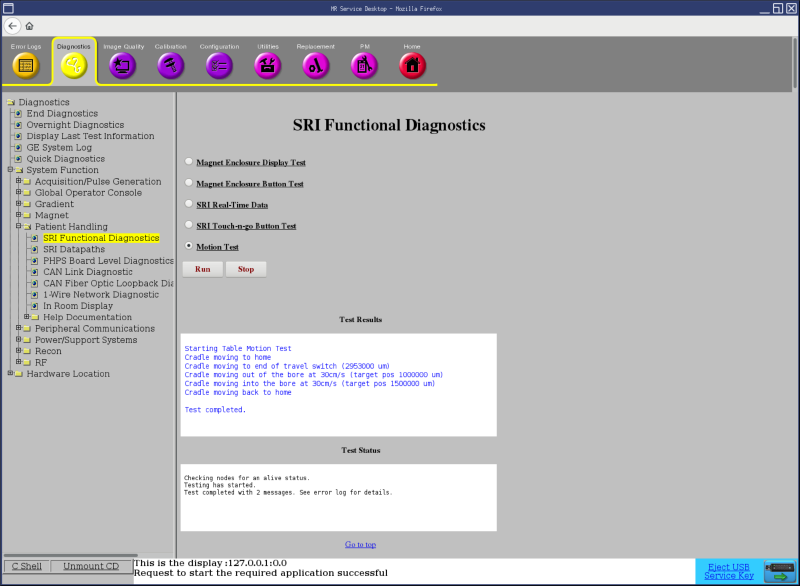
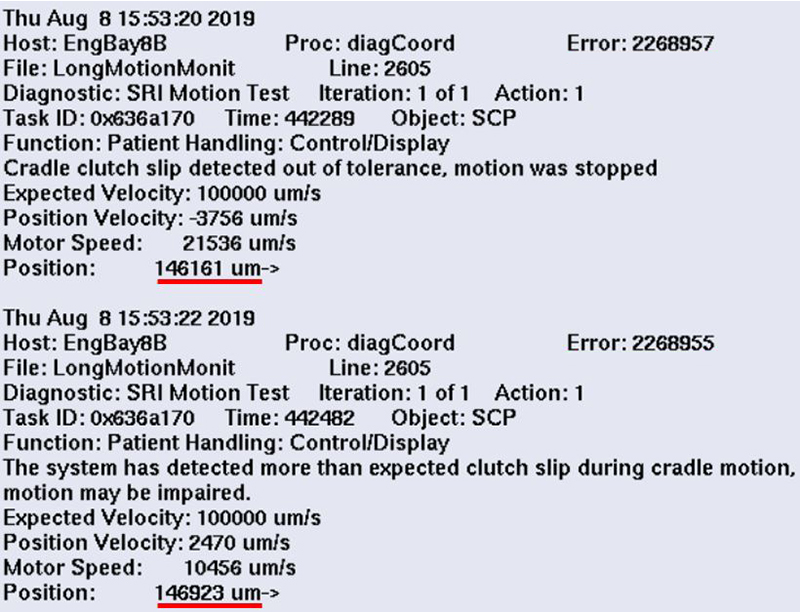
- After the cradle stops moving, make sure the test passed in the status window of the diagnostic tool.Note: The dockable table may produce the clutch slip error around the home location (150000 um ± 20000 um) as shown below. This behavior is expected and intentional. Note the position of the errors. Clutch slip errors at other locations (except near the home location 150000 um ± 20000 um) may indicate actual clutch slip problems.
Figure 2. Dockable table clutch errors