
- SIGNA MR355 / SIGNA MR360
- Service Manual
- 5856356-3EN Revision 5.0
- Basic Service Documentation. Copyright General Electric Company.
- 00000018WIA30FF0030GYZ
- id_131066781.1
- Jul 6, 2019 12:17:31 AM
Keyboard Functional Tests
Prerequisites
| Required persons | Preliminary requirements | Procedure | Finalization |
|---|---|---|---|
| 1 | Not Applicable | 5 minutes | Not Applicable |
About this task
This test provides a means of checking the functionally of the hard key buttons at the top of the keyboard assembly .
| Last Update | 08/18/2004 |
Procedure
- Go to the Service Desktop and on the Common Service
Desktop, go to the Diagnostics Tab and start the Keyboard
Processor Diagnostics.
Figure 1. Keyboard Processor Diagnostics 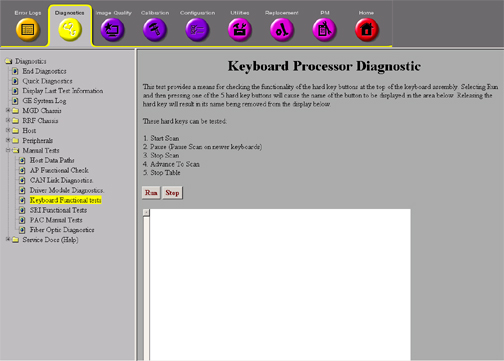
Finalization
No finalization steps.