
- SIGNA™ Hero 3.0T Service Methods
- 5852800-8EN Revision 1.0
- 00000018WIA30B9C230GYZ
- id_156670431.8
- Oct 15, 2021 4:53:27 AM
PS Filter Box Replacement
Prerequisites
| Required persons | Preliminary requirements | Procedure | Finalization |
|---|---|---|---|
| 1 | Not Applicable | 120 minutes | 15 minutes |
| Item | Quantity | Effectivity | Part number | Manufacturer |
|---|---|---|---|---|
| Non Magnetic Tool Set | 1 | - | - | - |
| Item | Quantity | Effectivity | Part number | Manufacturer |
|---|---|---|---|---|
| PS Filter Box | 1 | - |
Refer to FRU Manual | - |
| ||||||||

| Condition | Reference | Effectivity |
|---|---|---|
|
PDU must be turned OFF. Refer to Lockout / Tagout for ISC. | - | - |
Procedure
- Loosen fixing screws and remove ISC PW Cover by lifting up a little.Note: If furnished closet door prevents from removing, the PW cover can be separated in two pieces by removing 6 screws at center.
Figure 1. ISC PW Cover 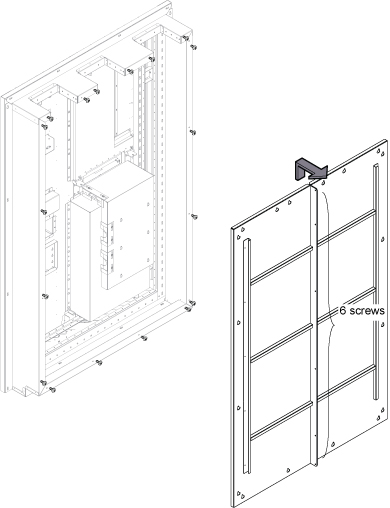
- Remove the cables from defective Filter Box Assy at Pen wall side.
Figure 2. Filter Box Assy Cables 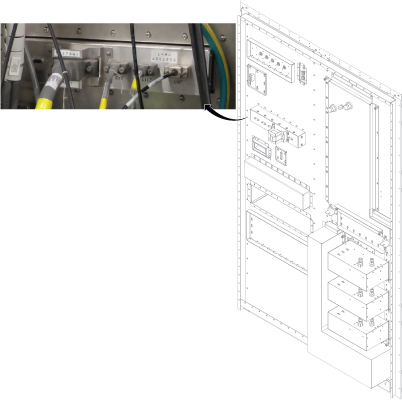
- Remove screws fixing Filter Box Assy and Penetration Panel.
Figure 3. Remove cables from Filter Board 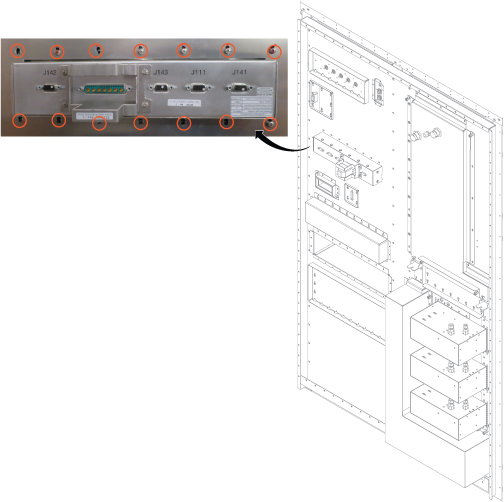
- Remove Filter Box Assy from Equipment room side.
Figure 4. Remove Filter Box Assy 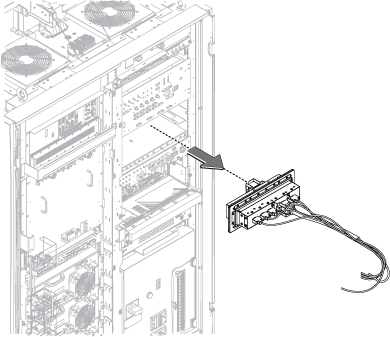
Finalization
- Restore the Power. Refer to Removing LOTO - ISC.
- Perform check scan.