
- SIGNA™ Hero 3.0T Service Methods
- 5852800-8EN Revision 1.0
- 00000018WIA30D7B230GYZ
- id_156670321.11
- Jul 13, 2021 4:27:37 PM
Driver Module Lite Replacement
Prerequisites
| Required persons | Preliminary requirements | Procedure | Finalization |
|---|---|---|---|
| 1 | Not Applicable | 60 minutes | 30 minutes |
| Item | Quantity | Effectivity | Part number | Manufacturer |
|---|---|---|---|---|
| Ladder | 1 | - | - | - |
| Standard Tool | 1 | - | - | - |
| Hoist Service Kit | 1 | - |
5196226 | - |
| Item | Quantity | Effectivity | Part number | Manufacturer |
|---|---|---|---|---|
| Driver Module Lite | 1 | - |
Refer to FRU Manual | - |
| ||||||||||||

| Condition | Reference | Effectivity |
|---|---|---|
|
System Power must be turned OFF. Refer to ISC LOTO for ISC. | - | - |
Procedure
- Remove right front cover per following steps.
- Open right front cover and remove a screw to disconnect GND cable.
- Unlock the cover.
- Lift up and remove the cover.
Figure 1. Cover removal 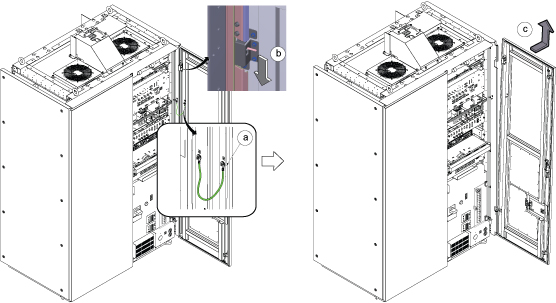 Note: If the service area is narrow, do the same for left front cover.
 - Perform the following steps.
- Disconnect all connectors from front panel of Driver Module Lite.
- Remove 4 screws fixing driver module lite and chassis.
- Slide out the Driver Module.
Figure 2. Driver Module Lite screws 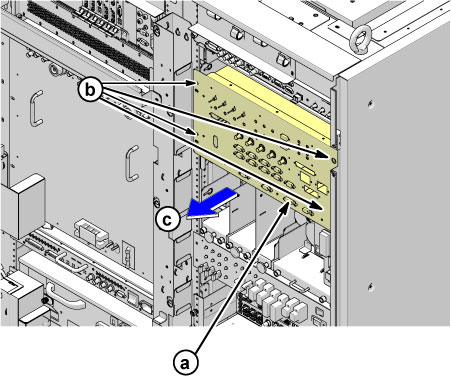
- Perform the following steps.
- Hook the winch and spreader bar to the lifting brackets.
- Using the hoist, apply tension to the lifting chain until the weight of the Driver Module is supported by the hoist.
- Press the release tabs in on each side and pull Driver Module forward.
Figure 3. Driver Module Lite Replacement 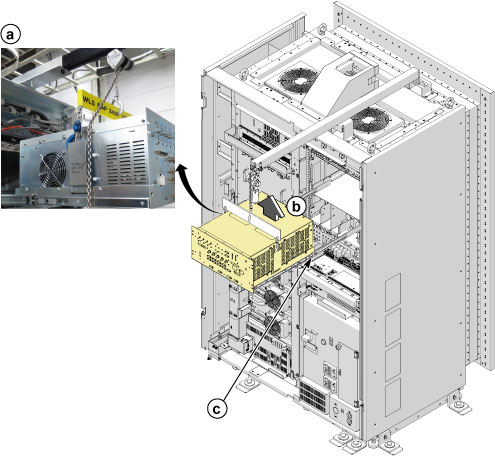
- Remove the Driver Module from Tray by loosening 6 fixing screws.
Figure 4. Driver Module Support 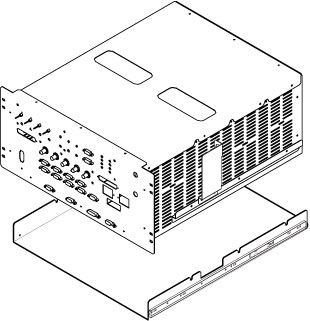
- Remove Driver Module tray brackets by removing fixing screws and install to the new one.
Figure 5. Driver Module tray brackets 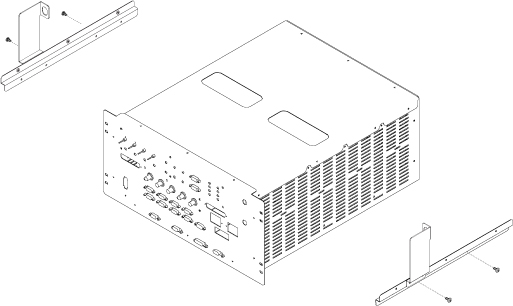
Finalization
- Restore the Power. Refer to Removing LOTO - ISC.
- Perform TR Dynamic Disable Calibration.
- Perform check scan.