
- SIGNA™ Hero 3.0T Service Methods
- 5852800-8EN Revision 1.0
- 00000018WIA30B5C230GYZ
- id_156668111.7
- Jul 13, 2021 4:27:37 PM
Leak Sensor 2 (Front) Replacement
Prerequisites
| Required persons | Preliminary requirements | Procedure | Finalization |
|---|---|---|---|
| 1 | Not Applicable | 10 minutes | 15 minutes |
| Item | Quantity | Effectivity | Part number | Manufacturer |
|---|---|---|---|---|
| Standard Tool | 1 | - | - | - |
| Item | Quantity | Effectivity | Part number | Manufacturer |
|---|---|---|---|---|
| Leak Sensor 2 (Front) | 1 | - |
Refer to FRU Manual | - |
| ||||
| Condition | Reference | Effectivity |
|---|---|---|
|
System Power must be turned OFF. Refer to ISC PDU Main Breaker LOTO Procedure. | - | - |
Procedure
- If Leak sensor tray of RF Amp is defective, disconnect connector and remove Water Leak sensor tray for RF Amp by removing screw.
Figure 1. Water Leak sensor tray for RF Amp 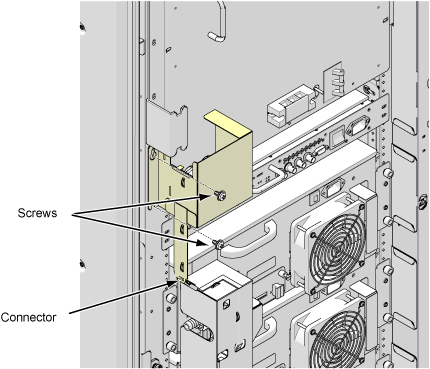
- If Leak Sensor for SSSA and SSSPS is defective, perform the following steps.
- Disconnect two connectors.
- Remove six screws.
- Remove Leak sensor assy.
Figure 2. Leak Sensor for SSSA and SSSPS 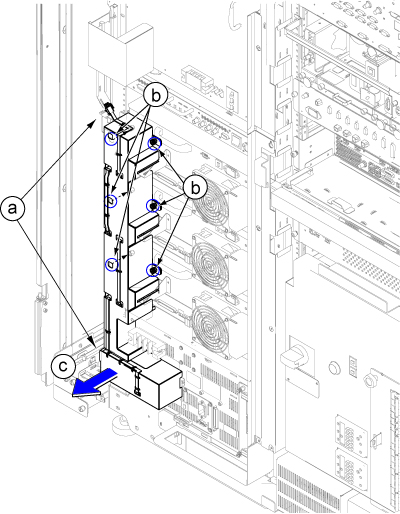
Finalization
- Restore the Power. Refer to Removing LOTO - ISC.
- Perform check scan.