
- SIGNA™ Hero 3.0T Service Methods
- 5852800-8EN Revision 1.0
- 00000018WIA30481E20GYZ
- id_131064745.1
- Jul 13, 2021 7:09:35 PM
KASC assembly replacement
Prerequisites
| Required persons | Preliminary requirements | Procedure | Finalization |
|---|---|---|---|
| 1 | Not Applicable | 30 minutes | For DV: 30 mins. For Voyager and Pioneer: 60 mins. |
| Item | Quantity | Effectivity | Part number | Manufacturer |
|---|---|---|---|---|
| Standard Tool | 1 | - | - | - |
| RF power measurement kit (use one of the following kits): | 1 | - |
EITHER 5307511-2 or 5307511-3 (Bird wattmeter) | - |
| Item | Quantity | Effectivity | Part number | Manufacturer |
|---|---|---|---|---|
| KASC Assembly | 1 | - |
Refer to FRU Manual | - |
Note:
The unit can be withdrawn with the slide rail. | ||||
Procedure
- Perform the following steps.
- Remove two screws.
- Remove bracket.
- Disconnect all connectors from KASC.
Figure 1. KASC bracket and cables 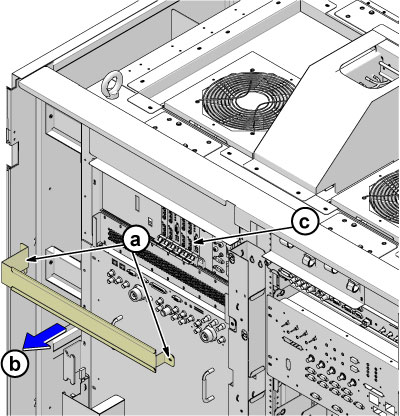
- Remove the KASC assembly as follows:
- Remove four screws.
- Slide the KASC out.
Figure 2. KASC assembly 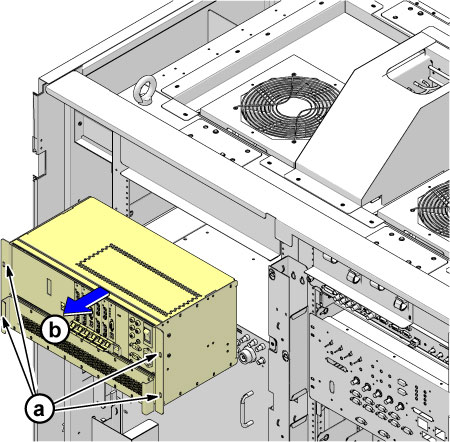
Finalization
- Restore the Power. Refer to Removing LOTO - ISC.
- Perform UPM Calibration and Functional Check — Body Mode.
- Perform UPM Calibration and Functional Check — Head Mode.
- Perform check scan.