
- SIGNA™ Hero 3.0T Service Methods
- 5852800-8EN Revision 1.0
- 00000018WIA308BF030GYZ
- id_123738821.15
- Oct 18, 2021 1:28:17 AM
MEMS DCPS Replacement
Prerequisites
Disclaimer:
Software version PX29 and later introduces support for a non-MEMS system configuration. Existing or upgraded systems will continue to use the MEMS power supply. Newly installed or upgraded systems may not have the MEMS power supply. Identify the presence or absence of MEMS on your system by looking for the MEMS DC Power Supply Assembly (part number 6859128) in the power supply rack of the ISC.
| Required persons | Preliminary requirements | Procedure | Finalization |
|---|---|---|---|
| 1 | Not Applicable | 30 minutes | 15 minutes |
| Item | Quantity | Effectivity | Part number | Manufacturer |
|---|---|---|---|---|
| Standard Tool | 1 | - | - | - |
| Item | Quantity | Effectivity | Part number | Manufacturer |
|---|---|---|---|---|
| DCPS for MEMS | 1 | - |
Refer to FRU Manual | - |
| ||||
| Condition | Reference | Effectivity |
|---|---|---|
|
System Power must be turned OFF. Refer to ISC PDU Main Breaker LOTO Procedure. | - | - |
About this task
Overview
Location of each Power Supply is as following illustration
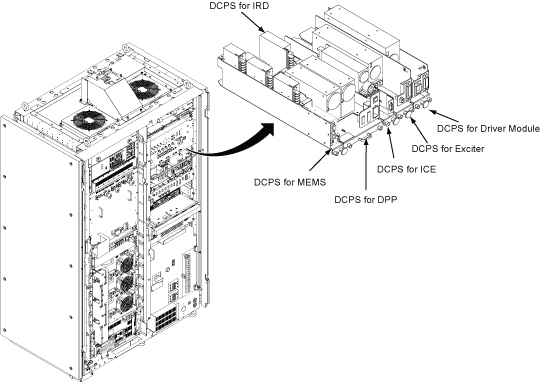
Disclaimer:
Software version PX29 and later introduces support for a non-MEMS system configuration. Existing or upgraded systems will continue to use the MEMS power supply. Newly installed or upgraded systems may not have the MEMS power supply. Identify the presence or absence of MEMS on your system by looking for the MEMS DC Power Supply Assembly (part number 6859128) in the power supply rack of the ISC.
Procedure
- Remove DCPS cable bracket.
- Loosen two screw.
- Rotate up a little at right side and remove the bracket.
Figure 2. DCPS cable bracket 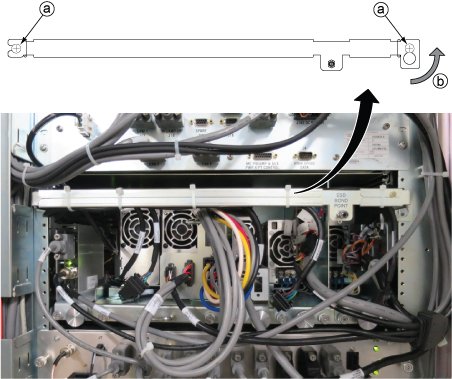
Remove the MEMS DC power supply from ISC.Notice - Loosen one screw tightening power supply and chassis.
- Slide out the tray.
Figure 3. DCPS for MEMS 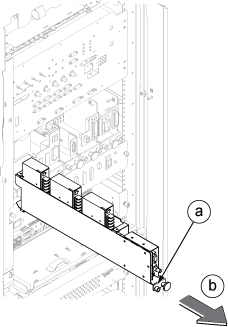
Finalization
- Restore the Power. Refer to Removing LOTO - ISC.
- Perform Check Scan.