
- SIGNA™ Hero 3.0T Service Methods
- 5852800-8EN Revision 1.0
- 00000018WIA3049C230GYZ
- id_156670101.11
- Oct 8, 2021 11:40:21 AM
PHPS 2 Replacement
Prerequisites
| Required persons | Preliminary requirements | Procedure | Finalization |
|---|---|---|---|
| 1 | Not Applicable | 60 minutes | 15 minutes |
| Item | Quantity | Effectivity | Part number | Manufacturer |
|---|---|---|---|---|
| Standard Tool | 1 | - | - | - |
| Item | Quantity | Effectivity | Part number | Manufacturer |
|---|---|---|---|---|
| PHPS 2 | 1 | - |
Refer to FRU Manual | - |
| ||||
| Condition | Reference | Effectivity |
|---|---|---|
|
System Power must be turned OFF. Refer to LOTO for ISC. | - | - |
Procedure
- Slowly move forward the ICN per following steps.
- Loosen 2 captive screws under the screw cover
- Slowly move forward the ICN about 1inch (2.5cm) not to force the rear cable.
Figure 1. ICN 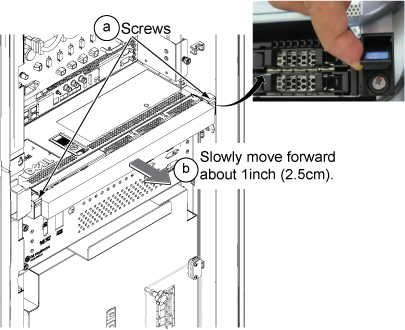
- At Magnet Room side, remove ICN rear access cover by loosening the screws.
Figure 2. ICN rear access cover 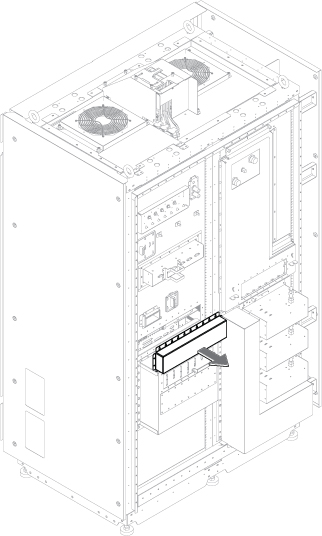
- Remove optical cable of PHPS from access window of ICN.Note: The other cables can be removed later from front access.Note: If the space is too narrow, ICN can be moved forward since front screws were already loosened.
Figure 3. Optical cable 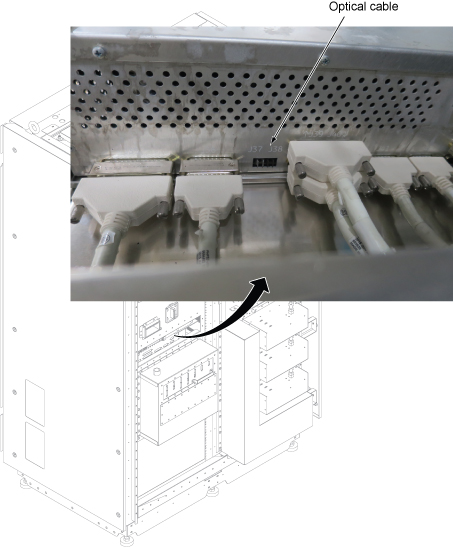
- Perform the following steps.
- Disconnect all connectors from PHPS2 front panel.
- Loosen 4 screws.
- slide out the tray.
Figure 4. PHPS 2 Removal 1 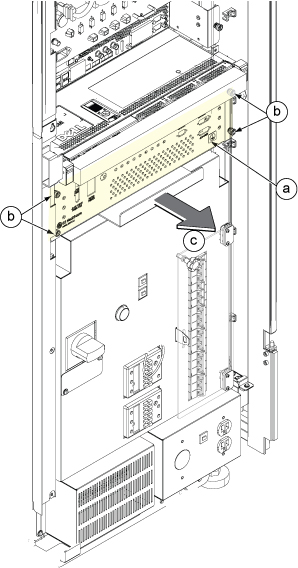
- Perform the following steps.
- Disconnect all cables from PHPS 2 from rear side.
- Slide the PHPS 2 forward and lift up to remove it.
Figure 5. PHPS 2 Removal 2 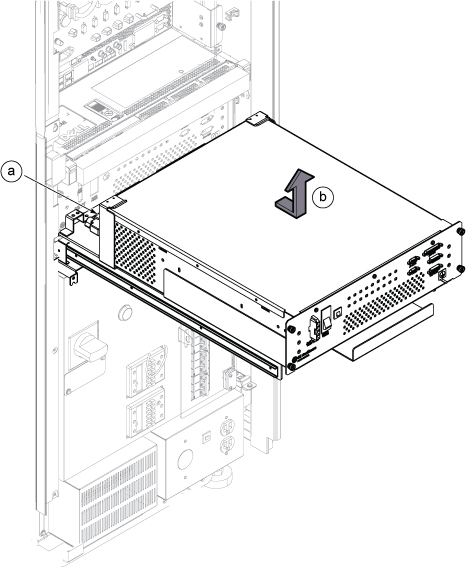
Finalization
- Restore the Power. Refer to Removing LOTO - ISC.
- Start up the host computer. Refer to Starting up the host computer
- Do the SRI datapath diagnostics. Refer to Doing the Scan Room Interface (SRI) datapath diagnostics.
- Do the PHPS diagnostics. Refer to Doing the Patient Handling Power Supply (PHPS) board level diagnostic.
- Perform Check scan.