Prerequisites
Table 1. Personnel requirements| Required persons | Preliminary requirements | Procedure | Finalization |
|---|
| 1 | Not Applicable | 30 minutes | 15 minutes |
Table 2. Tools and test equipment| Item | Quantity | Effectivity | Part number | Manufacturer |
|---|
| Standard Tool | 1 | - | - | - |
Table 3. Replacement parts| Item | Quantity | Effectivity | Part number | Manufacturer |
|---|
| Clock Splitter | 1 | - |
Refer to 6250625
| - |
Table 4. Safety
| Warning |
|---|
| ELECTROCUTION HAZARD! DANGEROUS AND/OR FATAL VOLTAGES ARE PRESENT IN THE ENERGIZED CABINET. Follow loto steps as given in first section of this document to disable and verify safe voltage levels. |
|
Procedure
- System Power must be turned OFF.
- Open ISC covers.
- Perform the following steps as shown in the illustration below:
- Disconnect the connectors from J2 and J3 of the clock splitter.
- Loosen 2 screws and slide out the clock splitter.
- Disconnect the connector from J1.
Figure 1. Clock Splitter Removal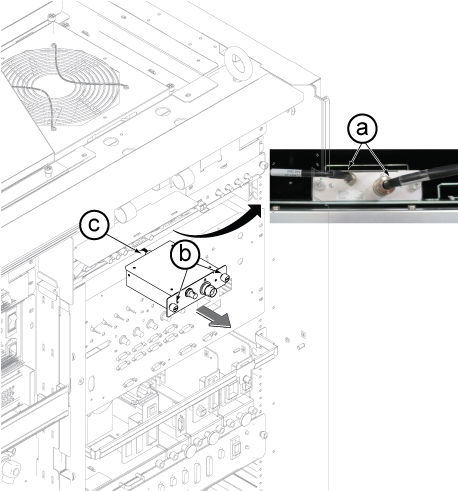
| CAUTION |
|---|
| Equipment Damage The clock splitter installs with a Twinax cable (not a coaxial cable). The pins can easily break. Align the twin marks before you connect this cable. |
Install the new clock splitter by reverse order of removal.- Restore ISC by reverse order of removal.
Finalization
- Perform check scan.
Restore the Power. Refer to Removing LOTO - ISC
.
