Installs a reciprocating pump assembly in the dockable patient table.
Procedure
Slide the new pump assembly onto the pin and shaft, and replace the clips on both ends.
To help align the assembly with the rear connection, lift the Up foot pedal upwards while inserting the pin.
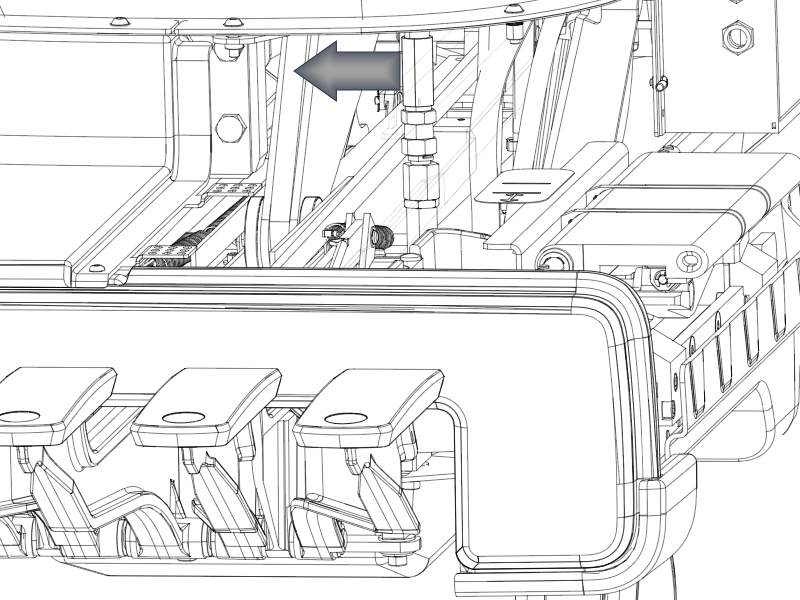
Using a backer wrench to hold the pump-side fittings in place, reconnect both black high-pressure hoses to the top and side of the pump with a 0.75 inch open-end wrench. To avoid the top hose being pinched when the table is in its lowest position, secure the top hose swivel fitting to angle the hose inward.
Figure 1. Top high-pressure line
Reconnect the hydraulic oil (low-pressure) line to the pump .
To help prevent leaks, avoid reusing old hose clamps. Secure the low-pressure line with a new hose clamp.
Raise the table lock safety bar to its upright position and lower the patient table.
Note: Make sure the high-pressure hoses reattached in Step 2 are not being pinched by table components when the table is lowered. If the hoses are being pinched, adjust the angle of their swivel fittings inward.
Use the Up foot pedal to raise the table to the full up position. Lower table and repeat this process to allow the hydraulic oil to circulate within the pump.
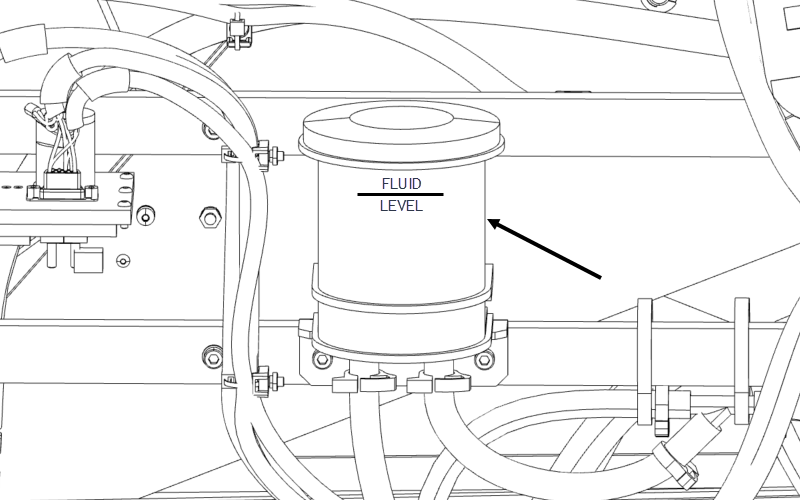
If necessary, add hydraulic oil to the reservoir so it is 0.25 to 0.50 inches (6.5 to 12.5 mm) above the fluid level line (shown below) when the table is at its lowest position.
Figure 2. Hydraulic fluid reservoir
Pump the table up, counting the number of pumps it takes to raise the table. (The baseline number is 15, ± one pump.)
Check all hydraulic lines and components for leaks.