Removes the middle bumper from the right-hand side of the dockable table.
Prerequisites
| Personnel requirements |
|---|
| Required persons | Preliminary requirements | Procedure | Finalization |
|---|
| 1 | - | 10 minutes | - |
| Tools and test equipment |
|---|
| Item | Quantity | Part number | Manufacturer |
|---|
| Nonmagnetic Titanium Service Tool Kit, Large Set | 1 | 5112581 | - |
| Required conditions |
|---|
| The right-hand table side cover is removed. |
Procedure
- Undock the table and position it where it can be accessed from all sides.
- Engage the table brakes.
- Remove the five screws securing the right-hand middle bumper to the table.
Figure 1. Bumper screws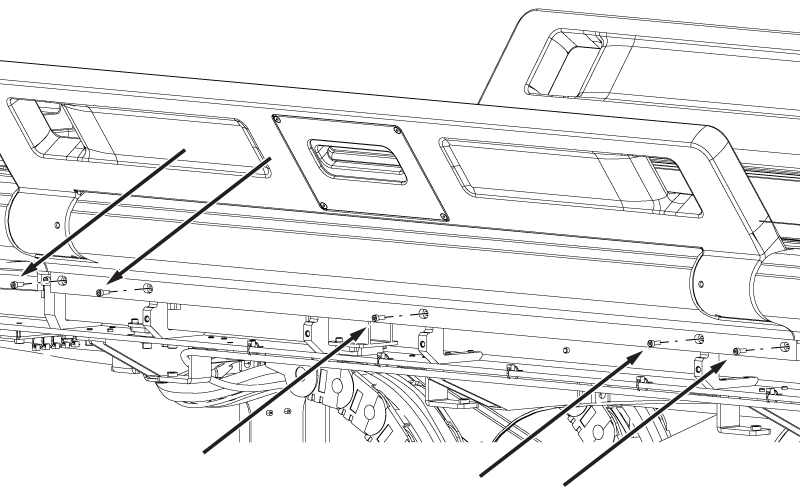
- Remove the four nuts and four washers securing the bumper to the tabletop.
Figure 2. Bumper nuts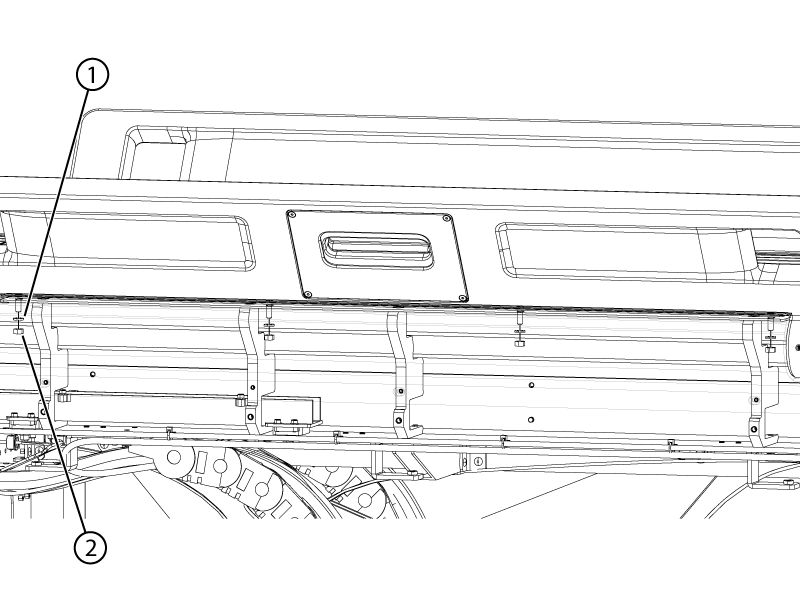
- Disconnect the touch-and-go assembly connectors from the table wiring.
- Remove the bumper from the table.
