• SIGNA™ Hero 3.0T Service Methods
  • 5852800-8EN Revision 1.0
  • Object ID: 00000018WIA3089C230GYZ
  • Topic ID: id_15666913 Version: 1.8
  • Date: Jul 13, 2021 4:27:37 PM

PQE Sensor Replacement

Prerequisites

Table 1. Personnel requirements
Required personsPreliminary requirementsProcedureFinalization
1Not Applicable60 minutesNot Applicable
Table 2. Tools and test equipment
ItemQuantityEffectivityPart numberManufacturer
Standard Tool1---
Table 3. Replacement parts
ItemQuantityEffectivityPart numberManufacturer
PQE Sensor 1-

Refer to FRU Manual

-
Table 4. Safety
Table 5. Required conditions
ConditionReferenceEffectivity

PDU and Service Disconnect Panel (or Main Disconnect Panel) must be turned OFF. Refer to Lockout / Tagout for MDP(Main Disconnect Panel) or Facility PDU.

--

Procedure

  1. Open ISC cover.
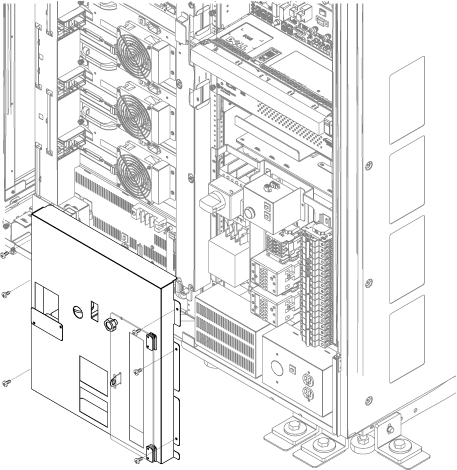
  2. Remove PDU Front Panel.
    Figure 1. PDU Front Panel
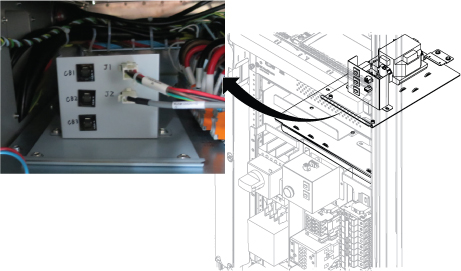
  3. Disconnect J1 and J2 cables from PQE Sensor.
    Figure 2. Remove cables
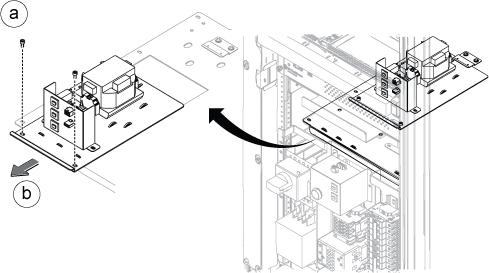
  4. Remove PQE sensor by following order.
    1. Remove two screws.
    2. Slide out the PQE sensor.
    Figure 3. PQE Sensor Removal
  5. Restore PQE sensor by the reverse order of the removal.

Finalization

  1. Restore the Power. Refer to Removing LOTO - MDP.
  2. Perform check scan.